On this page
- Part 1 · The problem hash maps solve — see it first
- Part 2 · How it finds things without scanning
- What worst-case O(n) looks like
- Part 3 · The one rule for keys — must be hashable
- The trap nobody warns you about: 1, True, and 1.0 are the same key
- Part 4 · Four tools — pick the right one
- Reading a missing key — three tools, three behaviors
- Part 5 · Six usage patterns you must separate
- Pattern 1 · Membership — "is this in that pile?"
- Pattern 2 · Frequency — "how many times does each appear?"
- Pattern 3 · Count of counts — "what does the frequency pattern look like?"
- Pattern 4 · Composite key — "several pieces as one key"
- Pattern 5 · Seen-so-far — "has the partner I need already walked by?"
- Pattern 6 · Grouping — "bucket items by a key you compute"
- Summary table of the six patterns
- Part 6 · When a hash map is the wrong tool
- Part 7 · Common traps
Hash Map / Set — Fundamentals & Mental Models
A structure that "computes position from the value itself," so lookups skip scanning — in Python: set, dict, Counter, defaultdict. Seven parts: the mechanism, the key rule, four tools, six usage patterns, and when not to use it.
Problems in this section look different on the surface, but they all ask the same core questions: "have I seen this before?", "how many times does this appear?", "what overlaps between these two groups?" — answered naively by scanning the whole collection every time. A hash map answers them in near-constant time, no matter how large the data gets.
It is not free — you pay with memory. You build an extra structure to "remember" what you have already seen. That trade is called a space-time tradeoff, and it is the heart of this whole section.
Parts 1–2 are "why it is fast". Parts 3–4 are "what tools you get". Part 5 is the core — 6 usage patterns you must tell apart. If short on time, read parts 5 and 7 at minimum.
Part 1 · The problem hash maps solve — see it first
Task: given two piles a and b, find values in b that do not appear in a at all. The naive way is to take each value from b and scan every value in a — which is exactly what `x in a` does when a is a list. Let's expand that and count comparisons.
a = [4, 9, 5, 2, 7]
b = [9, 4, 9, 8, 4, 3]

# Approach 1 — check with a list (expand what `x in a` does)
steps = 0
res = []
for x in b:
    found = False
    for y in a:                # scan every item in a until found or exhausted
        steps += 1
        if x == y:
            found = True
            break
    if not found:
        res.append(x)
print("list :", res, "| compared", steps, "times")

# Approach 2 — check with a set
a_set = set(a)                 # convert once; pay one chunk of extra memory
res2 = [x for x in b if x not in a_set]
print("set :", res2, "| compared", len(b), "times")list : [8, 3] | compared 16 times
set : [8, 3] | compared 6 times16 down to 6 is not exciting on a tiny pile. The point is how these numbers grow: with a list, as a grows, every query gets slower (≈ size(b) × size(a)). With a set, whether a has 5 or 5 million items, one query costs the same — total work is just size(b). In Big-O: O(n·m) vs O(n+m).
If a loop asks "is this in that pile?" or "have I seen this before?", immediately suspect that pile should be a set or dict, not a list — the most common signal in this section.
Part 2 · How it finds things without scanning
The question you need answered before trusting O(1): if it does not scan item by item, how does it know where something is? A hash table does not "search" — it computes which slot the item must live in.
In a list, position and value are unrelated. The number 7 might sit at index 0 or 900 — you cannot know ahead of time, so you walk. A hash table changes the rule: run the value through hash(), then mod by the number of slots. That gives the slot index. To look it up later, compute the same formula and go straight there.
for k in [7, 15, 23, 42, 100]:
print(f"key {k:<4} hash = {hash(k):<4} -> slot {hash(k) % 8}")key 7 hash = 7 -> slot 7
key 15 hash = 15 -> slot 7
key 23 hash = 23 -> slot 7
key 42 hash = 42 -> slot 2
key 100 hash = 100 -> slot 4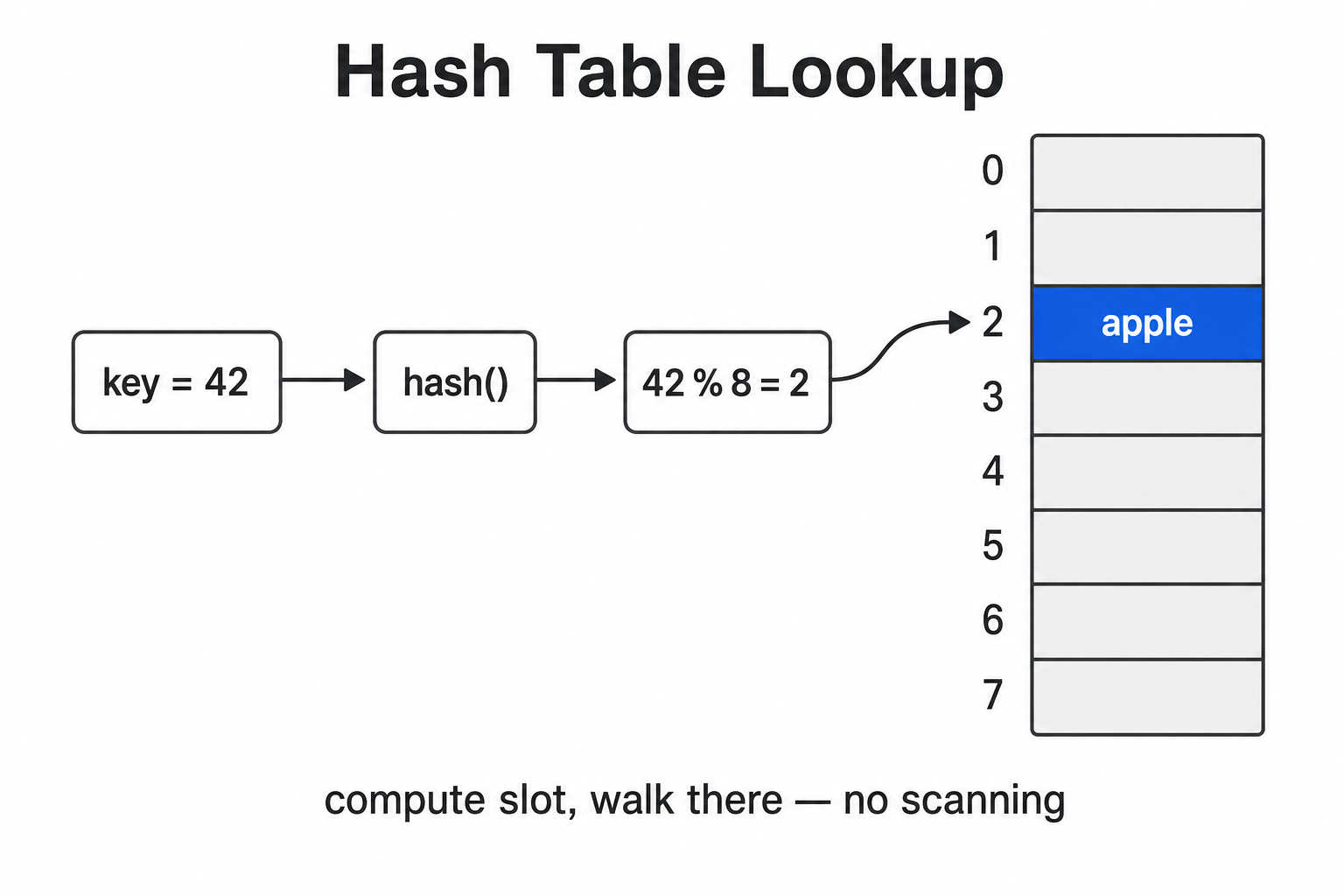
We use ints here because for small non-negative integers, hash(k) equals k, so key → slot is easiest to see (not a general rule — e.g. hash(-1) is -2, not -1). For str, hash is a large number and changes every process for security. Try print(hash("apple")) across two runs — do not write code that depends on raw hash values.
Notice: 7, 15, and 23 all land in slot 7. That is a collision, and it is unavoidable when you map unbounded keys into finitely many slots. Python then probes for the next open slot; lookup follows the same probe sequence comparing with == until it finds the real key or an empty slot — so one lookup is not always "one step".
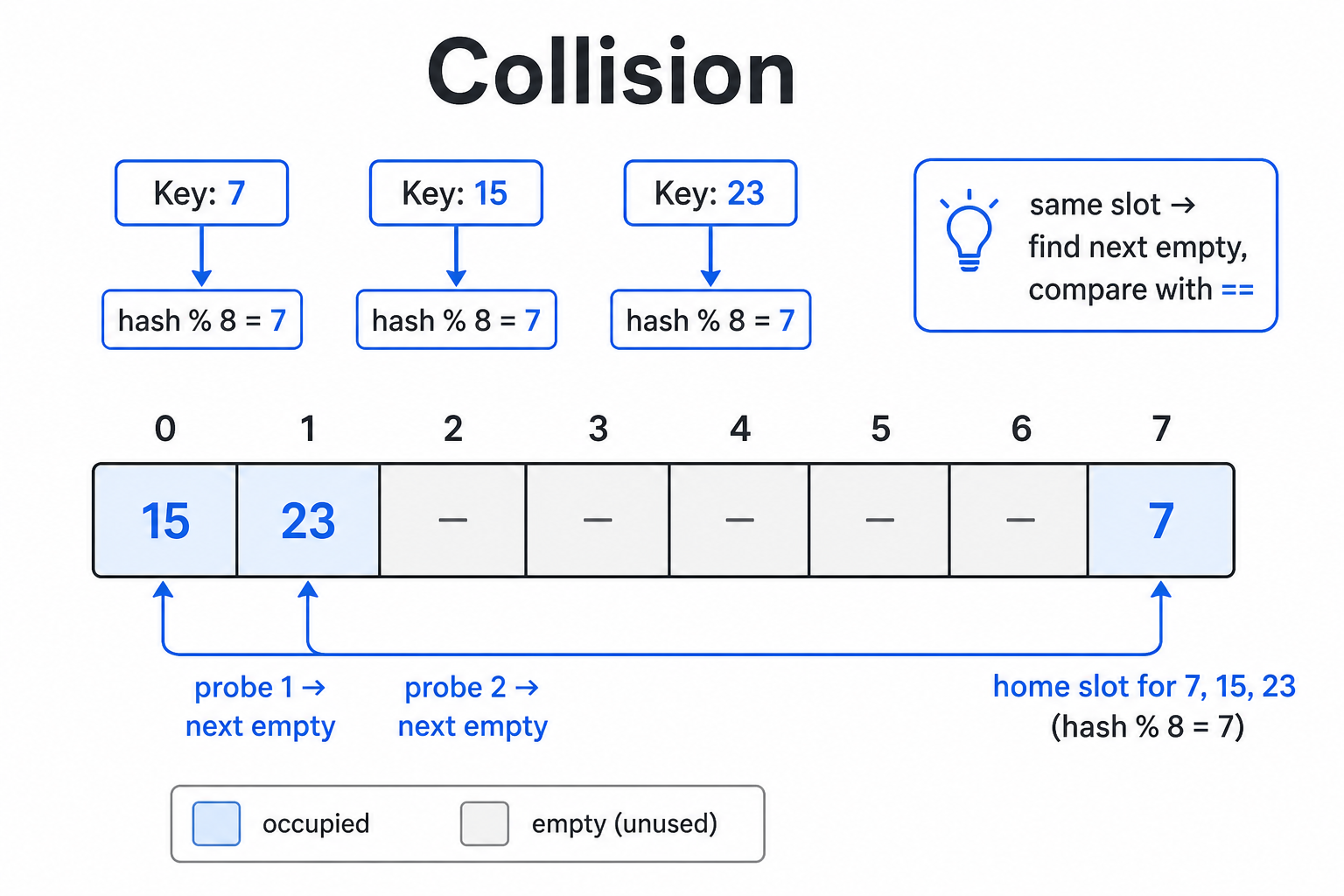
That is why every table says average O(1), not plain O(1). Python keeps the average fast by resizing (growing the table) when it gets full, so plenty of empty slots remain, collisions stay rare, and probe chains stay short.
What worst-case O(n) looks like
If every key hashes to the same number, everything piles into one region and one lookup compares almost every item — back to O(n) like a list. You can force this with a class whose __hash__ always returns the same value, then count how many == calls one lookup needs.
class Key:
    calls = 0                          # shared counter for == calls

    def __init__(self, v, h):
        self.v, self.h = v, h

    def __hash__(self):
        return self.h                  # you control the hash

    def __eq__(self, other):
        Key.calls += 1
        return self.v == other.v


# Normal case — different hashes, items spread out
s_good = {Key(i, i) for i in range(1000)}
Key.calls = 0                          # reset after build; count only lookup
Key(999, 999) in s_good
print("well distributed : == called", Key.calls, "times")

# Worst case — every hash is 0, everything piles up
s_bad = {Key(i, 0) for i in range(1000)}
Key.calls = 0
Key(999, 0) in s_bad
print("all collide : == called", Key.calls, "times")well distributed : == called 1 times
all collide : == called 1345 timesIn practice almost never — Python's hash for int, str, and tuple distributes well. All LC75 problems in this section can safely assume average O(1). Still know it because (1) in interviews, say "average case" after "O(1)", and (2) if you write a buggy __hash__ yourself, this is the failure mode.
Part 3 · The one rule for keys — must be hashable
From part 2, storage location depends on the key's hash. If the key can change after insert, its hash changes, the slot it should live in changes, and the item is effectively lost. Python forbids mutable objects as keys up front — that property is called hashable.
d = {}
d[3] = "int ok"
d["abc"] = "str ok"
d[(1, 2)] = "tuple ok"        # immutable -> ok
print(d)

try:
    d[[1, 2]] = "list?"        # mutable -> not ok
except TypeError as e:
    print("list  ->", type(e).__name__ + ":", e)

try:
    d[{1, 2}] = "set?"         # mutable -> not ok (frozenset is ok)
except TypeError as e:
print("set ->", type(e).__name__ + ":", e){3: 'int ok', 'abc': 'str ok', (1, 2): 'tuple ok'}
list -> TypeError: unhashable type: 'list'
set -> TypeError: unhashable type: 'set'unhashable type: 'list' is the error you will see often here. The fix is almost always one line: convert the list to a tuple before using it as a key — equal tuples share the same hash, so they compare correctly (this becomes pattern 4 next). But there is a catch worth knowing: a tuple is not automatically hashable. It is hashable only if every element inside it is hashable too. So tuple([1, 2]) works, but a tuple with a nested list such as (1, [2]) still raises unhashable type: 'list'. With nested lists you must convert every level to tuples.
rows = [[1, 2], [3, 4], [1, 2]]
print("plain tuple works    :", {tuple(r) for r in rows})

nested = [[1, [2]], [3, [4]]]
try:
    {tuple(r) for r in nested}
except TypeError as e:
    print("tuple with a list    ->", type(e).__name__ + ":", e)

def deep(x):
    return tuple(deep(i) for i in x) if isinstance(x, list) else x

print("convert every level :", {deep(r) for r in nested})plain tuple works : {(1, 2), (3, 4)}
tuple with a list -> TypeError: unhashable type: 'list'
convert every level : {(1, (2,)), (3, (4,))}The trap nobody warns you about: 1, True, and 1.0 are the same key
Samness as a key is not about type — it is about equal hash and == being True. 1, True, and 1.0 all satisfy that.
d = {}
d[1] = "one"
d[True] = "true"
d[1.0] = "one-point-zero"
print(d)                                        # only one key left!
print("1 == True == 1.0 :", 1 == True == 1.0)
print("same hashes :", hash(1) == hash(True) == hash(1.0)){1: 'one-point-zero'}
1 == True == 1.0 : True
same hashes : TrueThe displayed key stays 1 (the first insert), but the value is the last write — later inserts update, they do not add a new key. Silent breakage, no exception.
Part 4 · Four tools — pick the right one
Everything in this section is a hash table. They differ only in "what rides along with the key" and "what you get for free". This table is all you need.
| Tool | Stores | Free benefits | Reach for it when |
|---|---|---|---|
| set | keys only | dedupe + set ops (& | - ^) | question is "is it there?", not "how many?" |
| dict | key → any value | insertion order (Python 3.7+) | you need side data, e.g. an index |
| Counter | key → count | count in one line, missing key → 0, most_common() | the problem is pure "counting" |
| defaultdict | key → typed default | no need to check if key exists | value is a collection, e.g. list or set |
from collections import defaultdict, Counter

words = ["a", "b", "a", "c", "a", "b"]

c1 = {}                          # 1) check if key exists first
for w in words:
    if w not in c1:
        c1[w] = 0
    c1[w] += 1

c2 = {}                          # 2) .get(key, default) — shorter, no if
for w in words:
    c2[w] = c2.get(w, 0) + 1

c3 = defaultdict(int)            # 3) missing key starts at int() = 0
for w in words:
    c3[w] += 1

c4 = Counter(words)              # 4) count in one line

print("1) if/else       :", c1)
print("2) .get(w, 0)    :", c2)
print("3) defaultdict   :", dict(c3))
print("4) Counter       :", c4)
print("all equal :", c1 == c2 == dict(c3) == dict(c4))1) if/else : {'a': 3, 'b': 2, 'c': 1}
2) .get(w, 0) : {'a': 3, 'b': 2, 'c': 1}
3) defaultdict : {'a': 3, 'b': 2, 'c': 1}
4) Counter : Counter({'a': 3, 'b': 2, 'c': 1})
all equal : TrueSets do not preserve order. For str keys, order can reshuffle every process (str hashes are randomized). Never rely on set order — to dedupe while keeping first-seen order use list(dict.fromkeys(nums)). Problems that return a set often say "in any order", which is itself a hint that a set is fine.
Reading a missing key — three tools, three behaviors
from collections import Counter

count = {"a": 3}
print('count.get("z", 0)     :', count.get("z", 0))      # safe default
print('Counter("aaa")["z"]   :', Counter("aaa")["z"])     # Counter returns 0
try:
    print(count["z"])                                     # plain dict -> boom
except KeyError as e:
print('count["z"] : KeyError', e)count.get("z", 0) : 0
Counter("aaa")["z"] : 0
count["z"] : KeyError 'z'from collections import defaultdict
d = defaultdict(int)
print('"z" in d before read :', "z" in d)
_ = d["z"] # read only — no assignment
print('"z" in d after read :', "z" in d, "<- created by reading")
print("d =", dict(d), "| len(d) =", len(d))"z" in d before read : False
"z" in d after read : True <- created by reading
d = {'z': 0} | len(d) = 1If the problem asks "how many distinct values?" and you casually print(d[x]) while debugging, len(d) silently drifts. Counter does not — it returns 0 without creating the key.
Part 5 · Six usage patterns you must separate
This is the heart of the page. Only four tools (part 4), but six distinct questions you ask them. People stuck here usually know dict — they just remember "use a hash map" without knowing what to ask it.
Each pattern below has the same three parts: the question → a skeleton (not runnable) → a runnable example. Read all six before the problems, then ask yourself "which pattern is this?"
Pattern 1 · Membership — "is this in that pile?"
Simplest and most common. You only care present/absent — not count, not position. Tool: set. Build the set once before the loop, not every iteration.
pool = set(the_collection_to_check)   # once, before the loop
for x in data:
    if x in pool:                     # O(1) each query
...a, b = [4, 9, 5], [9, 8, 4, 3]
seen = set(a)
print("in b but not a :", [x for x in b if x not in seen])
# if duplicates in the answer do not matter, set ops are shorter
print("set difference :", set(b) - set(a))in b but not a : [8, 3]
set difference : {8, 3}Appears in problem 20 · Find the Difference of Two Arrays (both directions: set(a)-set(b) and set(b)-set(a)). Trap: results are sets (unordered) — wrap with list(...) if a list is required.
Pattern 2 · Frequency — "how many times does each appear?"
Step up from "yes/no" to "how many". A set is not enough — you need a dict of numbers. Counter does it in one line.
from collections import Counter

count = Counter(data)      # count the whole collection
count[x] # how many times x appears — 0 if missing, no errorfrom collections import Counter
c = Counter("abracadabra")
print("Counter :", c) # ordered by frequency
print('c["a"] / c["z"] :', c["a"], "/", c["z"])
print("top 2 :", c.most_common(2))Counter : Counter({'a': 5, 'b': 2, 'r': 2, 'c': 1, 'd': 1})
c["a"] / c["z"] : 5 / 0
top 2 : [('a', 5), ('b', 2)]Base for patterns 3 and 4. Counter(data) works on any iterable — str, list, generator. Trap: Counter returns 0 for missing keys, so if c[x] is falsy for both "missing" and "zero count" — separate those cases when the problem does.
Pattern 3 · Count of counts — "what does the frequency pattern look like?"
The most missed pattern in this section. The problem no longer asks about the data values — it asks about the counts themselves. Count with Counter, then drop the keys and reason over .values() as a second layer.
from collections import Counter

count = Counter(data)
vals = list(count.values())      # drop keys; keep only "how many times"

# second-layer questions, e.g.
len(set(vals)) == len(vals)      # are all frequencies unique?
sorted(vals) == sorted(other) # do two piles share the same frequency bag?from collections import Counter
for s in ["aabbbc", "aabbc"]:
c = Counter(s)
v = list(c.values())
print(f"{s:<8} -> {dict(c)}")
print(f"{'':8} freqs = {sorted(v)} | all unique? {len(set(v)) == len(v)}")aabbbc -> {'a': 2, 'b': 3, 'c': 1}
freqs = [1, 2, 3] | all unique? True
aabbc -> {'a': 2, 'b': 2, 'c': 1}
freqs = [1, 2, 2] | all unique? FalseRead len(set(v)) == len(v): set(v) drops duplicates in v; if length is unchanged, there were none — the standard "are all unique?" check. Notice we stack set on top of Counter: two tools, two layers, one problem.
Problem 21 · Unique Number of Occurrences (len(set(v)) == len(v)) and problem 22 · Determine if Two Strings Are Close (sorted(x.values()) == sorted(y.values()) plus set(x) == set(y)). The key is "count, then count again" — not a single counting pass.
Pattern 4 · Composite key — "several pieces as one key"
When what you compare is a whole bundle — a matrix row, a pair (x, y) — not a single value. Lists cannot be keys (part 3). Convert to a tuple so the whole bundle becomes one lookup key.
from collections import Counter

count = Counter(tuple(item) for item in data)   # list -> tuple first
count[tuple(another_bundle)] # whole-bundle compare in O(1)from collections import Counter
grid = [[3, 2, 1],
[1, 7, 6],
[2, 7, 7]]
rowc = Counter(tuple(r) for r in grid) # count rows; whole row is the key
print("row counts :", rowc)
cols = list(zip(*grid)) # zip(*grid) = transpose → columns
print("columns :", cols)
for col in cols:
print(f" col {col} -> matching rows: {rowc[col]}")
print("answer =", sum(rowc[col] for col in cols))row counts : Counter({(3, 2, 1): 1, (1, 7, 6): 1, (2, 7, 7): 1})
columns : [(3, 1, 2), (2, 7, 7), (1, 6, 7)]
col (3, 1, 2) -> matching rows: 0
col (2, 7, 7) -> matching rows: 1
col (1, 6, 7) -> matching rows: 0
answer = 1The whole problem collapses into the code above because the hash map does the heavy lifting: without it you compare every row to every column cell-by-cell (three nested loops). With a row as one key, each compare is O(1) — one loop left.
Problem 23 · Equal Row and Column Pairs. Remember: tuple(...) for hashability, then Counter. Build columns with tuple(grid[i][j] for i in ...) or zip(*grid). Trap: add rowc[col], not +1 — duplicate-looking rows each form their own pair.
Pattern 5 · Seen-so-far — "has the partner I need already walked by?"
Patterns 1–4 build the map first, then use it. Pattern 5 uses it while still building — one pass. At each step ask "has the value I need already passed?" If yes, done; if not, record yourself for someone later. Often called one-pass.
seen = {}                       # or set() if you do not need the index
for i, x in enumerate(data):
    if needed_value in seen:        # 1) ask first
        ...                         #    found — done
    seen[x] = i                     # 2) then record yourself — order matters
Best example: LC1 Two Sum — the Two Pointers page left this hanging ("two pointers cannot keep original indices because sorting destroys them"). Pattern 5 solves it: it remembers which value sat at which index, so no sort is needed.
nums = [3, 9, 4, 1]
target = 12
seen = {}                       # value -> index seen so far

for i, x in enumerate(nums):
    need = target - x           # the partner that would complete target
    print(f"i={i} x={x} | need {need} | seen={seen} -> seen? {need in seen}")
    if need in seen:
        print("answer indices:", (seen[need], i))
        break
seen[x] = i # not found yet -> leave yourself for lateri=0 x=3 | need 9 | seen={} -> seen? False
i=1 x=9 | need 3 | seen={3: 0} -> seen? True
answer indices: (0, 1)Critical trap: check first, then record. Swap those lines and the current value pairs with itself when 2*x == target — e.g. nums = [6, 3], target = 12 wrongly returns (0, 0). Not in the four problems of this section directly, but shows up in Prefix Sum, Sliding Window, and interviews constantly.
Pattern 6 · Grouping — "bucket items by a key you compute"
Patterns 1–5 use numeric values or no value. Pattern 6 uses a collection (list/set) as the value and dumps items that share a computed key into the same bucket. The key is not in the raw data — you invent it. Equal computed keys → same group.
from collections import defaultdict

groups = defaultdict(list)          # missing key starts as []
for item in data:
    key = compute_key(item)         # the part you design per problem
groups[key].append(item) # same key → same bucketfrom collections import defaultdict
words = ["eat", "tea", "tan", "ate", "nat", "bat"]
groups = defaultdict(list)
for w in words:
key = "".join(sorted(w)) # sorted letters → anagrams share a key
groups[key].append(w)
print(f"{w} -> key '{key}'")
print("result:", list(groups.values()))eat -> key 'aet'
tea -> key 'aet'
tan -> key 'ant'
ate -> key 'aet'
nat -> key 'ant'
bat -> key 'abt'
result: [['eat', 'tea', 'ate'], ['tan', 'nat'], ['bat']]The whole trick is key = "".join(sorted(w)) — choosing what to compute as the key is the problem. Once the key is right, append into defaultdict is identical every time.
Not in the four problems of this section, but the same shape as building an adjacency list in Graph (defaultdict(list) then append neighbors) — heavy in sections 12–13. Learn it now and Graph becomes mostly about traversal.
Summary table of the six patterns
| Pattern | Question asked | Tool | Key line | Course # |
|---|---|---|---|---|
| 1 · Membership | is this in that pile? | set | x in pool / set(b) - set(a) | 20 |
| 2 · Frequency | how many times each? | Counter | Counter(data)[x] | base of 21–23 |
| 3 · Count of counts | what do the frequencies look like? | Counter + set/sorted | len(set(c.values())) == len(c) | 21, 22 |
| 4 · Composite key | does this whole bundle match? | Counter of tuples | Counter(tuple(r) for r in data) | 23 |
| 5 · Seen-so-far | has my partner already passed? | dict (value → index) | if need in seen: ... then seen[x] = i | LC1, §4 |
| 6 · Grouping | how do these group together? | defaultdict(list) | groups[computed_key].append(item) | §12–13 |
Ask in order: need counts? if not → pattern 1. If yes: does it ask about the data or about the counts? counts → 3, data → 2. Is the key a bundle or a single value? bundle → 4. Need positions / one pass? → 5. Is the answer groups? → 6.
Part 6 · When a hash map is the wrong tool
Hash maps are fast because they throw away "order" and "nearness" — they only keep "present/absent" and "how many". Problems that need what they threw away cannot use this move.
| Situation | Why not | Use instead |
|---|---|---|
| range queries, e.g. "how many values between 3 and 7?" | hash answers exact equality only; scanning all keys defeats the point | sorted array + binary search (§15) |
| repeatedly take min/max while data changes | min/max over a dict is O(n) every time | heap / priority queue (§14) |
| need sorted output | sets are unordered; dicts only keep insertion order | sorted(...) at the end, or sort up front |
| key is a list / mutable object | unhashable — cannot be a key at all | convert to tuple / frozenset first (pattern 4) |
| tiny fixed domain, e.g. a–z only | works but wastes memory vs a plain array | list of size 26 indexed by ord(c) - ord('a') |
import sys

n = 1000
print("list(range(1000)) :", sys.getsizeof(list(range(n))), "bytes")
print("set(range(1000))  :", sys.getsizeof(set(range(n))), "bytes")
print("dict.fromkeys :", sys.getsizeof(dict.fromkeys(range(n))), "bytes")list(range(1000)) : 8056 bytes
set(range(1000)) : 32984 bytes
dict.fromkeys : 36960 bytesAbout 4× — because of part 2: hash tables keep many empty slots to avoid collisions. Pack them like a list and they stop being fast. That is the concrete "trade memory for time" from the opening. Almost never a LeetCode issue, but know what you are paying.
Part 7 · Common traps
- Writing if x in some_list inside a loop → accidental O(n²). Fix: set(...) once before the loop. #1 trap in this section.
- Relying on set order → unstable (for str, changes every process). Dedupe keeping order: list(dict.fromkeys(nums)).
- Reading d[key] when key may be missing → KeyError. Use d.get(key, default) or if key in d (Counter is safe; plain dict is not).
- Reading d[key] on a defaultdict while debugging → key is created for real; len(d) and loops drift with no error.
- Using a list as a key → TypeError: unhashable type: 'list'. Always tuple first (pattern 4).
- In pattern 5, writing seen[x] = i before the check → current item pairs with itself. Check first, then record.
- Forgetting 1, True, 1.0 are the same key; and key in d checks keys only, not values (v in d.values() is O(n)).
- Mutating keys while iterating for k in d → RuntimeError: dictionary changed size during iteration. Iterate a copy: for k in list(d).
This section has 4 problems, each mapped to a pattern in part 5: 20 · Difference of Two Arrays = pattern 1 → 21 · Unique Number of Occurrences = pattern 3 → 22 · Two Strings Are Close = pattern 3 (two layers) → 23 · Equal Row and Column Pairs = pattern 4. Hit next to start problem 20.