On this page
- สตริง (Strings)
- การสร้างสตริง
- การต่อสตริง (String Concatenation)
- Escape Sequences ในสตริง
- การจัดรูปแบบสตริง (String Formatting)
- รูปแบบเก่า: % Operator
- รูปแบบใหม่: str.format()
- String Interpolation / f-Strings (Python 3.6+)
- Python Strings เป็นลำดับของตัวอักษร
- การ Unpack ตัวอักษร
- การเข้าถึงตัวอักษรด้วย Index
- การตัดสตริง (Slicing)
- การกลับสตริง (Reversing)
- การข้ามตัวอักษรในการ Slicing
- String Methods
- 💻 แบบฝึกหัด — วันที่ 4
วันที่ 4 — สตริง (Strings)
เรียนรู้การสร้างและจัดการสตริงใน Python ทั้ง escape sequences, string formatting และ string methods
สตริง (Strings)
ข้อความคือชนิดข้อมูล string ข้อมูลใด ๆ ที่เขียนเป็นข้อความถือเป็น string ข้อมูลที่อยู่ใน single quote, double quote หรือ triple quote ล้วนเป็น string มี string methods และ built-in functions หลายอย่างที่ใช้จัดการข้อมูล string ใช้ฟังก์ชัน len() เพื่อหาความยาวของสตริง
การสร้างสตริง
letter = 'P'                # A string could be a single character or a bunch of texts
print(letter)               # P
print(len(letter))          # 1
greeting = 'Hello, World!'  # String could be made using a single or double quote,"Hello, World!"
print(greeting)             # Hello, World!
print(len(greeting))        # 13
sentence = "I hope you are enjoying 30 days of Python Challenge"
print(sentence)
สตริงหลายบรรทัดสร้างได้ด้วย triple single quote (''') หรือ triple double quote (""")
multiline_string = '''I am a teacher and enjoy teaching.
I didn't find anything as rewarding as empowering people.
That is why I created 30 days of python.'''
print(multiline_string)

# Another way of doing the same thing
multiline_string = """I am a teacher and enjoy teaching.
I didn't find anything as rewarding as empowering people.
That is why I created 30 days of python."""
print(multiline_string)
การต่อสตริง (String Concatenation)
เราสามารถเชื่อมต่อสตริงเข้าด้วยกันได้ การเชื่อมต่อหรือรวมสตริงเรียกว่า concatenation
first_name = 'Asabeneh'
last_name  = 'Yetayeh'
space      = ' '
full_name  = first_name + space + last_name
print(full_name) # Asabeneh Yetayeh
# Checking the length of a string using len() built-in function
print(len(first_name))  # 8
print(len(last_name))   # 7
print(len(first_name) > len(last_name)) # True
print(len(full_name)) # 16
Escape Sequences ในสตริง
ใน Python และภาษาโปรแกรมอื่น \ ตามด้วยตัวอักษรคือ escape sequence ที่ใช้บ่อยได้แก่:
- \n: ขึ้นบรรทัดใหม่
- \t: Tab (8 ช่อง)
- \\: Backslash
- \'': Single quote (')
- \" : Double quote (")
print('I hope everyone is enjoying the Python Challenge.\nAre you ?') # line break
print('Days\tTopics\tExercises') # adding tab space or 4 spaces
print('Day 1\t5\t5')
print('Day 2\t6\t20')
print('Day 3\t5\t23')
print('Day 4\t1\t35')
print('This is a backslash  symbol (\\)') # To write a backslash
print('In every programming language it starts with \"Hello, World!\"') # to write a double quote inside a single quote

# output
# I hope every one is enjoying the Python Challenge.
# Are you ?
# Days  Topics  Exercises
# Day 1 5       5
# Day 2 6       20
# Day 3 5       23
# Day 4 1       35
# This is a backslash  symbol (\)
# In every programming language it starts with "Hello, World!"
การจัดรูปแบบสตริง (String Formatting)
รูปแบบเก่า: % Operator
ใน Python มีหลายวิธีในการจัดรูปแบบสตริง เครื่องหมาย % ใช้จัดรูปแบบตัวแปรให้แทรกลงในสตริง:
- %s - String (หรือ object ใด ๆ ที่มี string representation เช่น ตัวเลข)
- %d - Integers
- %f - Floating point numbers
- %.Nf - Floating point numbers ที่มีทศนิยม N ตำแหน่ง
# Strings only
first_name = 'Asabeneh'
last_name  = 'Yetayeh'
language   = 'Python'
formated_string = 'I am %s %s. I teach %s' %(first_name, last_name, language)
print(formated_string)

# Strings  and numbers
radius = 10
pi     = 3.14
area   = pi * radius ** 2
formated_string = 'The area of circle with a radius %d is %.2f.' %(radius, area) # 2 refers the 2 significant digits after the point

python_libraries = ['Django', 'Flask', 'NumPy', 'Matplotlib','Pandas']
formated_string = 'The following are python libraries:%s' % (python_libraries)
print(formated_string) # "The following are python libraries:['Django', 'Flask', 'NumPy', 'Matplotlib','Pandas']"
รูปแบบใหม่: str.format()
รูปแบบนี้ถูกนำมาใช้ใน Python เวอร์ชัน 3:
first_name = 'Asabeneh'
last_name  = 'Yetayeh'
language   = 'Python'
formated_string = 'I am {} {}. I teach {}'.format(first_name, last_name, language)
print(formated_string)
a = 4
b = 3

print('{} + {} = {}'.format(a, b, a + b))
print('{} - {} = {}'.format(a, b, a - b))
print('{} * {} = {}'.format(a, b, a * b))
print('{} / {} = {:.2f}'.format(a, b, a / b)) # limits it to two digits after decimal
print('{} % {} = {}'.format(a, b, a % b))
print('{} // {} = {}'.format(a, b, a // b))
print('{} ** {} = {}'.format(a, b, a ** b))

# output
# 4 + 3 = 7
# 4 - 3 = 1
# 4 * 3 = 12
# 4 / 3 = 1.33
# 4 % 3 = 1
# 4 // 3 = 1
# 4 ** 3 = 64

# Strings  and numbers
radius = 10
pi     = 3.14
area   = pi * radius ** 2
formated_string = 'The area of a circle with a radius {} is {:.2f}.'.format(radius, area) # 2 digits after decimal
print(formated_string)
String Interpolation / f-Strings (Python 3.6+)
รูปแบบใหม่ล่าสุดคือ f-strings สตริงเริ่มต้นด้วย f และเราสามารถแทรกข้อมูลในตำแหน่งที่ต้องการได้:
a = 4
b = 3
print(f'{a} + {b} = {a +b}')
print(f'{a} - {b} = {a - b}')
print(f'{a} * {b} = {a * b}')
print(f'{a} / {b} = {a / b:.2f}')
print(f'{a} % {b} = {a % b}')
print(f'{a} // {b} = {a // b}')
print(f'{a} ** {b} = {a ** b}')
Python Strings เป็นลำดับของตัวอักษร
Python strings คือลำดับของตัวอักษร มีวิธีเข้าถึงค่าพื้นฐานเหมือนกับ sequence ที่มีลำดับอื่น ๆ เช่น lists และ tuples วิธีง่ายสุดในการดึงตัวอักษรแต่ละตัวคือการ unpack ลงในตัวแปรที่สอดคล้องกัน
การ Unpack ตัวอักษร
language = 'Python'
a,b,c,d,e,f = language # unpacking sequence characters into variables
print(a) # P
print(b) # y
print(c) # t
print(d) # h
print(e) # o
print(f) # n
การเข้าถึงตัวอักษรด้วย Index
ในการเขียนโปรแกรมนับเริ่มจากศูนย์ ดังนั้นตัวอักษรแรกของสตริงอยู่ที่ index 0 และตัวอักษรสุดท้ายอยู่ที่ length - 1
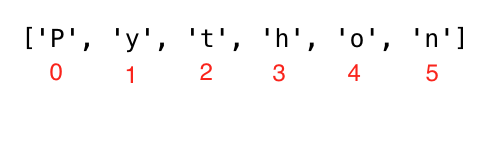
language     = 'Python'
first_letter = language[0]
print(first_letter) # P
second_letter = language[1]
print(second_letter) # y
last_index    = len(language) - 1
last_letter   = language[last_index]
print(last_letter) # n
ถ้าต้องการเริ่มนับจากขวา ใช้ negative indexing ได้เลย โดย -1 คือ index สุดท้าย:
language    = 'Python'
last_letter = language[-1]
print(last_letter) # n
second_last = language[-2]
print(second_last) # o
การตัดสตริง (Slicing)
ใน Python เราสามารถตัดสตริงออกเป็น substring ได้:
language    = 'Python'
first_three = language[0:3] # starts at zero index and up to 3 but not include 3
print(first_three) #Pyt
last_three  = language[3:6]
print(last_three)  # hon
# Another way
last_three = language[-3:]
print(last_three)  # hon
last_three = language[3:]
print(last_three)  # hon
การกลับสตริง (Reversing)
ใน Python เราสามารถกลับสตริงได้ง่าย ๆ:
greeting = 'Hello, World!'
print(greeting[::-1]) # !dlroW ,olleH
การข้ามตัวอักษรในการ Slicing
สามารถข้ามตัวอักษรขณะ slicing ได้โดยส่ง step argument:
language = 'Python'
pto = language[0:6:2] #
print(pto) # Pto
String Methods
มี string methods จำนวนมากที่ช่วยจัดรูปแบบสตริง ดูตัวอย่างด้านล่าง:
- capitalize(): แปลงตัวอักษรแรกเป็นตัวพิมพ์ใหญ่
- count(): นับจำนวนครั้งที่ substring ปรากฏในสตริง — count(substring, start=.., end=..)
- endswith(): เช็คว่าสตริงลงท้ายด้วยค่าที่ระบุหรือไม่
- expandtabs(): แทนที่ tab ด้วย spaces (default 8 ช่อง)
- find(): คืน index ของ substring ที่พบแรก ถ้าไม่พบคืน -1
- rfind(): คืน index ของ substring ที่พบท้ายสุด ถ้าไม่พบคืน -1
- format(): จัดรูปแบบสตริง
- index(): คืน index ต่ำสุดของ substring ถ้าไม่พบ raise ValueError
- rindex(): คืน index สูงสุดของ substring
- isalnum(): เช็คตัวอักษรและตัวเลข (alphanumeric)
- isalpha(): เช็คว่าตัวอักษรทั้งหมดเป็น alphabet (a-z, A-Z)
- isdecimal(): เช็คว่าตัวอักษรทั้งหมดเป็นทศนิยม (0-9)
- isdigit(): เช็คว่าตัวอักษรทั้งหมดเป็นตัวเลข (0-9 และ unicode บางตัว)
- isnumeric(): เช่น isdigit() แต่รับสัญลักษณ์ตัวเลขเพิ่มเติม เช่น ½
- isidentifier(): เช็คว่าเป็นชื่อตัวแปรที่ถูกต้อง
- islower(): เช็คว่าตัวอักษรทั้งหมดเป็นตัวพิมพ์เล็ก
- isupper(): เช็คว่าตัวอักษรทั้งหมดเป็นตัวพิมพ์ใหญ่
- join(): รวมสตริง
- strip(): ลบตัวอักษรที่ระบุออกจากต้นและท้ายสตริง
- replace(): แทนที่ substring ด้วยสตริงที่ระบุ
- split(): แยกสตริงโดยใช้ space หรือตัวคั่นที่ระบุ
- title(): คืนสตริงรูปแบบ title case
- swapcase(): แปลงตัวพิมพ์ใหญ่เป็นเล็กและเล็กเป็นใหญ่
- startswith(): เช็คว่าสตริงขึ้นต้นด้วยค่าที่ระบุหรือไม่
challenge = 'thirty days of python'
print(challenge.capitalize()) # 'Thirty days of python'challenge = 'thirty days of python'
print(challenge.count('y')) # 3
print(challenge.count('y', 7, 14)) # 1,
print(challenge.count('th')) # 2challenge = 'thirty days of python'
print(challenge.endswith('on')) # True
print(challenge.endswith('tion')) # Falsechallenge = 'thirty\tdays\tof\tpython'
print(challenge.expandtabs()) # 'thirty days of python'
print(challenge.expandtabs(10)) # 'thirty days of python'challenge = 'thirty days of python'
print(challenge.find('y')) # 5
print(challenge.find('th')) # 0challenge = 'thirty days of python'
print(challenge.rfind('y')) # 16
print(challenge.rfind('th')) # 17first_name = 'Asabeneh'
last_name = 'Yetayeh'
age = 250
job = 'teacher'
country = 'Finland'
sentence = 'I am {} {}. I am a {}. I am {} years old. I live in {}.'.format(first_name, last_name, job, age, country)
print(sentence) # I am Asabeneh Yetayeh. I am 250 years old. I am a teacher. I live in Finland.
radius = 10
pi = 3.14
area = pi * radius ** 2
result = 'The area of a circle with radius {} is {}'.format(str(radius), str(area))
print(result) # The area of a circle with radius 10 is 314.0challenge = 'thirty days of python'
sub_string = 'da'
print(challenge.index(sub_string)) # 7
print(challenge.index(sub_string, 9)) # errorchallenge = 'thirty days of python'
sub_string = 'da'
print(challenge.rindex(sub_string)) # 7
print(challenge.rindex(sub_string, 9)) # error
print(challenge.rindex('on', 8)) # 19challenge = 'ThirtyDaysPython'
print(challenge.isalnum()) # True
challenge = '30DaysPython'
print(challenge.isalnum()) # True
challenge = 'thirty days of python'
print(challenge.isalnum()) # False, space is not an alphanumeric character
challenge = 'thirty days of python 2019'
print(challenge.isalnum()) # Falsechallenge = 'thirty days of python'
print(challenge.isalpha()) # False, space is once again excluded
challenge = 'ThirtyDaysPython'
print(challenge.isalpha()) # True
num = '123'
print(num.isalpha()) # Falsechallenge = 'thirty days of python'
print(challenge.isdecimal()) # False
challenge = '123'
print(challenge.isdecimal()) # True
challenge = '\u00B2'
print(challenge.isdigit()) # True
challenge = '12 3'
print(challenge.isdecimal()) # False, space not allowedchallenge = 'Thirty'
print(challenge.isdigit()) # False
challenge = '30'
print(challenge.isdigit()) # True
challenge = '\u00B2'
print(challenge.isdigit()) # Truenum = '10'
print(num.isnumeric()) # True
num = '\u00BD' # ½
print(num.isnumeric()) # True
num = '10.5'
print(num.isnumeric()) # Falsechallenge = '30DaysOfPython'
print(challenge.isidentifier()) # False, because it starts with a number
challenge = 'thirty_days_of_python'
print(challenge.isidentifier()) # Truechallenge = 'thirty days of python'
print(challenge.islower()) # True
challenge = 'Thirty days of python'
print(challenge.islower()) # Falsechallenge = 'thirty days of python'
print(challenge.isupper()) # False
challenge = 'THIRTY DAYS OF PYTHON'
print(challenge.isupper()) # Trueweb_tech = ['HTML', 'CSS', 'JavaScript', 'React']
result = ' '.join(web_tech)
print(result) # 'HTML CSS JavaScript React'web_tech = ['HTML', 'CSS', 'JavaScript', 'React']
result = '# '.join(web_tech)
print(result) # 'HTML# CSS# JavaScript# React'challenge = 'thirty days of pythoonnn'
print(challenge.strip('noth')) # 'irty days of py'challenge = 'thirty days of python'
print(challenge.replace('python', 'coding')) # 'thirty days of coding'challenge = 'thirty days of python'
print(challenge.split()) # ['thirty', 'days', 'of', 'python']
challenge = 'thirty, days, of, python'
print(challenge.split(', ')) # ['thirty', 'days', 'of', 'python']challenge = 'thirty days of python'
print(challenge.title()) # Thirty Days Of Pythonchallenge = 'thirty days of python'
print(challenge.swapcase()) # THIRTY DAYS OF PYTHON
challenge = 'Thirty Days Of Python'
print(challenge.swapcase()) # tHIRTY dAYS oF pYTHONchallenge = 'thirty days of python'
print(challenge.startswith('thirty')) # True
challenge = '30 days of python'
print(challenge.startswith('thirty')) # False💻 แบบฝึกหัด — วันที่ 4
- ต่อสตริง 'Thirty', 'Days', 'Of', 'Python' ให้เป็น 'Thirty Days Of Python'
- ต่อสตริง 'Coding', 'For', 'All' ให้เป็น 'Coding For All'
- ประกาศตัวแปร company และกำหนดค่าเริ่มต้นเป็น "Coding For All"
- Print ตัวแปร company ด้วย print()
- Print ความยาวของ company string ด้วย len() และ print()
- เปลี่ยนตัวอักษรทั้งหมดเป็นพิมพ์ใหญ่ด้วย upper()
- เปลี่ยนตัวอักษรทั้งหมดเป็นพิมพ์เล็กด้วย lower()
- ใช้ capitalize(), title(), swapcase() เพื่อจัดรูปแบบ 'Coding For All'
- ตัด (slice) เอาคำแรกออกจากสตริง 'Coding For All'
- เช็คว่า 'Coding For All' มีคำว่า 'Coding' หรือไม่ โดยใช้ index, find หรือ methods อื่น
- แทนที่คำว่า 'coding' ในสตริง 'Coding For All' ด้วย 'Python'
- เปลี่ยน "Python for Everyone" เป็น "Python for All" ด้วย replace หรือ methods อื่น
- แยกสตริง 'Coding For All' ด้วย space เป็น separator (split())
- แยกสตริง "Facebook, Google, Microsoft, Apple, IBM, Oracle, Amazon" ด้วย comma
- ตัวอักษรที่ index 0 ของ 'Coding For All' คืออะไร
- index ท้ายสุดของ 'Coding For All' คือเท่าไร
- ตัวอักษรที่ index 10 ใน 'Coding For All' คืออะไร
- สร้าง acronym หรือตัวย่อสำหรับชื่อ 'Python For Everyone'
- สร้าง acronym หรือตัวย่อสำหรับ 'Coding For All'
- ใช้ index หาตำแหน่งการปรากฏแรกของ C ใน 'Coding For All'
- ใช้ index หาตำแหน่งการปรากฏแรกของ F ใน 'Coding For All'
- ใช้ rfind หาตำแหน่งการปรากฏท้ายสุดของ l ใน 'Coding For All People'
- ใช้ index หรือ find หาตำแหน่งการปรากฏแรกของคำว่า 'because' ในประโยค: 'You cannot end a sentence with because because because is a conjunction'
- ใช้ rindex หาตำแหน่งการปรากฏท้ายสุดของ 'because' ในประโยคข้างต้น
- ตัด phrase 'because because because' ออกจากประโยค: 'You cannot end a sentence with because because because is a conjunction'
- หาตำแหน่งการปรากฏแรกของคำว่า 'because' ในประโยคข้างต้น
- ตัด phrase 'because because because' ออกจากประโยคข้างต้น
- 'Coding For All' ขึ้นต้นด้วย 'Coding' หรือไม่?
- 'Coding For All' ลงท้ายด้วย 'coding' หรือไม่?
- ' Coding For All ' — ลบ space ซ้ายและขวาออก
- ตัวแปรใดต่อไปนี้ได้ผล True เมื่อใช้ isidentifier(): 30DaysOfPython หรือ thirty_days_of_python
- List ต่อไปนี้มีชื่อ Python libraries: ['Django', 'Flask', 'Bottle', 'Pyramid', 'Falcon'] ต่อ list ด้วย hash กับ space
- ใช้ escape sequence ขึ้นบรรทัดใหม่แยกประโยคต่อไปนี้:
I am enjoying this challenge.
I just wonder what is next. - ใช้ tab escape sequence เขียนบรรทัดต่อไปนี้:
Name Age Country City
Asabeneh 250 Finland Helsinki - ใช้ string formatting แสดงผลดังนี้:
radius = 10
area = 3.14 * radius ** 2
The area of a circle with radius 10 is 314 meters square. - แสดงผลต่อไปนี้ด้วย string formatting:
8 + 6 = 14
8 - 6 = 2
8 * 6 = 48
8 / 6 = 1.33
8 % 6 = 2
8 // 6 = 1
8 ** 6 = 262144