On this page
- สร้าง API (Building API)
- โครงสร้างของ API (Structure of an API)
- การดึงข้อมูลด้วย GET (Retrieving data using get)
- การดึงข้อมูลด้วย ID (Getting a document by id)
- การสร้างข้อมูลด้วย POST (Creating data using POST)
- การอัปเดตด้วย PUT (Updating using PUT)
- การลบเอกสารด้วย DELETE (Deleting a document using Delete)
- แบบฝึกหัด — วันที่ 29
วันที่ 29 — สร้าง API (Building API)
เรียนรู้การสร้าง RESTful API ด้วย Python Flask และ MongoDB รองรับ GET, POST, PUT, DELETE ครบวงจร
สร้าง API (Building API)
ในส่วนนี้ เราจะครอบคลุม RESTful API ที่ใช้ HTTP request methods ในการ GET, PUT, POST และ DELETE ข้อมูล
RESTful API คือ application program interface (API) ที่ใช้ HTTP requests เพื่อ GET, PUT, POST และ DELETE ข้อมูล ในบทก่อนหน้านี้เราได้เรียนเรื่อง Python, Flask และ MongoDB แล้ว เราจะนำความรู้เหล่านั้นมาพัฒนา RESTful API โดยใช้ Python Flask และ MongoDB แอปพลิเคชันทุกตัวที่มีการทำงานแบบ CRUD (Create, Read, Update, Delete) จะมี API สำหรับสร้างข้อมูล ดึงข้อมูล อัปเดตข้อมูล หรือลบข้อมูลออกจากฐานข้อมูล
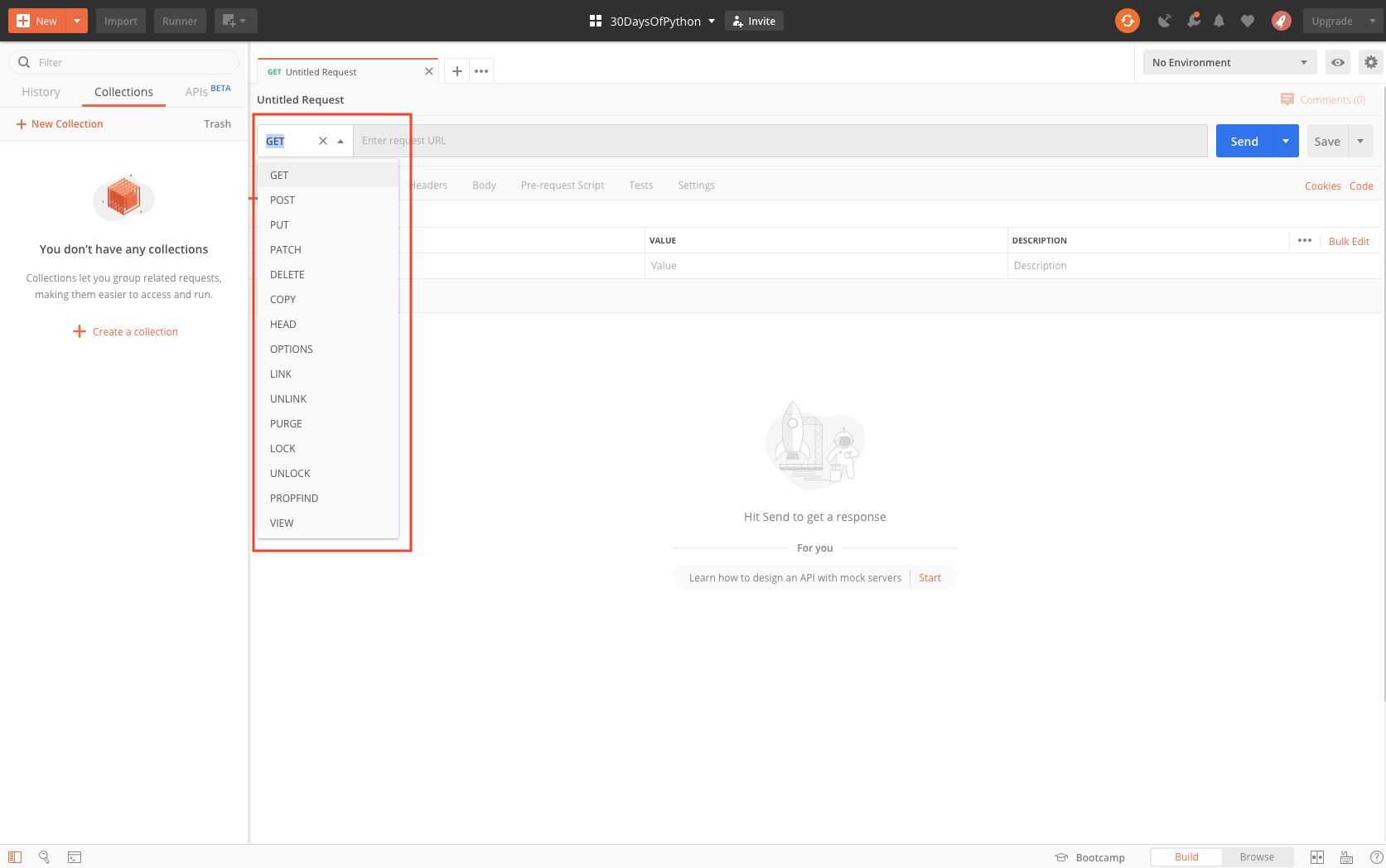
เบราว์เซอร์สามารถจัดการได้เฉพาะ GET request เท่านั้น ดังนั้นเราจึงต้องมีเครื่องมือที่ช่วยจัดการ request methods ทั้งหมด ได้แก่ GET, POST, PUT, DELETE
ตัวอย่าง API:
- Countries API: https://restcountries.eu/rest/v2/all
- Cats breed API: https://api.thecatapi.com/v1/breeds
Postman เป็นเครื่องมือที่ได้รับความนิยมอย่างมากในการพัฒนา API ดังนั้นหากต้องการทำบทนี้ให้ดาวน์โหลด Postman ก่อน อีกทางเลือกหนึ่งของ Postman คือ Insomnia
โครงสร้างของ API (Structure of an API)
API endpoint คือ URL ที่ใช้สำหรับดึงข้อมูล สร้างข้อมูล อัปเดตข้อมูล หรือลบ resource โครงสร้างมีลักษณะดังนี้:
ตัวอย่าง: https://api.twitter.com/1.1/lists/members.json — จะ return สมาชิกของ list ที่ระบุ โดยสมาชิกของ private list จะแสดงเฉพาะเมื่อผู้ใช้ที่ยืนยันตัวตนแล้วเป็นเจ้าของ list นั้น โครงสร้างคือชื่อบริษัทตามด้วยเวอร์ชันตามด้วยวัตถุประสงค์ของ API
HTTP methods และ URL:
API ใช้ HTTP methods ต่อไปนี้ในการจัดการ object:
GET        Used for object retrieval
POST       Used for object creation and object actions
PUT        Used for object update
DELETE     Used for object deletion
มาสร้าง API ที่รวบรวมข้อมูลเกี่ยวกับนักศึกษาใน 30DaysOfPython กัน เราจะรวบรวมชื่อ ประเทศ เมือง วันเกิด ทักษะ และประวัติส่วนตัว
ในการพัฒนา API นี้เราจะใช้:
- Postman
- Python
- Flask
- MongoDB
การดึงข้อมูลด้วย GET (Retrieving data using get)
ในขั้นตอนนี้ เราจะใช้ข้อมูลจำลองและ return กลับมาในรูปแบบ JSON ในการ return เป็น JSON เราจะใช้ json module และ Response module
# let's import the flask

from flask import Flask,  Response
import json
import os

app = Flask(__name__)

@app.route('/api/v1.0/students', methods = ['GET'])
def students ():
    student_list = [
        {
            'name':'Asabeneh',
            'country':'Finland',
            'city':'Helsinki',
            'skills':['HTML', 'CSS','JavaScript','Python']
        },
        {
            'name':'David',
            'country':'UK',
            'city':'London',
            'skills':['Python','MongoDB']
        },
        {
            'name':'John',
            'country':'Sweden',
            'city':'Stockholm',
            'skills':['Java','C#']
        }
    ]
    return Response(json.dumps(student_list), mimetype='application/json')


if __name__ == '__main__':
    # for deployment
    # to make it work for both production and development
    port = int(os.environ.get("PORT", 5000))
    app.run(debug=True, host='0.0.0.0', port=port)
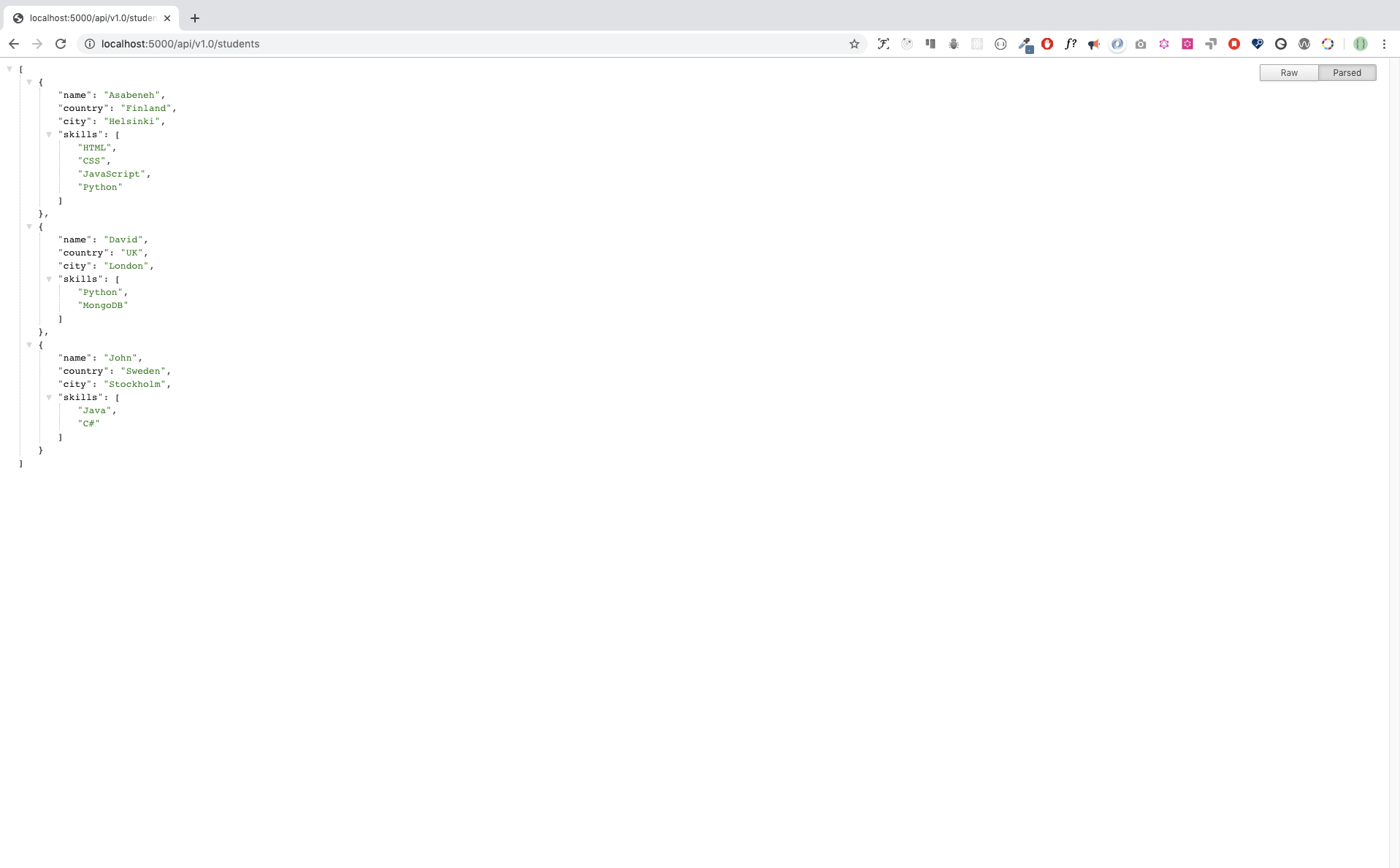
เมื่อคุณเรียก URL http://localhost:5000/api/v1.0/students บนเบราว์เซอร์ คุณจะได้ผลลัพธ์ดังนี้:
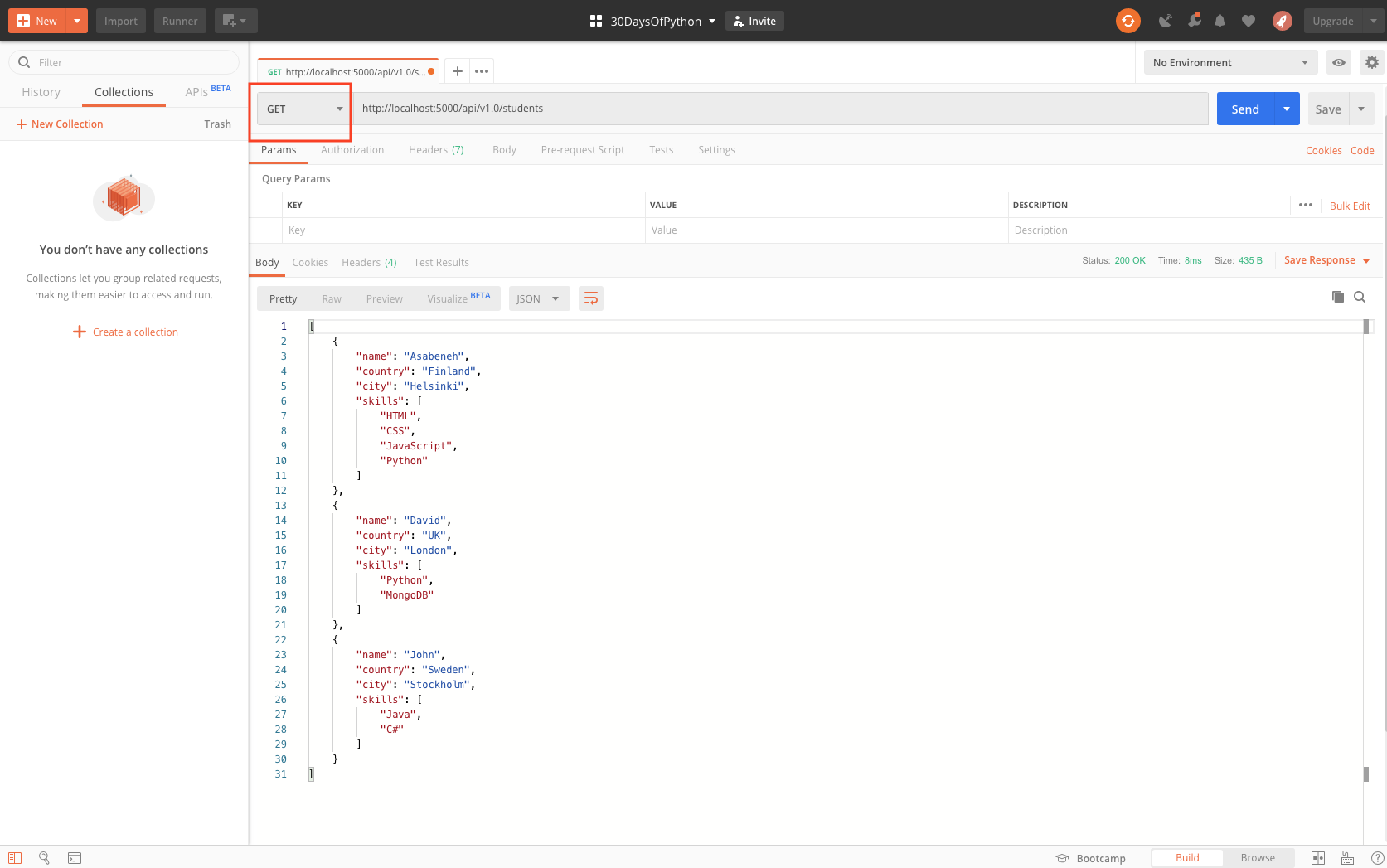
เมื่อคุณเรียก URL http://localhost:5000/api/v1.0/students บน Postman คุณจะได้ผลลัพธ์ดังนี้:
แทนที่จะแสดงข้อมูลจำลอง มาเชื่อมต่อแอปพลิเคชัน Flask กับ MongoDB แล้วดึงข้อมูลจากฐานข้อมูล MongoDB กัน
# let's import the flask

from flask import Flask,  Response
import json
import pymongo
import os

app = Flask(__name__)

#
MONGODB_URI='mongodb+srv://asabeneh:your_password@30daysofpython-twxkr.mongodb.net/test?retryWrites=true&w=majority'
client = pymongo.MongoClient(MONGODB_URI)
db = client['thirty_days_of_python'] # accessing the database

@app.route('/api/v1.0/students', methods = ['GET'])
def students ():

    return Response(json.dumps(student), mimetype='application/json')


if __name__ == '__main__':
    # for deployment
    # to make it work for both production and development
    port = int(os.environ.get("PORT", 5000))
    app.run(debug=True, host='0.0.0.0', port=port)
เมื่อเชื่อมต่อ Flask กับ MongoDB แล้ว เราสามารถดึงข้อมูล students collection จากฐานข้อมูล thirty_days_of_python ได้
[
    {
        "_id": {
            "$oid": "5df68a21f106fe2d315bbc8b"
        },
        "name": "Asabeneh",
        "country": "Finland",
        "city": "Helsinki",
        "age": 38
    },
    {
        "_id": {
            "$oid": "5df68a23f106fe2d315bbc8c"
        },
        "name": "David",
        "country": "UK",
        "city": "London",
        "age": 34
    },
    {
        "_id": {
            "$oid": "5df68a23f106fe2d315bbc8e"
        },
        "name": "Sami",
        "country": "Finland",
        "city": "Helsinki",
        "age": 25
    }
]
การดึงข้อมูลด้วย ID (Getting a document by id)
เราสามารถเข้าถึงเอกสารแต่ละรายการโดยใช้ id ได้ มาเข้าถึงข้อมูลของ Asabeneh โดยใช้ id ของเขากัน: http://localhost:5000/api/v1.0/students/5df68a21f106fe2d315bbc8b
# let's import the flask

from flask import Flask,  Response
import json
from bson.objectid import ObjectId
import json
from bson.json_util import dumps
import pymongo
import os

app = Flask(__name__)

#
MONGODB_URI='mongodb+srv://asabeneh:your_password@30daysofpython-twxkr.mongodb.net/test?retryWrites=true&w=majority'
client = pymongo.MongoClient(MONGODB_URI)
db = client['thirty_days_of_python'] # accessing the database

@app.route('/api/v1.0/students', methods = ['GET'])
def students ():

    return Response(json.dumps(student), mimetype='application/json')
@app.route('/api/v1.0/students/<id>', methods = ['GET'])
def single_student (id):
    student = db.students.find({'_id':ObjectId(id)})
    return Response(dumps(student), mimetype='application/json')

if __name__ == '__main__':
    # for deployment
    # to make it work for both production and development
    port = int(os.environ.get("PORT", 5000))
app.run(debug=True, host='0.0.0.0', port=port)[
{
"_id": {
"$oid": "5df68a21f106fe2d315bbc8b"
},
"name": "Asabeneh",
"country": "Finland",
"city": "Helsinki",
"age": 38
}
]การสร้างข้อมูลด้วย POST (Creating data using POST)
เราใช้ POST request method ในการสร้างข้อมูล
# let's import the flask

from flask import Flask,  Response
import json
from bson.objectid import ObjectId
import json
from bson.json_util import dumps
import pymongo
from datetime import datetime
import os

app = Flask(__name__)

#
MONGODB_URI='mongodb+srv://asabeneh:your_password@30daysofpython-twxkr.mongodb.net/test?retryWrites=true&w=majority'
client = pymongo.MongoClient(MONGODB_URI)
db = client['thirty_days_of_python'] # accessing the database

@app.route('/api/v1.0/students', methods = ['GET'])
def students ():

    return Response(json.dumps(student), mimetype='application/json')
@app.route('/api/v1.0/students/<id>', methods = ['GET'])
def single_student (id):
    student = db.students.find({'_id':ObjectId(id)})
    return Response(dumps(student), mimetype='application/json')
@app.route('/api/v1.0/students', methods = ['POST'])
def create_student ():
    name = request.form['name']
    country = request.form['country']
    city = request.form['city']
    skills = request.form['skills'].split(', ')
    bio = request.form['bio']
    birthyear = request.form['birthyear']
    created_at = datetime.now()
    student = {
        'name': name,
        'country': country,
        'city': city,
        'birthyear': birthyear,
        'skills': skills,
        'bio': bio,
        'created_at': created_at

    }
    db.students.insert_one(student)
    return ;
def update_student (id):
if __name__ == '__main__':
    # for deployment
    # to make it work for both production and development
    port = int(os.environ.get("PORT", 5000))
    app.run(debug=True, host='0.0.0.0', port=port)
การอัปเดตด้วย PUT (Updating using PUT)
# let's import the flask

from flask import Flask,  Response
import json
from bson.objectid import ObjectId
import json
from bson.json_util import dumps
import pymongo
from datetime import datetime
import os

app = Flask(__name__)

#
MONGODB_URI='mongodb+srv://asabeneh:your_password@30daysofpython-twxkr.mongodb.net/test?retryWrites=true&w=majority'
client = pymongo.MongoClient(MONGODB_URI)
db = client['thirty_days_of_python'] # accessing the database

@app.route('/api/v1.0/students', methods = ['GET'])
def students ():

    return Response(json.dumps(student), mimetype='application/json')
@app.route('/api/v1.0/students/<id>', methods = ['GET'])
def single_student (id):
    student = db.students.find({'_id':ObjectId(id)})
    return Response(dumps(student), mimetype='application/json')
@app.route('/api/v1.0/students', methods = ['POST'])
def create_student ():
    name = request.form['name']
    country = request.form['country']
    city = request.form['city']
    skills = request.form['skills'].split(', ')
    bio = request.form['bio']
    birthyear = request.form['birthyear']
    created_at = datetime.now()
    student = {
        'name': name,
        'country': country,
        'city': city,
        'birthyear': birthyear,
        'skills': skills,
        'bio': bio,
        'created_at': created_at

    }
    db.students.insert_one(student)
    return
@app.route('/api/v1.0/students/<id>', methods = ['PUT']) # this decorator create the home route
def update_student (id):
    query = {"_id":ObjectId(id)}
    name = request.form['name']
    country = request.form['country']
    city = request.form['city']
    skills = request.form['skills'].split(', ')
    bio = request.form['bio']
    birthyear = request.form['birthyear']
    created_at = datetime.now()
    student = {
        'name': name,
        'country': country,
        'city': city,
        'birthyear': birthyear,
        'skills': skills,
        'bio': bio,
        'created_at': created_at

    }
    db.students.update_one(query, student)
    # return Response(dumps({"result":"a new student has been created"}), mimetype='application/json')
    return
def update_student (id):
if __name__ == '__main__':
    # for deployment
    # to make it work for both production and development
    port = int(os.environ.get("PORT", 5000))
    app.run(debug=True, host='0.0.0.0', port=port)
การลบเอกสารด้วย DELETE (Deleting a document using Delete)
# let's import the flask

from flask import Flask,  Response
import json
from bson.objectid import ObjectId
import json
from bson.json_util import dumps
import pymongo
from datetime import datetime
import os

app = Flask(__name__)

#
MONGODB_URI='mongodb+srv://asabeneh:your_password@30daysofpython-twxkr.mongodb.net/test?retryWrites=true&w=majority'
client = pymongo.MongoClient(MONGODB_URI)
db = client['thirty_days_of_python'] # accessing the database

@app.route('/api/v1.0/students', methods = ['GET'])
def students ():

    return Response(json.dumps(student), mimetype='application/json')
@app.route('/api/v1.0/students/<id>', methods = ['GET'])
def single_student (id):
    student = db.students.find({'_id':ObjectId(id)})
    return Response(dumps(student), mimetype='application/json')
@app.route('/api/v1.0/students', methods = ['POST'])
def create_student ():
    name = request.form['name']
    country = request.form['country']
    city = request.form['city']
    skills = request.form['skills'].split(', ')
    bio = request.form['bio']
    birthyear = request.form['birthyear']
    created_at = datetime.now()
    student = {
        'name': name,
        'country': country,
        'city': city,
        'birthyear': birthyear,
        'skills': skills,
        'bio': bio,
        'created_at': created_at

    }
    db.students.insert_one(student)
    return
@app.route('/api/v1.0/students/<id>', methods = ['PUT']) # this decorator create the home route
def update_student (id):
    query = {"_id":ObjectId(id)}
    name = request.form['name']
    country = request.form['country']
    city = request.form['city']
    skills = request.form['skills'].split(', ')
    bio = request.form['bio']
    birthyear = request.form['birthyear']
    created_at = datetime.now()
    student = {
        'name': name,
        'country': country,
        'city': city,
        'birthyear': birthyear,
        'skills': skills,
        'bio': bio,
        'created_at': created_at

    }
    db.students.update_one(query, student)
    # return Response(dumps({"result":"a new student has been created"}), mimetype='application/json')
    return
@app.route('/api/v1.0/students/<id>', methods = ['PUT']) # this decorator create the home route
def update_student (id):
    query = {"_id":ObjectId(id)}
    name = request.form['name']
    country = request.form['country']
    city = request.form['city']
    skills = request.form['skills'].split(', ')
    bio = request.form['bio']
    birthyear = request.form['birthyear']
    created_at = datetime.now()
    student = {
        'name': name,
        'country': country,
        'city': city,
        'birthyear': birthyear,
        'skills': skills,
        'bio': bio,
        'created_at': created_at

    }
    db.students.update_one(query, student)
    # return Response(dumps({"result":"a new student has been created"}), mimetype='application/json')
    return ;
@app.route('/api/v1.0/students/<id>', methods = ['DELETE'])
def delete_student (id):
    db.students.delete_one({"_id":ObjectId(id)})
    return
if __name__ == '__main__':
    # for deployment
    # to make it work for both production and development
    port = int(os.environ.get("PORT", 5000))
    app.run(debug=True, host='0.0.0.0', port=port)
แบบฝึกหัด — วันที่ 29
- พัฒนาตัวอย่างข้างต้นและสร้าง API ตาม https://thirtydayofpython-api.herokuapp.com/
🎉 ยินดีด้วย ! 🎉