On this page
วันที่ 2 — ตัวแปร & ฟังก์ชันพื้นฐาน (Variables & Built-in Functions)
เรียนรู้การสร้างตัวแปร, ชนิดข้อมูล และฟังก์ชันในตัวที่ Python มีให้ใช้งานทันที
ฟังก์ชันพื้นฐาน (Built-in Functions)
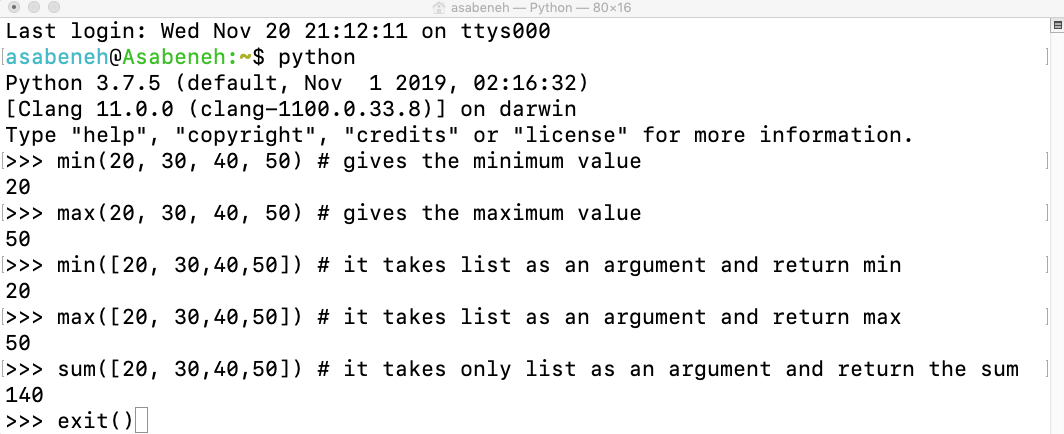
ใน Python มีฟังก์ชันพื้นฐานจำนวนมากที่พร้อมใช้งานได้เลย ซึ่งหมายความว่าเราสามารถใช้ฟังก์ชันพื้นฐานได้โดยไม่ต้อง import หรือ configure อะไรเพิ่มเติม ฟังก์ชันพื้นฐานที่ใช้บ่อยที่สุดได้แก่: print(), len(), type(), int(), float(), str(), input(), list(), dict(), min(), max(), sum(), sorted(), open(), file(), help() และ dir() ดูรายการฟังก์ชันทั้งหมดได้ที่ python documentation: https://docs.python.org/3.9/library/functions.html
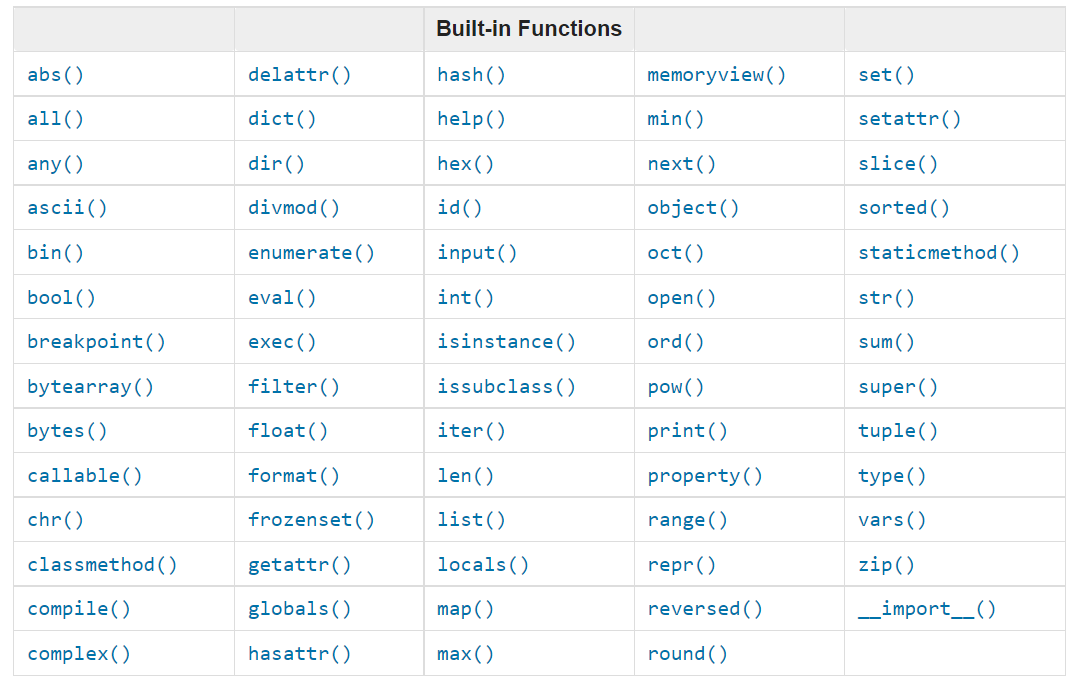
เปิด Python Shell แล้วลองใช้ฟังก์ชันพื้นฐานเหล่านี้ดู:
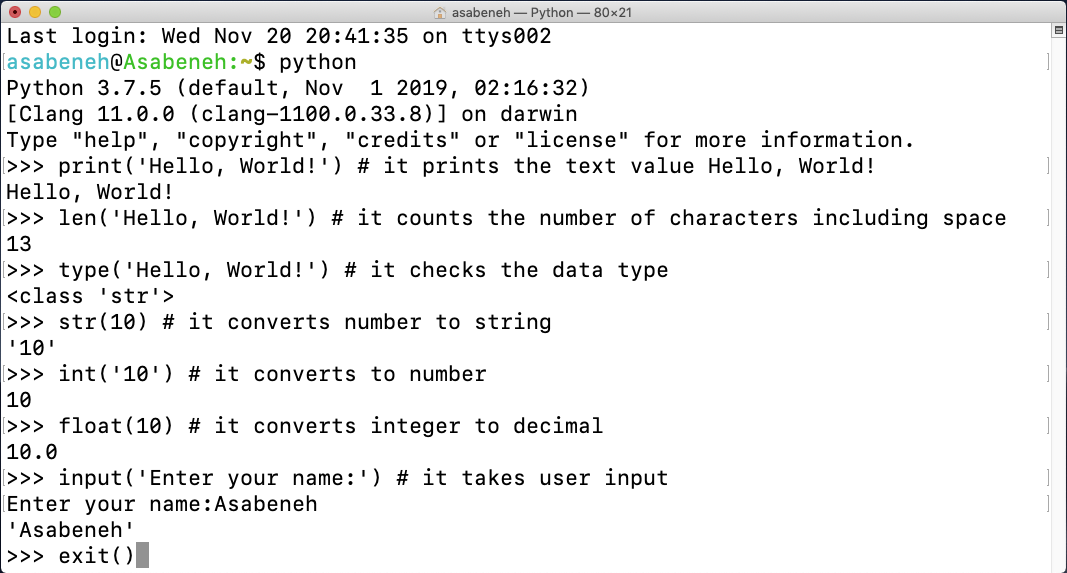
ลองใช้ help() และ dir() เพิ่มเติม:
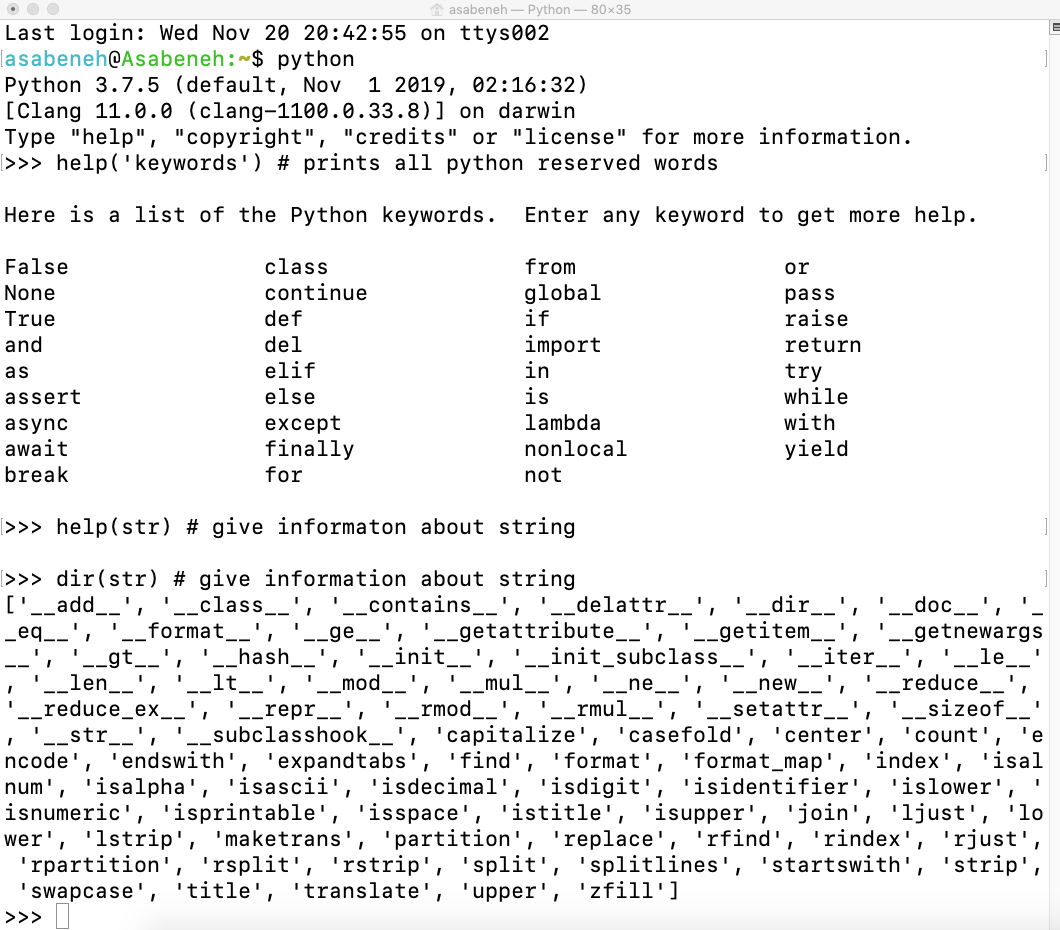
ตัวอย่างเพิ่มเติมของฟังก์ชัน min(), max() และ sum():
ตัวแปร (Variables)
ตัวแปรเก็บข้อมูลไว้ในหน่วยความจำของคอมพิวเตอร์ แนะนำให้ใช้ตัวแปรที่ตั้งชื่อเพื่อช่วยจำ (mnemonic variables) ในภาษาโปรแกรมหลาย ๆ ภาษา ตัวแปรที่ตั้งชื่อได้จำง่ายคือตัวแปรที่จำได้ง่ายและเชื่อมโยงกับค่าที่เก็บได้ ตัวแปรอ้างถึงที่อยู่ในหน่วยความจำที่เก็บข้อมูลนั้นไว้
กฎการตั้งชื่อตัวแปร
- ชื่อตัวแปรต้องขึ้นต้นด้วยตัวอักษรหรือ underscore (_)
- ชื่อตัวแปรห้ามขึ้นต้นด้วยตัวเลข
- ชื่อตัวแปรประกอบด้วยตัวอักษร ตัวเลข และ underscore เท่านั้น (A-z, 0-9, _)
- ชื่อตัวแปร case-sensitive — firstname, Firstname, FirstName และ FIRSTNAME คือตัวแปรคนละตัว
ตัวอย่างชื่อตัวแปรที่ถูกต้อง (valid):
firstname
lastname
age
country
city
first_name
last_name
capital_city
_if          # ถ้าต้องการใช้ keyword เป็นชื่อตัวแปร
year_2021
year2021
current_year_2021
birth_year
num1
num2
ตัวอย่างชื่อตัวแปรที่ไม่ถูกต้อง (invalid):
first-name
first@name
first$name
num-1
1num
นักพัฒนา Python ใช้รูปแบบ snake_case ในการตั้งชื่อตัวแปร เมื่อกำหนดค่าให้ตัวแปร เครื่องหมาย = คือ assignment operator ไม่ใช่เครื่องหมายเท่ากับในทางคณิตศาสตร์
# Variables in Python
first_name = 'Asabeneh'
last_name  = 'Yetayeh'
country    = 'Finland'
city       = 'Helsinki'
age        = 250
is_married = True
skills     = ['HTML', 'CSS', 'JS', 'React', 'Python']
person_info = {
   'firstname':'Asabeneh',
   'lastname':'Yetayeh',
   'country':'Finland',
   'city':'Helsinki'
}print('Hello, World!') # The text Hello, World! is an argument
print('Hello',',', 'World','!') # it can take multiple arguments, four arguments have been passed
print(len('Hello, World!')) # it takes only one argument# Printing the values stored in the variables
print('First name:', first_name)
print('First name length:', len(first_name))
print('Last name: ', last_name)
print('Last name length: ', len(last_name))
print('Country: ', country)
print('City: ', city)
print('Age: ', age)
print('Married: ', is_married)
print('Skills: ', skills)
print('Person information: ', person_info)การประกาศตัวแปรหลายตัวในบรรทัดเดียว (Declaring Multiple Variable in a Line)
ตัวแปรหลายตัวสามารถประกาศพร้อมกันในบรรทัดเดียวได้:
first_name, last_name, country, age, is_married = 'Asabeneh', 'Yetayeh', 'Helsink', 250, True

print(first_name, last_name, country, age, is_married)
print('First name:', first_name)
print('Last name: ', last_name)
print('Country: ', country)
print('Age: ', age)
print('Married: ', is_married)
รับข้อมูลจากผู้ใช้ด้วย input() built-in function:
first_name = input('What is your name: ')
age = input('How old are you? ')

print(first_name)
print(age)
ชนิดข้อมูล (Data Types)
ใน Python มีชนิดข้อมูลหลายประเภท ในการระบุชนิดข้อมูลเราใช้ฟังก์ชัน type() แต่ละชนิดข้อมูลจะถูกเรียนในบทของตัวเองโดยละเอียด
เช็คชนิดข้อมูลและการแปลง (Checking Data types and Casting)
เช็คชนิดข้อมูล: ใช้ฟังก์ชัน type() เพื่อตรวจสอบชนิดข้อมูลของตัวแปรหรือค่าที่ต้องการ
# Different python data types
# Let's declare variables with various data types

first_name = 'Asabeneh'     # str
last_name  = 'Yetayeh'      # str
country    = 'Finland'      # str
city       = 'Helsinki'     # str
age        = 250            # int, it is not my real age, don't worry about it

# Printing out types
print(type('Asabeneh'))          # str
print(type(first_name))          # str
print(type(10))                  # int
print(type(3.14))                # float
print(type(1 + 1j))              # complex
print(type(True))                # bool
print(type([1, 2, 3, 4]))        # list
print(type({'name':'Asabeneh'})) # dict
print(type((1,2)))               # tuple
print(type(zip([1,2],[3,4]))) # zip# int to float
num_int = 10
print('num_int',num_int) # 10
num_float = float(num_int)
print('num_float:', num_float) # 10.0
# float to int
gravity = 9.81
print(int(gravity)) # 9
# int to str
num_int = 10
print(num_int) # 10
num_str = str(num_int)
print(num_str) # '10'
# str to int or float
num_str = '10.6'
num_float = float(num_str) # Convert the string to a float first
num_int = int(num_float) # Then convert the float to an integer
print('num_int', int(num_str)) # 10
print('num_float', float(num_str)) # 10.6
num_int = int(num_float)
print('num_int', int(num_int)) # 10
# str to list
first_name = 'Asabeneh'
print(first_name) # 'Asabeneh'
first_name_to_list = list(first_name)
print(first_name_to_list) # ['A', 's', 'a', 'b', 'e', 'n', 'e', 'h']ตัวเลข (Numbers)
ชนิดข้อมูลตัวเลขใน Python ได้แก่ integers, floating-point numbers และ complex numbers
- Integers: จำนวนเต็ม (บวก ลบ ศูนย์) เช่น ..., -3, -2, -1, 0, 1, 2, 3, ...
- Floating Point Numbers (Floats): ตัวเลขทศนิยม เช่น ..., -3.5, -2.25, -1.0, 0.0, 1.1, 2.2, 3.5, ...
- Complex Numbers: จำนวนเชิงซ้อน เช่น 1 + j, 2 + 4j, 1 - 1j
💻 แบบฝึกหัด — วันที่ 2
ระดับ 1
- สร้างโฟลเดอร์ชื่อ day_2 ใน 30DaysOfPython แล้วสร้างไฟล์ชื่อ variables.py
- เขียน Python comment ว่า 'Day 2: 30 Days of python programming'
- ประกาศตัวแปร first name และกำหนดค่าให้
- ประกาศตัวแปร last name และกำหนดค่าให้
- ประกาศตัวแปร full name และกำหนดค่าให้
- ประกาศตัวแปร country และกำหนดค่าให้
- ประกาศตัวแปร city และกำหนดค่าให้
- ประกาศตัวแปร age และกำหนดค่าให้
- ประกาศตัวแปร year และกำหนดค่าให้
- ประกาศตัวแปร is_married และกำหนดค่าให้
- ประกาศตัวแปร is_true และกำหนดค่าให้
- ประกาศตัวแปร is_light_on และกำหนดค่าให้
- ประกาศตัวแปรหลายตัวในบรรทัดเดียว
ระดับ 2
- เช็คชนิดข้อมูลของตัวแปรทั้งหมดด้วย type() built-in function
- ใช้ len() built-in function หาความยาวของ first name
- เปรียบเทียบความยาวของ first name กับ last name
- กำหนด 5 ให้กับ num_one และ 4 ให้กับ num_two
- บวก num_one กับ num_two แล้วเก็บผลลัพธ์ในตัวแปร total
- ลบ num_two จาก num_one แล้วเก็บผลลัพธ์ในตัวแปร diff
- คูณ num_two กับ num_one แล้วเก็บผลลัพธ์ในตัวแปร product
- หาร num_one ด้วย num_two แล้วเก็บผลลัพธ์ในตัวแปร division
- ใช้ modulus division หา num_two หาร num_one แล้วเก็บผลลัพธ์ในตัวแปร remainder
- คำนวณ num_one ยกกำลัง num_two แล้วเก็บผลลัพธ์ในตัวแปร exp
- หาผลการหารทิ้งเศษของ num_one ด้วย num_two แล้วเก็บผลลัพธ์ในตัวแปร floor_division
- วงกลมมีรัศมี 30 เมตร:
1. คำนวณพื้นที่วงกลมและเก็บในตัวแปร area_of_circle
2. คำนวณเส้นรอบวงและเก็บในตัวแปร circum_of_circle
3. รับรัศมีจาก input() แล้วคำนวณพื้นที่ - ใช้ built-in input function รับ first name, last name, country และ age จากผู้ใช้แล้วเก็บในตัวแปรที่สอดคล้องกัน
- รัน help('keywords') ใน Python Shell หรือในไฟล์ เพื่อดูคำสงวน (reserved words) ของ Python