On this page
วันที่ 3 — ตัวดำเนินการ (Operators)
เรียนรู้ตัวดำเนินการของ Python ทั้งหมด: arithmetic, comparison, logical, assignment และ Boolean
Boolean
ชนิดข้อมูล Boolean แทนค่าหนึ่งในสองค่า: True หรือ False การใช้งานชนิดข้อมูลนี้จะชัดเจนยิ่งขึ้นเมื่อเราเริ่มใช้ตัวดำเนินการเปรียบเทียบ ตัวอักษรแรกของ True ต้องเป็น T พิมพ์ใหญ่ และ False ต้องเป็น F พิมพ์ใหญ่ ต่างจาก JavaScript
ตัวอย่าง: Boolean Values
print(True)
print(False)
ตัวดำเนินการ (Operators)
Python รองรับตัวดำเนินการหลายประเภท ในบทนี้จะโฟกัสที่ตัวดำเนินการหลักที่ใช้บ่อย
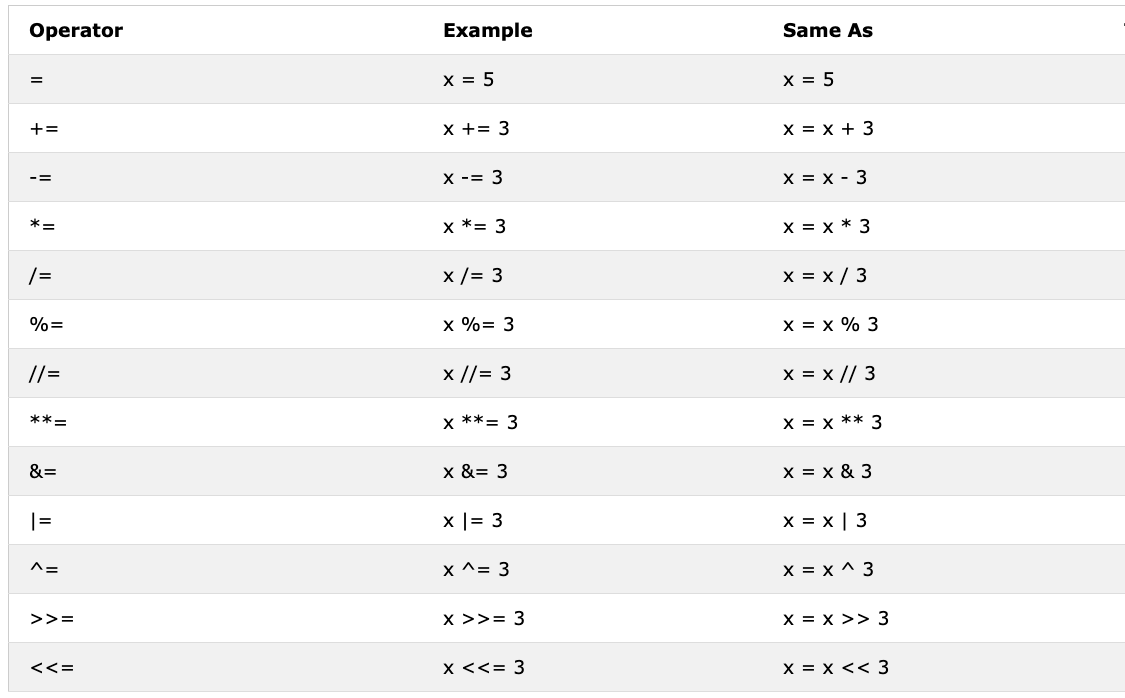
ตัวดำเนินการกำหนดค่า (Assignment Operators)
ตัวดำเนินการกำหนดค่าใช้เพื่อกำหนดค่าให้กับตัวแปร เครื่องหมาย = ใน Python หมายถึงการ "กำหนดค่า" ไม่ใช่ "เท่ากับ" ทางคณิตศาสตร์
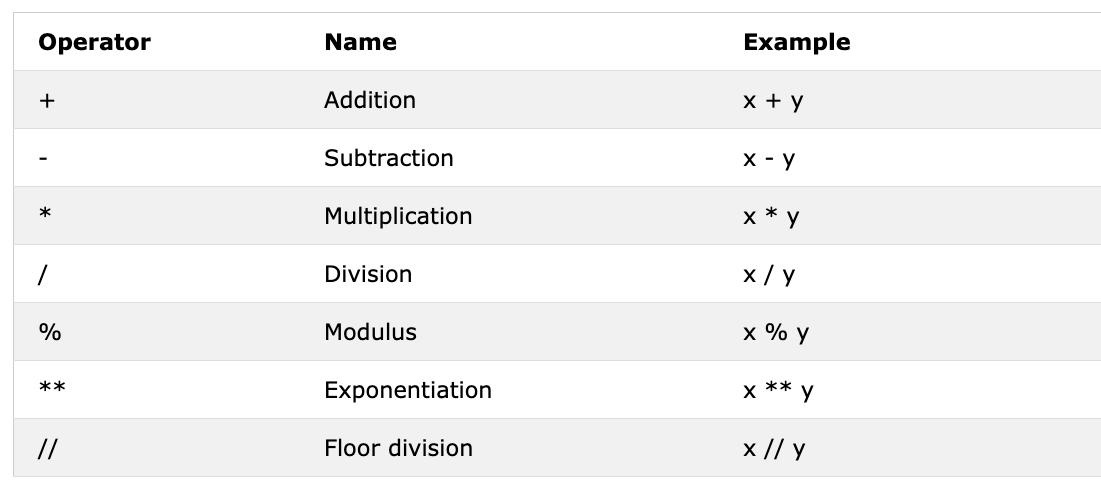
ตัวดำเนินการคณิตศาสตร์ (Arithmetic Operators)
- การบวก (+): a + b
- การลบ (-): a - b
- การคูณ (*): a * b
- การหาร (/): a / b
- Modulus (%): a % b
- การหารทิ้งเศษ (//): a // b
- ยกกำลัง (**): a ** b
ตัวอย่าง: Integers
# Arithmetic Operations in Python
# Integers

print('Addition: ', 1 + 2)        # 3
print('Subtraction: ', 2 - 1)     # 1
print('Multiplication: ', 2 * 3)  # 6
print('Division: ', 4 / 2)        # 2.0  Division in Python gives floating number
print('Division: ', 6 / 2)        # 3.0
print('Division: ', 7 / 2)        # 3.5
print('Division without the remainder: ', 7 // 2)   # 3,  gives without the floating number or without the remaining
print('Division without the remainder: ',7 // 3)    # 2
print('Modulus: ', 3 % 2)         # 1, Gives the remainder
print('Exponentiation: ', 2 ** 3) # 8 it means 2 * 2 * 2
ตัวอย่าง: Floats
# Floating numbers
print('Floating Point Number, PI', 3.14)
print('Floating Point Number, gravity', 9.81)
ตัวอย่าง: Complex numbers
# Complex numbers
print('Complex number: ', 1 + 1j)
print('Multiplying complex numbers: ',(1+1j) * (1-1j))
มาประกาศตัวแปรและกำหนดค่าตัวเลขกัน แนะนำให้ตั้งชื่อตัวแปรที่สื่อความหมาย (mnemonic variable name)
ตัวอย่าง:
# Declaring the variable at the top first

a = 3 # a is a variable name and 3 is an integer data type
b = 2 # b is a variable name and 2 is an integer data type

# Arithmetic operations and assigning the result to a variable
total          = a + b
diff           = a - b
product        = a * b
division       = a / b
remainder      = a % b
floor_division = a // b
exponential    = a ** b

# I should have used sum instead of total but sum is a built-in function - try to avoid overriding built-in functions
print(total) # if you do not label your print with some string, you never know where the result is coming from
print('a + b = ', total)
print('a - b = ', diff)
print('a * b = ', product)
print('a / b = ', division)
print('a % b = ', remainder)
print('a // b = ', floor_division)
print('a ** b = ', exponential)
ตัวอย่าง:
print('== Addition, Subtraction, Multiplication, Division, Modulus ==')

# Declaring values and organizing them together
num_one = 3
num_two = 4

# Arithmetic operations
total     = num_one + num_two
diff      = num_two - num_one
product   = num_one * num_two
div       = num_two / num_one
remainder = num_two % num_one

# Printing values with label
print('total: ', total)
print('difference: ', diff)
print('product: ', product)
print('division: ', div)
print('remainder: ', remainder)
มาลองประยุกต์ใช้ความรู้ที่มีในการคำนวณ (พื้นที่, ปริมาตร, ความหนาแน่น, น้ำหนัก, เส้นรอบวง, ระยะทาง, แรง):
# Calculating area of a circle
radius = 10                                 # radius of a circle
area_of_circle = 3.14 * radius ** 2         # two * sign means exponent or power
print('Area of a circle:', area_of_circle)

# Calculating area of a rectangle
length = 10
width  = 20
area_of_rectangle = length * width
print('Area of rectangle:', area_of_rectangle)

# Calculating a weight of an object
mass    = 75
gravity = 9.81
weight  = mass * gravity
print(weight, 'N')                          # Adding unit to the weight

# Calculate the density of a liquid
mass    = 75    # in Kg
volume  = 0.075 # in cubic meter
density = mass / volume  # 1000 Kg/m^3
print(density, 'Kg/m^3') # Adding unit to the density
ตัวดำเนินการเปรียบเทียบ (Comparison Operators)
ในการเขียนโปรแกรมเราเปรียบเทียบค่าต่าง ๆ ด้วยตัวดำเนินการเปรียบเทียบ ผลลัพธ์จะเป็น True หรือ False เสมอ
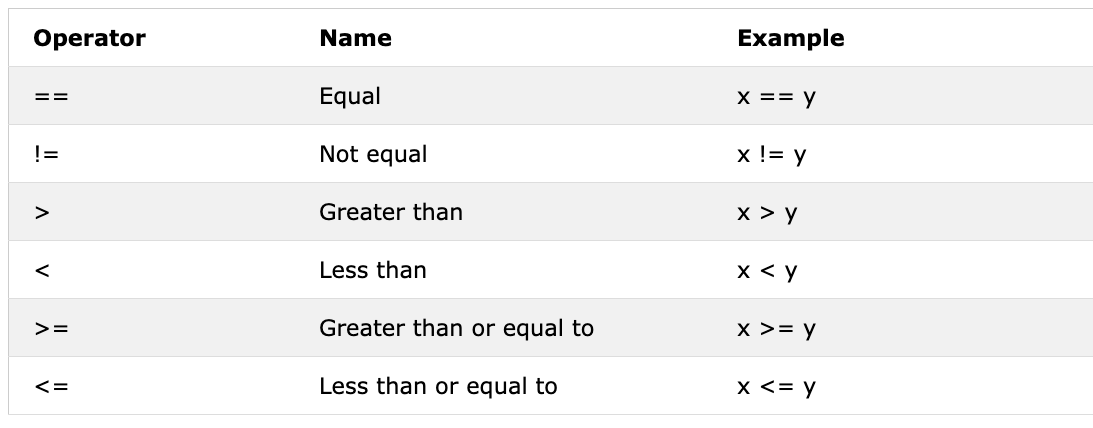
ตัวอย่าง: Comparison Operators
print(3 > 2)     # True, because 3 is greater than 2
print(3 >= 2)    # True, because 3 is greater than 2
print(3 < 2)     # False,  because 3 is greater than 2
print(2 < 3)     # True, because 2 is less than 3
print(2 <= 3)    # True, because 2 is less than 3
print(3 == 2)    # False, because 3 is not equal to 2
print(3 != 2)    # True, because 3 is not equal to 2
print(len('mango') == len('avocado'))  # False
print(len('mango') != len('avocado'))  # True
print(len('mango') < len('avocado'))   # True
print(len('milk') != len('meat'))      # False
print(len('milk') == len('meat'))      # True
print(len('tomato') == len('potato'))  # True
print(len('python') > len('dragon'))   # False


# Comparing something gives either a True or False

print('True == True: ', True == True)
print('True == False: ', True == False)
print('False == False:', False == False)
นอกจากตัวดำเนินการข้างต้นแล้ว Python ยังมีตัวดำเนินการพิเศษเพิ่มเติม:
- is: คืนค่า True ถ้าตัวแปรทั้งสองอ้างถึง object เดียวกัน (x is y)
- is not: คืนค่า True ถ้าตัวแปรทั้งสองไม่ได้อ้างถึง object เดียวกัน (x is not y)
- in: คืนค่า True ถ้า list มีค่านั้นอยู่ (x in y)
- not in: คืนค่า True ถ้า list ไม่มีค่านั้น (x not in y)
print('1 is 1', 1 is 1)                   # True - because the data values are the same
print('1 is not 2', 1 is not 2)           # True - because 1 is not 2
print('A in Asabeneh', 'A' in 'Asabeneh') # True - A found in the string
print('B not in Asabeneh', 'B' in 'Asabeneh') # False - there is no uppercase B
print('coding' in 'coding for all') # True - because coding for all has the word coding
print('a in an:', 'a' in 'an')      # True
print('4 is 2 ** 2:', 4 is 2 ** 2)  # True
ตัวดำเนินการเชิงตรรกะ (Logical Operators)
Python ใช้คำสงวน and, or และ not สำหรับตัวดำเนินการเชิงตรรกะ ต่างจากภาษาโปรแกรมอื่น ๆ ที่ใช้สัญลักษณ์ ตัวดำเนินการเชิงตรรกะใช้รวมคำสั่งเงื่อนไขหลายคำสั่งเข้าด้วยกัน
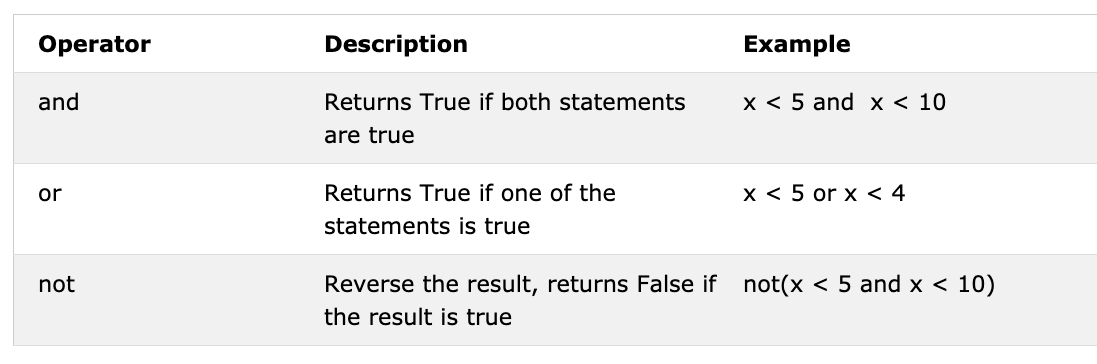
print(3 > 2 and 4 > 3) # True - because both statements are true
print(3 > 2 and 4 < 3) # False - because the second statement is false
print(3 < 2 and 4 < 3) # False - because both statements are false
print('True and True: ', True and True)
print(3 > 2 or 4 > 3)  # True - because both statements are true
print(3 > 2 or 4 < 3)  # True - because one of the statements is true
print(3 < 2 or 4 < 3)  # False - because both statements are false
print('True or False:', True or False)
print(not 3 > 2)     # False - because 3 > 2 is true, then not True gives False
print(not True)      # False - Negation, the not operator turns true to false
print(not False)     # True
print(not not True)  # True
print(not not False) # False
💻 แบบฝึกหัด — วันที่ 3
- ประกาศอายุของคุณเป็นตัวแปร integer
- ประกาศส่วนสูงของคุณเป็นตัวแปร float
- ประกาศตัวแปรที่เก็บ complex number
- เขียนโปรแกรมที่รับค่า base และ height ของสามเหลี่ยม แล้วคำนวณพื้นที่สามเหลี่ยม (area = 0.5 x b x h)
Enter base: 20
Enter height: 10
The area of the triangle is 100 - เขียนโปรแกรมที่รับค่าด้าน a, b, c ของสามเหลี่ยม แล้วคำนวณเส้นรอบรูป (perimeter = a + b + c)
Enter side a: 5
Enter side b: 4
Enter side c: 3
The perimeter of the triangle is 12 - รับความยาวและความกว้างของสี่เหลี่ยมผืนผ้า แล้วคำนวณพื้นที่ (area = length x width) และเส้นรอบรูป (perimeter = 2 x (length + width))
- รับรัศมีของวงกลม แล้วคำนวณพื้นที่ (area = pi x r x r) และเส้นรอบวง (c = 2 x pi x r) โดย pi = 3.14
- คำนวณ slope, x-intercept และ y-intercept ของ y = 2x - 2
- Slope คือ (m = y2-y1/x2-x1) หา slope และ Euclidean distance ระหว่างจุด (2, 2) และ (6, 10)
- เปรียบเทียบ slope ในข้อ 8 และ 9
- คำนวณค่า y (y = x^2 + 6x + 9) ลองใช้ค่า x ต่าง ๆ และหาว่าเมื่อใด y จะเป็น 0
- หาความยาวของ 'python' และ 'dragon' แล้วสร้างคำสั่งเปรียบเทียบที่เป็น falsy
- ใช้ตัวดำเนินการ and เพื่อเช็คว่า 'on' อยู่ใน 'python' และ 'dragon' ทั้งคู่หรือไม่
- ประโยค: 'I hope this course is not full of jargon' ใช้ตัวดำเนินการ in เช็คว่า 'jargon' อยู่ในประโยคหรือไม่
- ไม่มี 'on' ใน 'dragon' และ 'python' ทั้งคู่
- หาความยาวของคำว่า 'python' แล้วแปลงค่าเป็น float จากนั้นแปลงเป็น string
- จำนวนคู่หารด้วย 2 ลงตัว เศษเป็นศูนย์ จะเช็คว่าตัวเลขเป็นเลขคู่หรือไม่ด้วย Python ได้อย่างไร?
- เช็คว่า floor division ของ 7 หาร 3 เท่ากับค่า int แปลงมาจาก 2.7 หรือไม่
- เช็คว่า type ของ '10' เท่ากับ type ของ 10 หรือไม่
- เช็คว่า int('9.8') เท่ากับ 10 หรือไม่
- เขียนโปรแกรมที่รับชั่วโมงทำงานและอัตราค่าจ้างต่อชั่วโมง แล้วคำนวณค่าจ้างรายสัปดาห์
Enter hours: 40
Enter rate per hour: 28
Your weekly earning is 1120 - เขียนโปรแกรมที่รับจำนวนปี แล้วคำนวณจำนวนวินาทีที่มีชีวิตอยู่ โดยสมมติว่าอายุขัย 100 ปี
Enter number of years you have lived: 100
You have lived for 3153600000 seconds. - เขียนโปรแกรม Python แสดงตารางต่อไปนี้:
1 1 1 1 1
2 1 2 4 8
3 1 3 9 27
4 1 4 16 64
5 1 5 25 125