On this page
- ลิสต์ (Lists)
- วิธีสร้าง List
- การเข้าถึงสมาชิกด้วย Positive Index
- การเข้าถึงสมาชิกด้วย Negative Index
- การ Unpack สมาชิก List
- การตัด List (Slicing)
- การแก้ไข List
- การเช็คสมาชิกใน List
- การเพิ่มสมาชิกเข้า List
- การลบสมาชิกออกจาก List
- การคัดลอก List
- การต่อ List
- การนับสมาชิก
- การหา Index
- การกลับลำดับ List
- การเรียงลำดับ List
- 💻 แบบฝึกหัด — วันที่ 5
- ระดับ 1
- ระดับ 2
วันที่ 5 — ลิสต์ (Lists)
เรียนรู้โครงสร้างข้อมูล List ใน Python — การสร้าง การเข้าถึง การแก้ไข และ methods ที่ใช้งานบ่อย
ลิสต์ (Lists)
List คือ collection ของชนิดข้อมูลต่าง ๆ ที่มีลำดับและแก้ไขได้ (ordered and modifiable/mutable) List ยอมให้มีค่าซ้ำกันได้ List ว่างจะเป็น list ที่ไม่มีค่าใด ๆ อยู่เลย
วิธีสร้าง List
ใน Python เราสามารถสร้าง list ด้วยสองวิธี:
- ใช้ built-in function list()
- ใช้ square brackets []
# syntax
lst = list()
# หรือ
lst = []# Lists containing data of various types
first_list = [] # empty list
first_list = ['Banana'] # list with single item
fruits = ['banana', 'orange', 'mango', 'lemon'] # list of fruits
vegetables = ['Tomato', 'Potato', 'Cabbage','Onion', 'Carrot'] # list of vegetables
animal_products = ['milk', 'meat', 'butter', 'yoghurt'] # list of animal products
web_techs = ['HTML', 'CSS', 'Bootstrap', 'JavaScript', 'React', 'Redux', 'NodeJs'] # list of web technologies
countries = ['Finland', 'Estonia', 'Denmark', 'Sweden', 'Norway']
# Print the lists and its length
print('Fruits:', fruits)
print('Number of fruits:', len(fruits))
print('Vegetables:', vegetables)
print('Number of vegetables:', len(vegetables))
print('Animal products:',animal_products)
print('Number of animal products:', len(animal_products))
print('Web technologies:', web_techs)
print('Number of web technologies:', len(web_techs))
print('Countries:', countries)
print('Number of countries:', len(countries))List สามารถมีชนิดข้อมูลต่างกันในตัวเดียวกันได้ รวมถึง list ซ้อน list:
 # List can have different data types at the same time
my_list = ['Asabeneh', 250, True, {'country':'Finland', 'city':'Helsinki'}] # list containing different data types
การเข้าถึงสมาชิกด้วย Positive Index
เราเข้าถึงสมาชิกแต่ละตัวใน list ได้ด้วย index ของมัน การนับ index ใน list เริ่มจาก 0
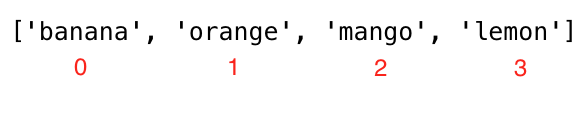
fruits = ['banana', 'orange', 'mango', 'lemon']
first_fruit  = fruits[0]  # we are accessing the first item using its index
print(first_fruit)        # banana
second_fruit = fruits[1]
print(second_fruit)       # orange
last_fruit   = fruits[3]
print(last_fruit)         # lemon
# Last index
last_index   = len(fruits) - 1
last_fruit   = fruits[last_index]
print(last_fruit)         # lemon
การเข้าถึงสมาชิกด้วย Negative Index
การนับ negative index เริ่มจากท้ายสุด โดย -1 คือสมาชิกตัวสุดท้าย
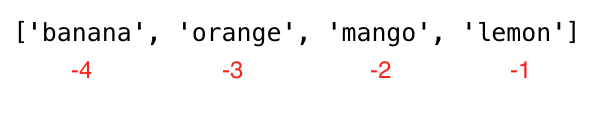
fruits = ['banana', 'orange', 'mango', 'lemon']
all_fruits   = fruits[-4:]  # it returns all the fruits
# Negative indexing means starting from the end
first_fruit  = fruits[-4]
print(first_fruit)      # banana
second_fruit = fruits[-3]
print(second_fruit)     # orange
last_fruit   = fruits[-1]
print(last_fruit)       # lemon
การ Unpack สมาชิก List
lst = ['item','item2','item3', 'item4', 'item5']
first_item, second_item, third_item, *rest = lst
print(first_item)   # item1
print(second_item)  # item2
print(third_item)   # item3
print(rest)         # ['item4', 'item5']

# First Example
fruits = ['banana', 'orange', 'mango', 'lemon','lime','cherry']
first_fruit, second_fruit, third_fruit, *rest = fruits
print(first_fruit)   # banana
print(second_fruit)  # orange
print(third_fruit)   # mango
print(rest)          # ['lemon','lime','cherry']

# Second Example about unpacking list
first, second, third,*rest, tenth = [1,2,3,4,5,6,7,8,9,10]
print(first)  # 1
print(second) # 2
print(third)  # 3
print(rest)   # [4,5,6,7,8,9]
print(tenth)  # 10

# Third Example about unpacking list
countries = ['Germany', 'France','Belgium','Sweden','Denmark','Finland','Norway','Iceland','Estonia']
gr, fr, bg, sw, *scandic, es = countries
print(gr)
print(fr)
print(bg)
print(sw)
print(scandic)
print(es)
การตัด List (Slicing)
ใช้ positive index ในการตัด:
fruits = ['banana', 'orange', 'mango', 'lemon']
all_fruits = fruits[0:4]    # it returns all the fruits
                            # this is also the same as fruits[0:]
print('All: ', all_fruits)  # All: ['banana', 'orange', 'mango', 'lemon']
all_fruits = fruits[0:4:2]  # here we used a 3rd argument, step. It will take every 2cnd item - ['banana', 'mango']
print('All: ', all_fruits)  # All: ['banana', 'mango']
all_fruits = fruits[::-1]   # negative step will take the list in reverse order
print('Reverse: ', all_fruits) # Reverse: ['lemon', 'mango', 'orange', 'banana']
fruits = ['banana', 'orange', 'mango', 'lemon']
first_three = fruits[0:3]   # The first three items start at index 0 to index 3
print('First three items: ', first_three) # First three items: ['banana', 'orange', 'mango']
ใช้ negative index ในการตัด:
fruits = ['banana', 'orange', 'mango', 'lemon']
all_fruits = fruits[-4:]         # it returns all the fruits
print('All: ', all_fruits)       # All: ['banana', 'orange', 'mango', 'lemon']
all_fruits = fruits[-4:-1]       # it does not include the last index
print('All except the last: ', all_fruits) # All except the last: ['banana', 'orange', 'mango']
all_fruits = fruits[-3:-1]       # ['orange', 'mango']
print('All except the first and last: ', all_fruits) # All except the first and last: ['orange', 'mango']
การแก้ไข List
List เป็น mutable หมายความว่าแก้ไขค่าได้:
fruits = ['banana', 'orange', 'mango', 'lemon']
fruits[0] = 'avocado'
print(fruits)       # ['avocado', 'orange', 'mango', 'lemon']
fruits[1] = 'apple'
print(fruits)       # ['avocado', 'apple', 'mango', 'lemon']
last_index = len(fruits) - 1
fruits[last_index] = 'lime'
print(fruits)       # ['avocado', 'apple', 'mango', 'lime']
การเช็คสมาชิกใน List
fruits = ['banana', 'orange', 'mango', 'lemon']
does_exist = 'banana' in fruits
print(does_exist)  # True
does_exist = 'lime' in fruits
print(does_exist)  # False
การเพิ่มสมาชิกเข้า List
ใช้ append() เพิ่มสมาชิกที่ท้าย list:
# syntax
lst = list()
lst.append(item)

fruits = ['banana', 'orange', 'mango', 'lemon']
fruits.append('apple')
print(fruits)           # ['banana', 'orange', 'mango', 'lemon', 'apple']
fruits.append('lime')   # ['banana', 'orange', 'mango', 'lemon', 'apple', 'lime']
print(fruits)
ใช้ insert() เพิ่มสมาชิกที่ตำแหน่ง index ที่กำหนด:
# syntax
lst = ['item1', 'item2']
lst.insert(index, item)

fruits = ['banana', 'orange', 'mango', 'lemon']
fruits.insert(2, 'apple') # insert apple between orange and mango
print(fruits)             # ['banana', 'orange', 'apple', 'mango', 'lemon']
fruits.insert(3, 'lime')  # ['banana', 'orange', 'apple', 'lime', 'mango', 'lemon']
print(fruits)
การลบสมาชิกออกจาก List
ใช้ remove() ลบสมาชิกที่ระบุออกจาก list:
# syntax
lst = ['item1', 'item2']
lst.remove(item)

fruits = ['banana', 'orange', 'mango', 'lemon', 'banana']
fruits.remove('banana')
print(fruits)  # ['orange', 'mango', 'lemon', 'banana'] - removes the first occurrence of banana
ใช้ pop() ลบและคืนค่าสมาชิกที่ index ที่กำหนด (ถ้าไม่ระบุ index จะลบตัวท้ายสุด):
# syntax
lst = ['item1', 'item2']
lst.pop()       # last item
lst.pop(index)

fruits = ['banana', 'orange', 'mango', 'lemon']
fruits.pop()
print(fruits)       # ['banana', 'orange', 'mango']

fruits.pop(0)
print(fruits)       # ['orange', 'mango']
ใช้ del ลบสมาชิกที่ index หรือ slice ที่กำหนด นอกจากนี้ยังใช้ลบ list ทั้งหมดได้:
# syntax
lst = ['item1', 'item2']
del lst[index] # only a single item
del lst        # to delete the list completely

fruits = ['banana', 'orange', 'mango', 'lemon', 'kiwi', 'lime']
del fruits[0]
print(fruits)       # ['orange', 'mango', 'lemon', 'kiwi', 'lime']
del fruits[1]
print(fruits)       # ['orange', 'lemon', 'kiwi', 'lime']
del fruits[1:3]     # this deletes items between given indexes, so it does not delete the item with index 3!
print(fruits)       # ['orange', 'lime']
del fruits
print(fruits)       # This should give: NameError: name 'fruits' is not defined
ใช้ clear() ลบสมาชิกทั้งหมดออกจาก list:
# syntax
lst = ['item1', 'item2']
lst.clear()

fruits = ['banana', 'orange', 'mango', 'lemon']
fruits.clear()
print(fruits) # []
การคัดลอก List
อาจเกิดปัญหาได้เมื่อ reassign list ให้ตัวแปรใหม่ เพราะจะเป็นแค่การอ้างอิงแบบ reference ไม่ใช่ copy จริง ๆ การใช้ copy() จะช่วยหลีกเลี่ยงปัญหานี้:
# syntax
lst = ['item1', 'item2']
lst_copy = lst.copy()

fruits = ['banana', 'orange', 'mango', 'lemon']
fruits_copy = fruits.copy()
print(fruits_copy)       # ['banana', 'orange', 'mango', 'lemon']
การต่อ List
มีหลายวิธีในการรวม list เข้าด้วยกัน:
ใช้เครื่องหมาย + หรือ extend():
# syntax
list3 = list1 + list2

positives = [1, 2, 3, 4, 5]
negatives = [-5, -4, -3, -2, -1]
integers  = positives + negatives
print(integers)          # [-5, -4, -3, -2, -1, 1, 2, 3, 4, 5]
print(len(integers))     # 10

fruits    = ['banana', 'orange', 'mango', 'lemon']
vegitables = ['Tomato', 'Potato', 'Cabbage', 'Onion', 'Carrot']
fruits_and_vegitables = fruits + vegitables
print(fruits_and_vegitables)
# ['banana', 'orange', 'mango', 'lemon', 'Tomato', 'Potato', 'Cabbage', 'Onion', 'Carrot']# syntax
list1 = ['item1', 'item2']
list2 = ['item3', 'item4','item5']
list1.extend(list2)
num1 = [0, 1, 2, 3]
num2 = [4, 5, 6]
num1.extend(num2)
print('Numbers:', num1) # Numbers: [0, 1, 2, 3, 4, 5, 6]
neg_num = [-5,-4,-3,-2,-1,0]
positive = [1, 2, 3, 4, 5]
neg_num.extend(positive)
print('Integers:', neg_num) # Integers: [-5, -4, -3, -2, -1, 0, 1, 2, 3, 4, 5]การนับสมาชิก
ใช้ count() นับจำนวนครั้งที่สมาชิกปรากฏใน list:
# syntax
lst = ['item1', 'item2', 'item3', 'item1', 'item2']
print(lst.count('item1')) # 2

fruits = ['banana', 'orange', 'mango', 'lemon']
print(fruits.count('orange')) # 1
การหา Index
ใช้ index() หา index ของสมาชิก:
# syntax
lst = ['item1', 'item2', 'item3']
lst.index('item2') # 1

fruits = ['banana', 'orange', 'mango', 'lemon']
print(fruits.index('orange')) # 1
การกลับลำดับ List
ใช้ reverse() กลับลำดับของ list:
# syntax
lst = ['item1', 'item2', 'item3']
lst.reverse()

fruits = ['banana', 'orange', 'mango', 'lemon']
fruits.reverse()
print(fruits.reverse())  # None
print(fruits)            # ['lemon', 'mango', 'orange', 'banana']
การเรียงลำดับ List
ใช้ sort() เรียงลำดับ list โดยแก้ไข list ต้นฉบับ หรือใช้ sorted() ที่คืน list ใหม่โดยไม่แก้ต้นฉบับ:
# syntax
lst = ['item3', 'item2', 'item1']
lst.sort()                # ['item1', 'item2', 'item3']
lst.sort(reverse=True)    # ['item3', 'item2', 'item1']
sorted(lst, reverse=True) # ['item3', 'item2', 'item1']

fruits = ['banana', 'orange', 'mango', 'lemon']
fruits.sort()
print(fruits)             # sorted in alphabetical order, ['banana', 'lemon', 'mango', 'orange']
fruits.sort(reverse=True)
print(fruits)             # ['orange', 'mango', 'lemon', 'banana']

ages = [22, 19, 24, 25, 26, 24, 25, 24]
ages.sort()
print(ages)               # [19, 22, 24, 24, 24, 25, 25, 26]

ages.sort(reverse=True)
print(ages)               # [26, 25, 25, 24, 24, 24, 22, 19]
print(sorted(ages))       # [19, 22, 24, 24, 24, 25, 25, 26]
print(sorted(ages, reverse=True)) # [26, 25, 25, 24, 24, 24, 22, 19]
💻 แบบฝึกหัด — วันที่ 5
ระดับ 1
- ประกาศ empty list
- ประกาศ list ที่มีสมาชิกมากกว่า 5 รายการ
- หาความยาวของ list ด้วย len()
- รับ first item, middle item และ last item จาก list
- ประกาศ list ชื่อ mixed_data_types แล้วใส่ข้อมูลส่วนตัว (ชื่อ, อายุ, ส่วนสูง, สถานภาพการสมรส, ที่อยู่)
- ประกาศตัวแปร list ชื่อ it_companies และกำหนดค่าเริ่มต้นเป็น Facebook, Google, Microsoft, Apple, IBM, Oracle, Amazon
- Print list ด้วย print()
- Print จำนวน companies ใน list
- Print first, middle และ last company
- Print list หลังจาก modify company ใด company หนึ่ง
- เพิ่ม IT company ลงใน list
- Insert IT company ตรงกลาง list
- เปลี่ยนชื่อ IT company หนึ่งใน list เป็นตัวพิมพ์ใหญ่ (ยกเว้น IBM!)
- Join it_companies ด้วย string '#; '
- เช็คว่า 'Google' มีอยู่ใน it_companies list หรือไม่
- เรียงลำดับ list ด้วย sort()
- Reverse list ด้วย reverse() method
- ตัด first 3 companies ออกจาก list
- ตัด last 3 companies ออกจาก list
- ตัด middle IT company หรือ companies ออกจาก list
- ลบ company แรกออกจาก list
- ลบ middle IT company หรือ companies ออกจาก list
- ลบ last IT company ออกจาก list
- ลบ IT companies ทั้งหมดออกจาก list
- ทำลาย list ทิ้งทั้งหมด
- Join lists ต่อไปนี้:
front_end = ['HTML', 'CSS', 'JS', 'React', 'Redux']
back_end = ['Node','Express', 'MongoDB'] - หลังจาก join lists ใน task ข้างต้น แล้ว copy ผลลัพธ์แล้วเก็บในตัวแปร full_stack จากนั้น insert Python และ SQL หลังจาก Redux
ระดับ 2
- List ต่อไปนี้มีอายุของนักเรียน 10 คน:
ages = [19, 22, 19, 24, 20, 25, 26, 24, 25, 24]
เรียงลำดับ list และหาค่า min และ max age
เพิ่ม min age และ max age กลับเข้าไปใน list อีกครั้ง
หา median age (สมาชิกตรงกลาง หรือค่าเฉลี่ยของสองตัวกลาง)
หาค่า mean age โดย (sum of all items / number of items)
หาค่า range ของ ages โดย (max - min)
เปรียบเทียบ (min - average) กับ (max - average) โดยใช้ abs() - Find the middle country(ies) in the countries list:
countries = ['China', 'Russia', 'USA', 'Finland', 'Sweden', 'Norway', 'Denmark'] - แยก countries list ออกเป็นสองส่วนเท่า ๆ กัน (หรือไม่เท่ากันถ้า list มีจำนวนคี่)
- Unpack สามประเทศแรกและที่เหลือเป็น scandic countries จาก ['China', 'Russia', 'USA', 'Finland', 'Sweden', 'Norway', 'Denmark']