On this page
- Python กับ MongoDB
- MongoDB
- SQL เทียบกับ NoSQL
- การรับ Connection String (MongoDB URI)
- การเชื่อมต่อแอปพลิเคชัน Flask กับ MongoDB Cluster
- การสร้างฐานข้อมูลและ collection
- การ Insert เอกสารหลายรายการลงใน Collection
- MongoDB Find
- Find พร้อม Query
- Find query พร้อม modifier
- การจำกัดจำนวนเอกสาร
- Find พร้อมการเรียงลำดับ
- การอัปเดตด้วย Query
- การลบเอกสาร
- การ Drop Collection
- แบบฝึกหัด: วันที่ 27
วันที่ 27 — Python กับ MongoDB
เชื่อมต่อ Python เข้ากับ MongoDB ฐานข้อมูล NoSQL และเรียนรู้การทำ CRUD operations ผ่าน PyMongo
Python กับ MongoDB
Python เป็นเทคโนโลยีฝั่ง backend และสามารถเชื่อมต่อกับแอปพลิเคชันฐานข้อมูลได้หลากหลายประเภท ทั้งฐานข้อมูล SQL และ NoSQL ในส่วนนี้เราจะเชื่อมต่อ Python กับฐานข้อมูล MongoDB ซึ่งเป็นฐานข้อมูล NoSQL
MongoDB
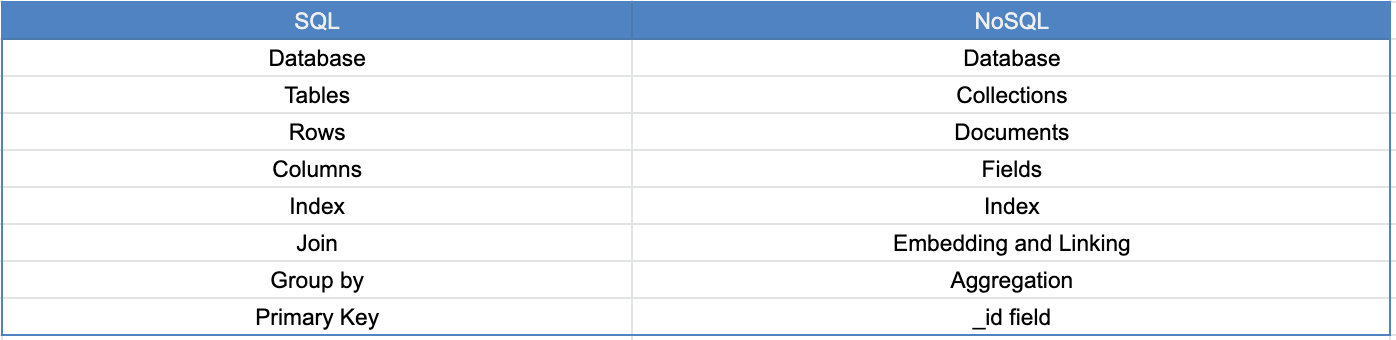
MongoDB เป็นฐานข้อมูล NoSQL โดย MongoDB จัดเก็บข้อมูลในรูปแบบเอกสาร JSON ซึ่งทำให้ MongoDB มีความยืดหยุ่นและขยายระบบได้ดี มาดูคำศัพท์ต่าง ๆ ของฐานข้อมูล SQL และ NoSQL กัน ตารางด้านล่างจะแสดงให้เห็นความแตกต่างระหว่าง SQL และ NoSQL
SQL เทียบกับ NoSQL
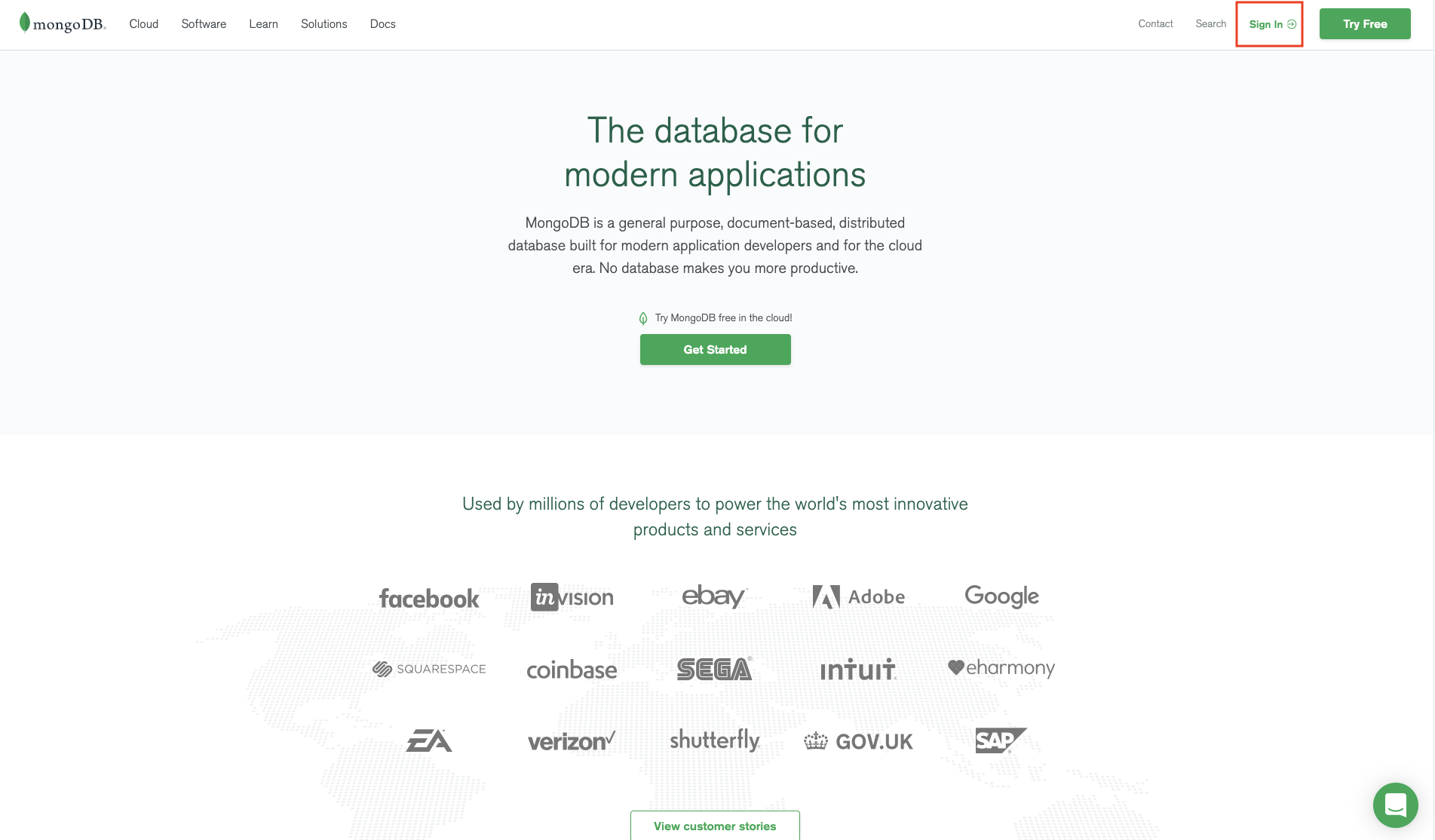
ในส่วนนี้เราจะมุ่งเน้นที่ฐานข้อมูล NoSQL อย่าง MongoDB สมัครใช้งาน mongoDB ได้ที่ mongodb.com โดยคลิกที่ปุ่ม sign in จากนั้นคลิก register ในหน้าถัดไป
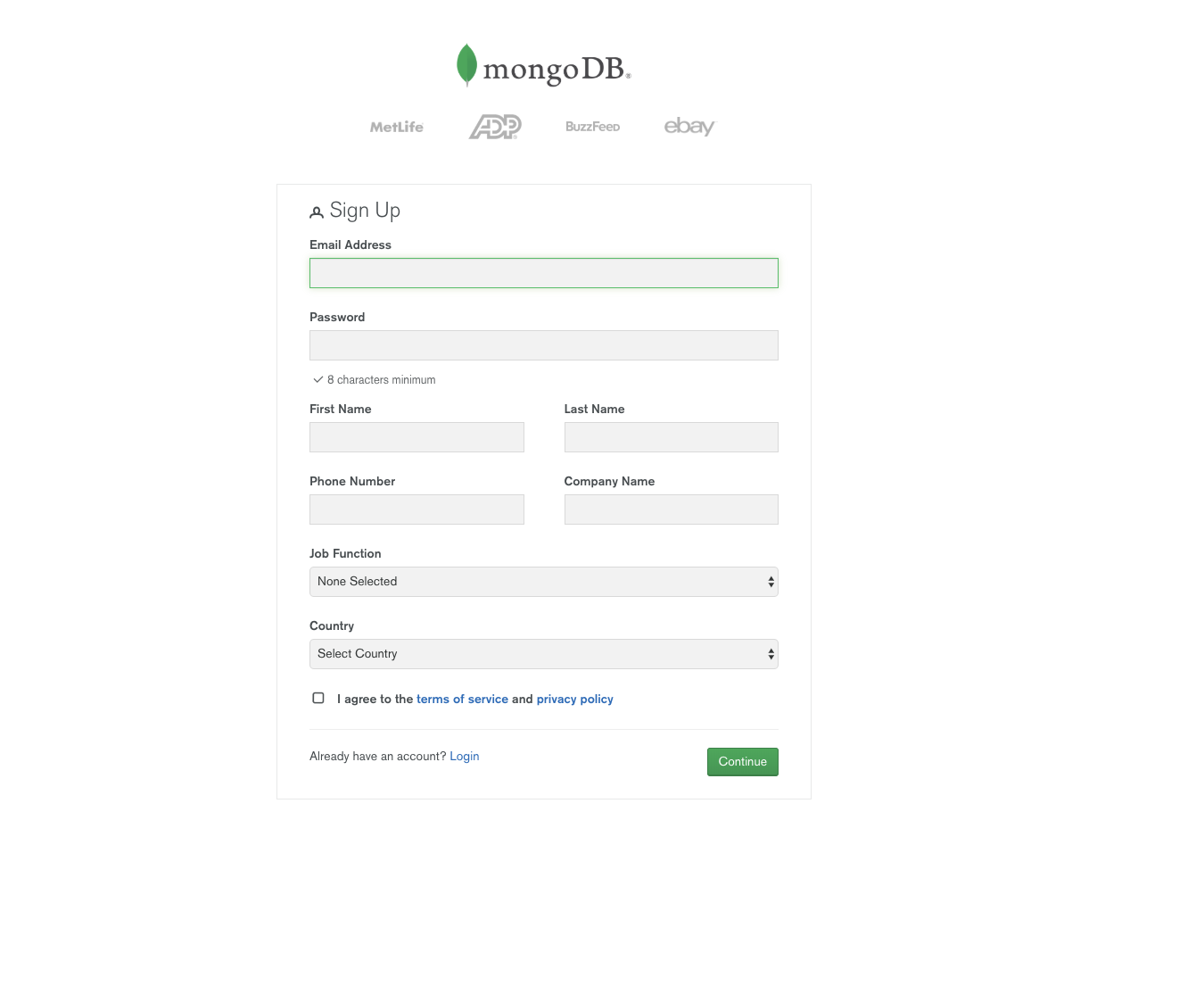
กรอกข้อมูลในช่องต่าง ๆ ให้ครบแล้วคลิก continue
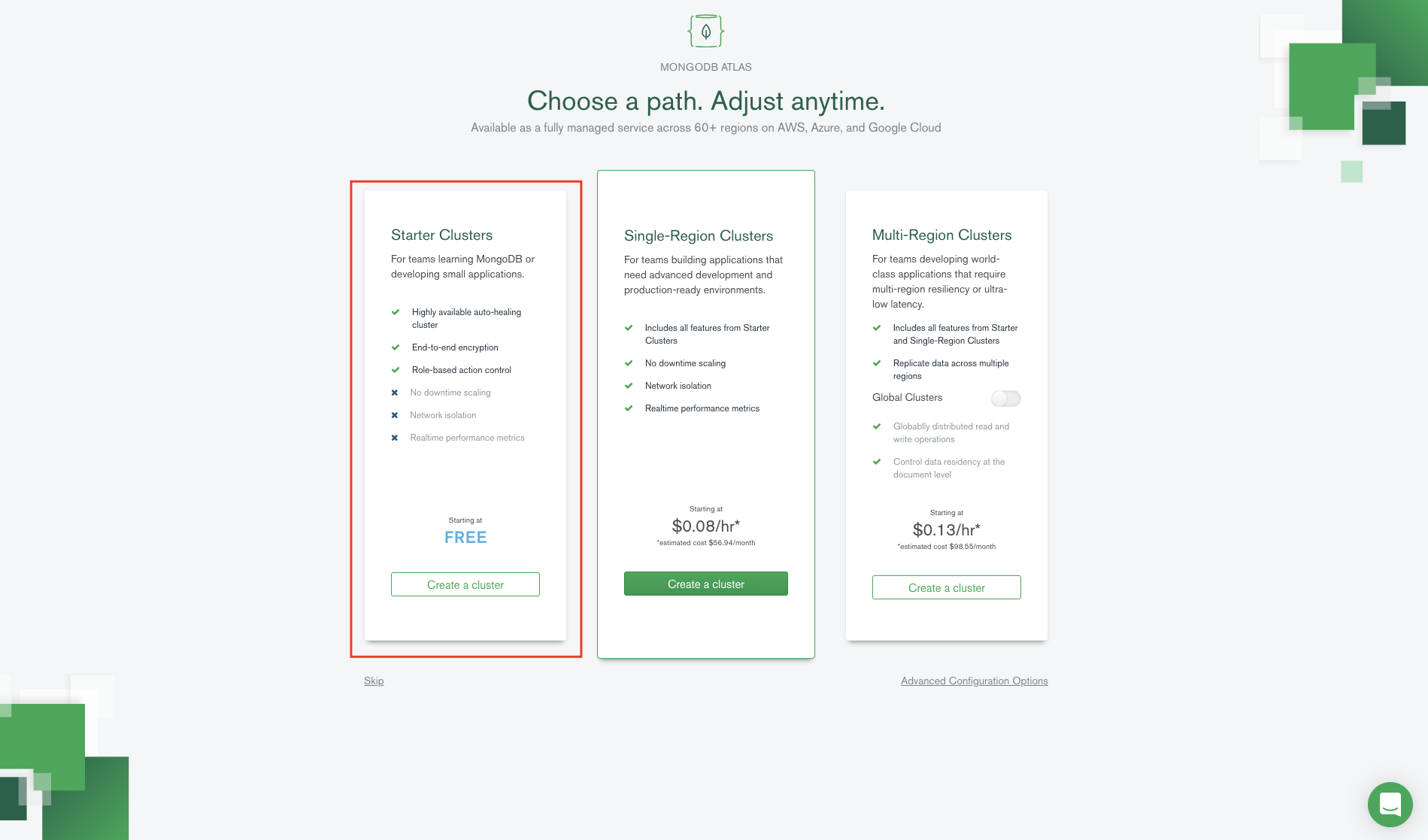
เลือกแผนฟรี
เลือก region ที่ใกล้เคียงที่สุดซึ่งให้บริการฟรี และตั้งชื่อ cluster ของคุณ
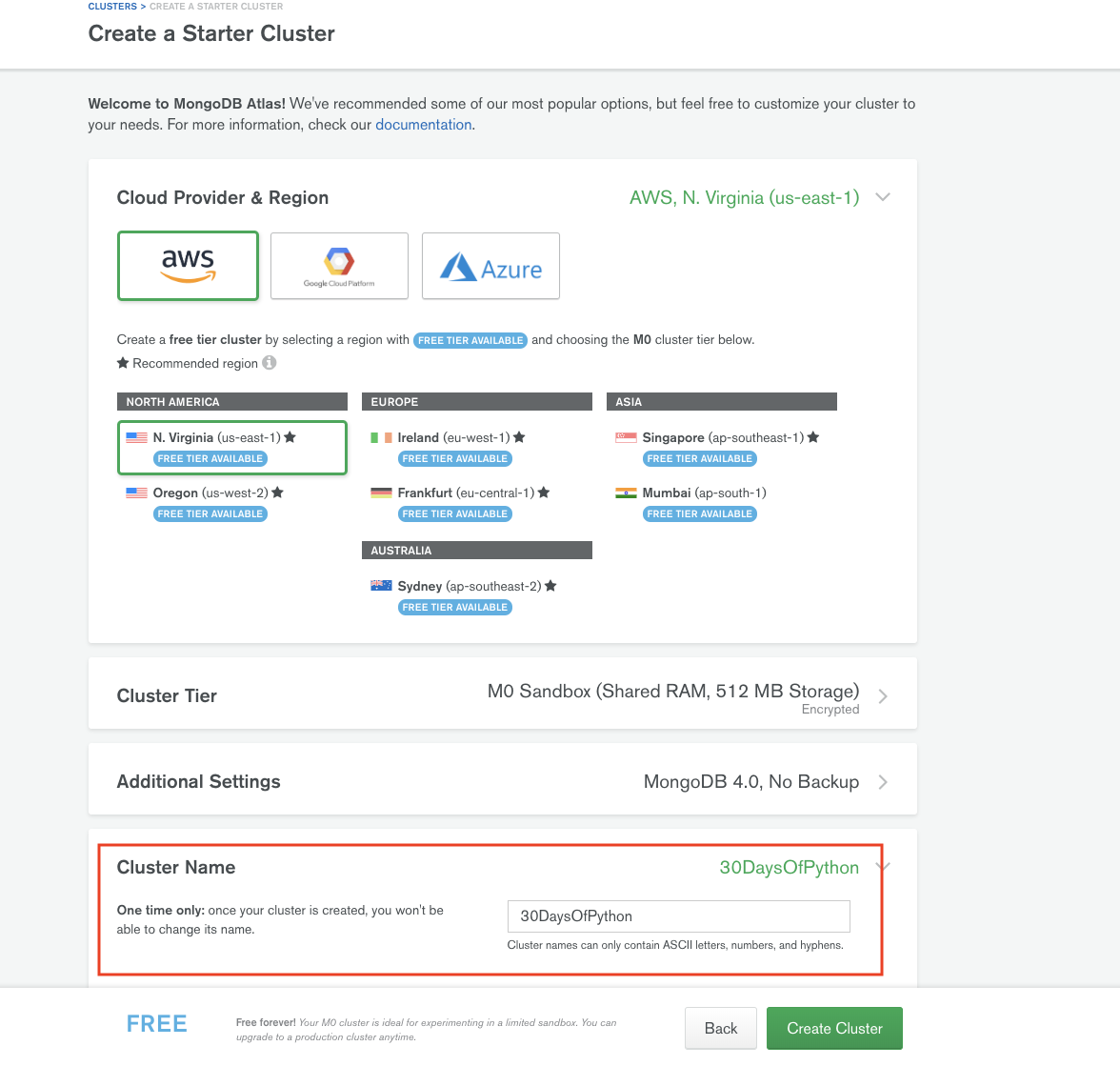
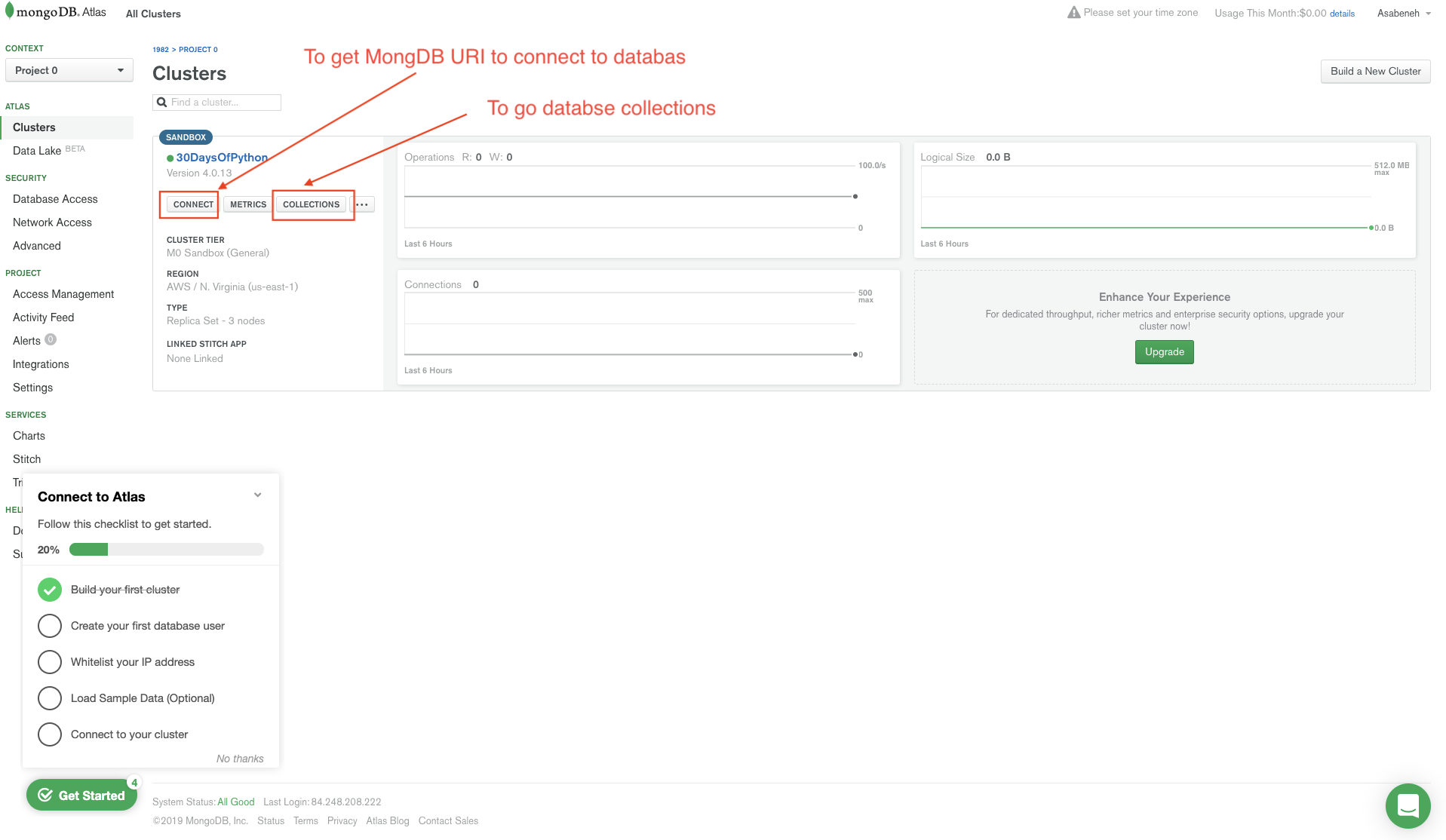
ตอนนี้ sandbox ฟรีของคุณถูกสร้างขึ้นแล้ว
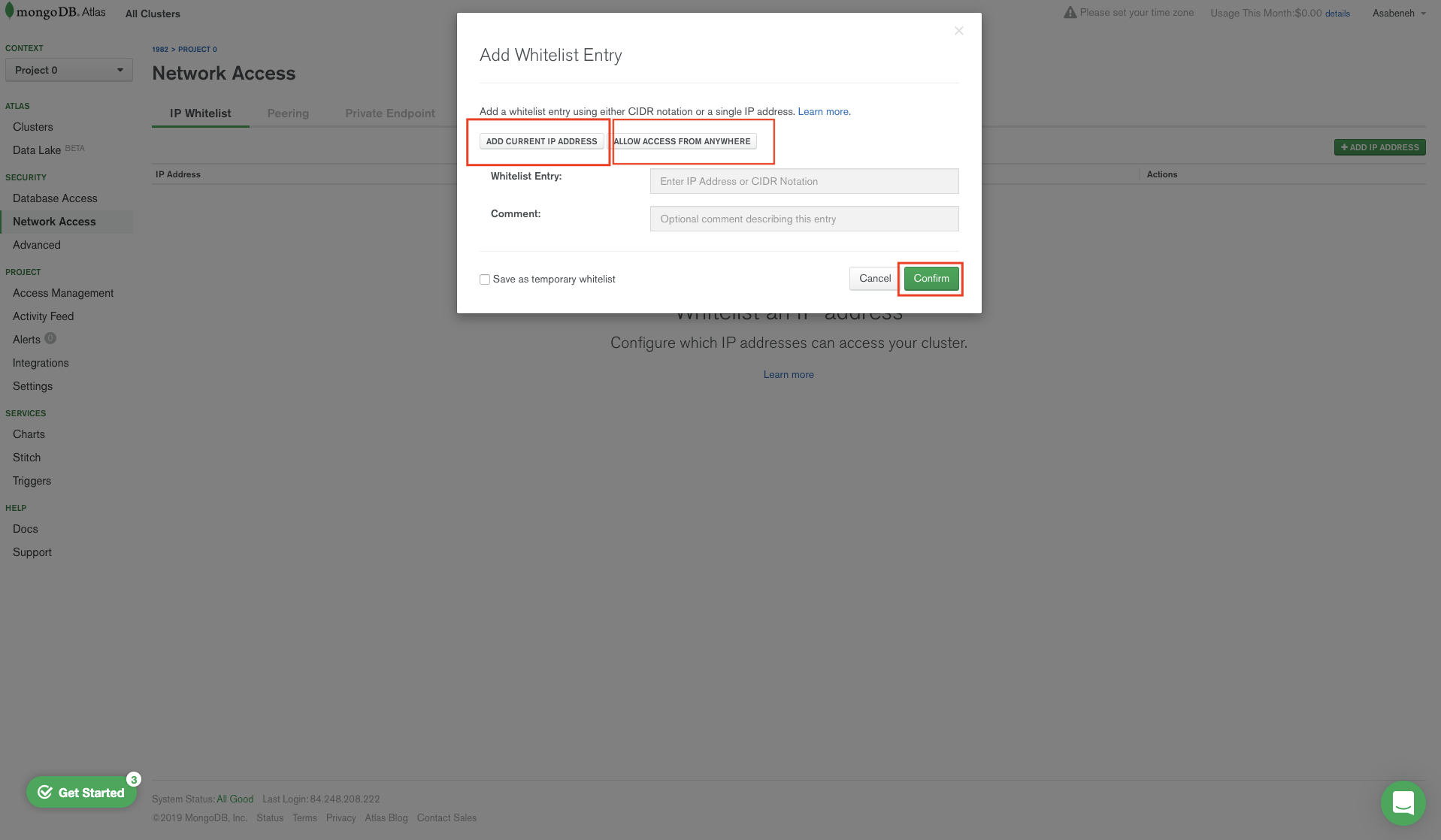
อนุญาตการเข้าถึงจาก localhost ทั้งหมด
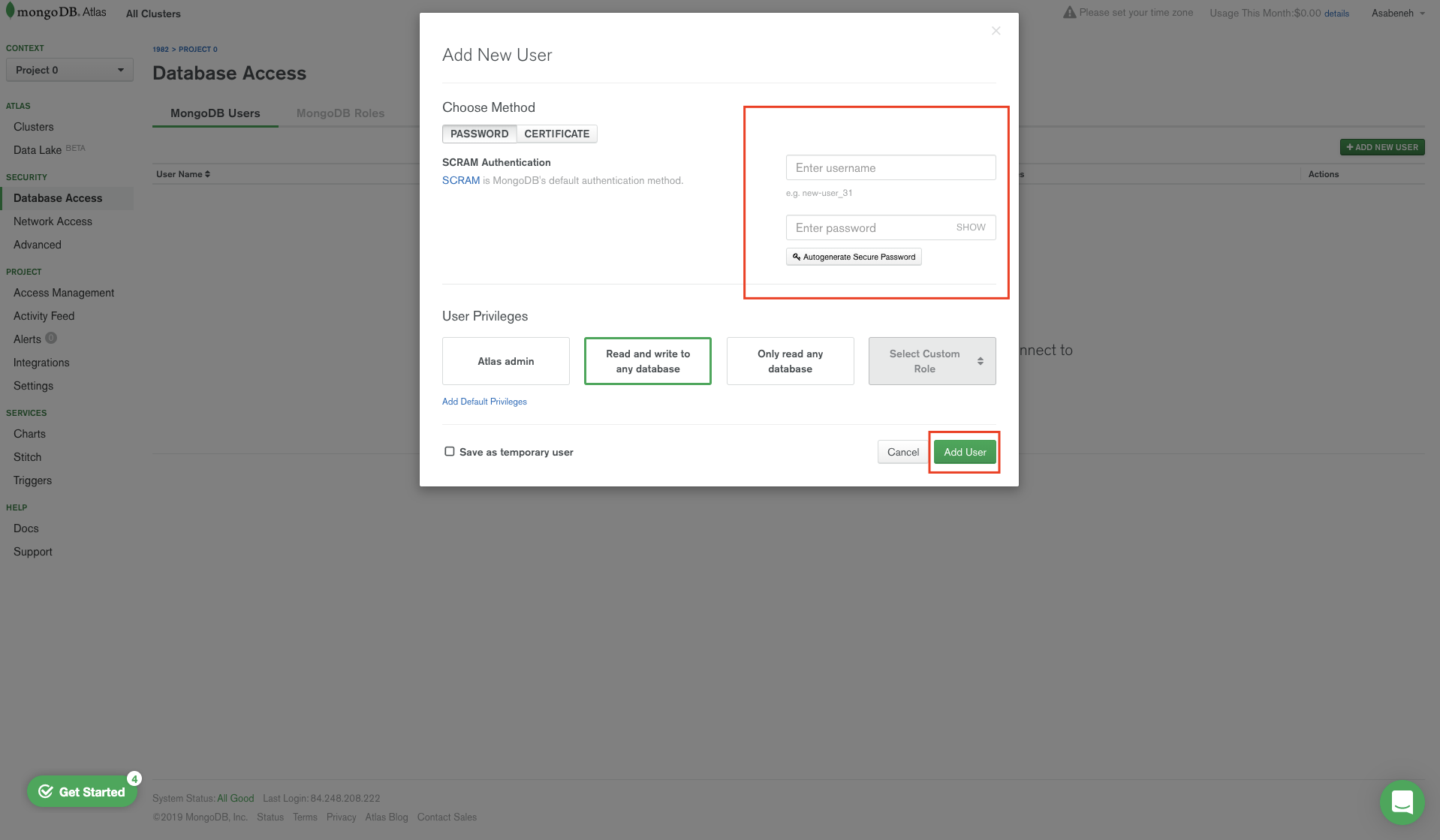
เพิ่ม user และ password
สร้าง mongoDB URI link
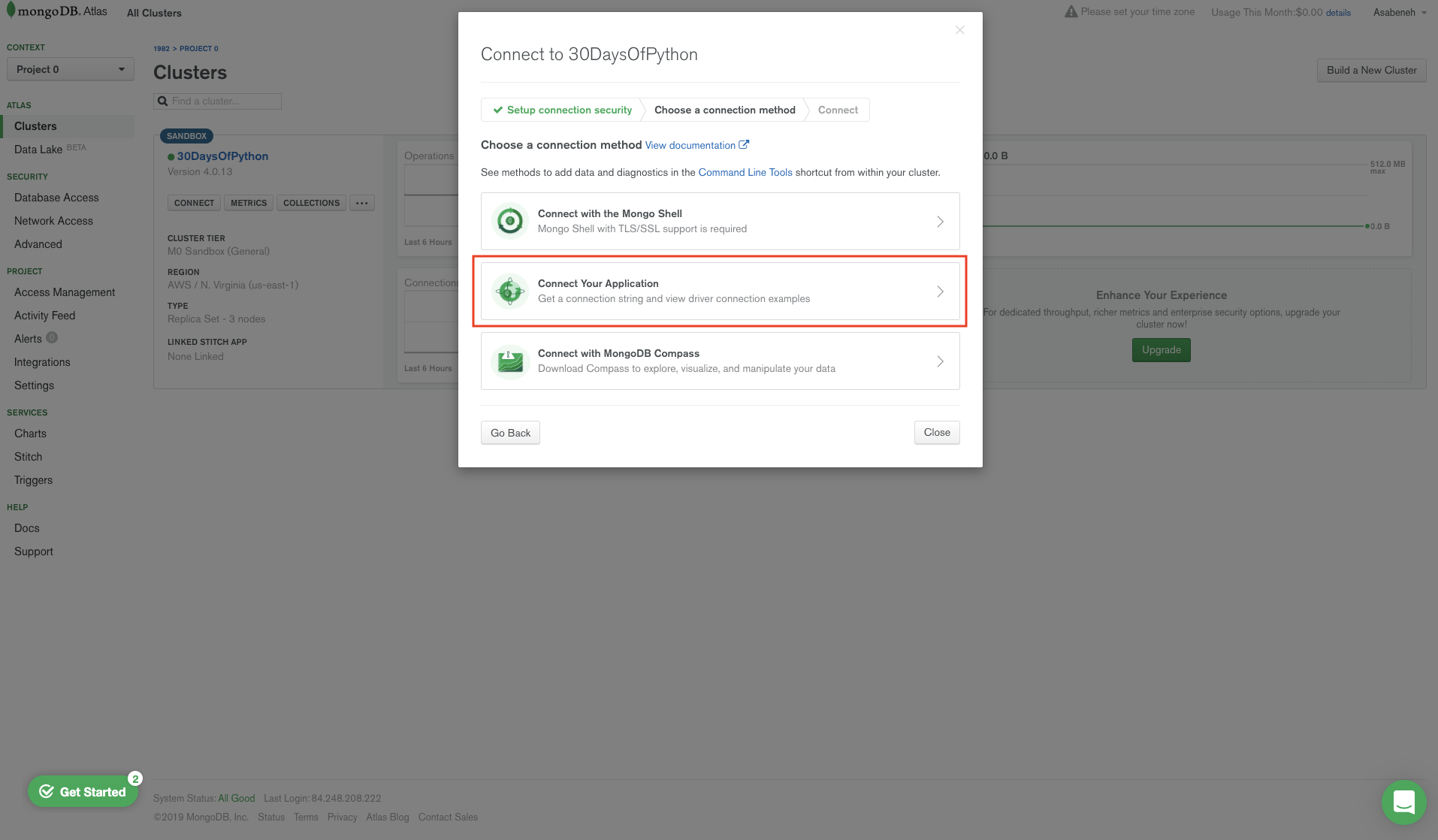
เลือก driver Python 3.6 หรือสูงกว่า
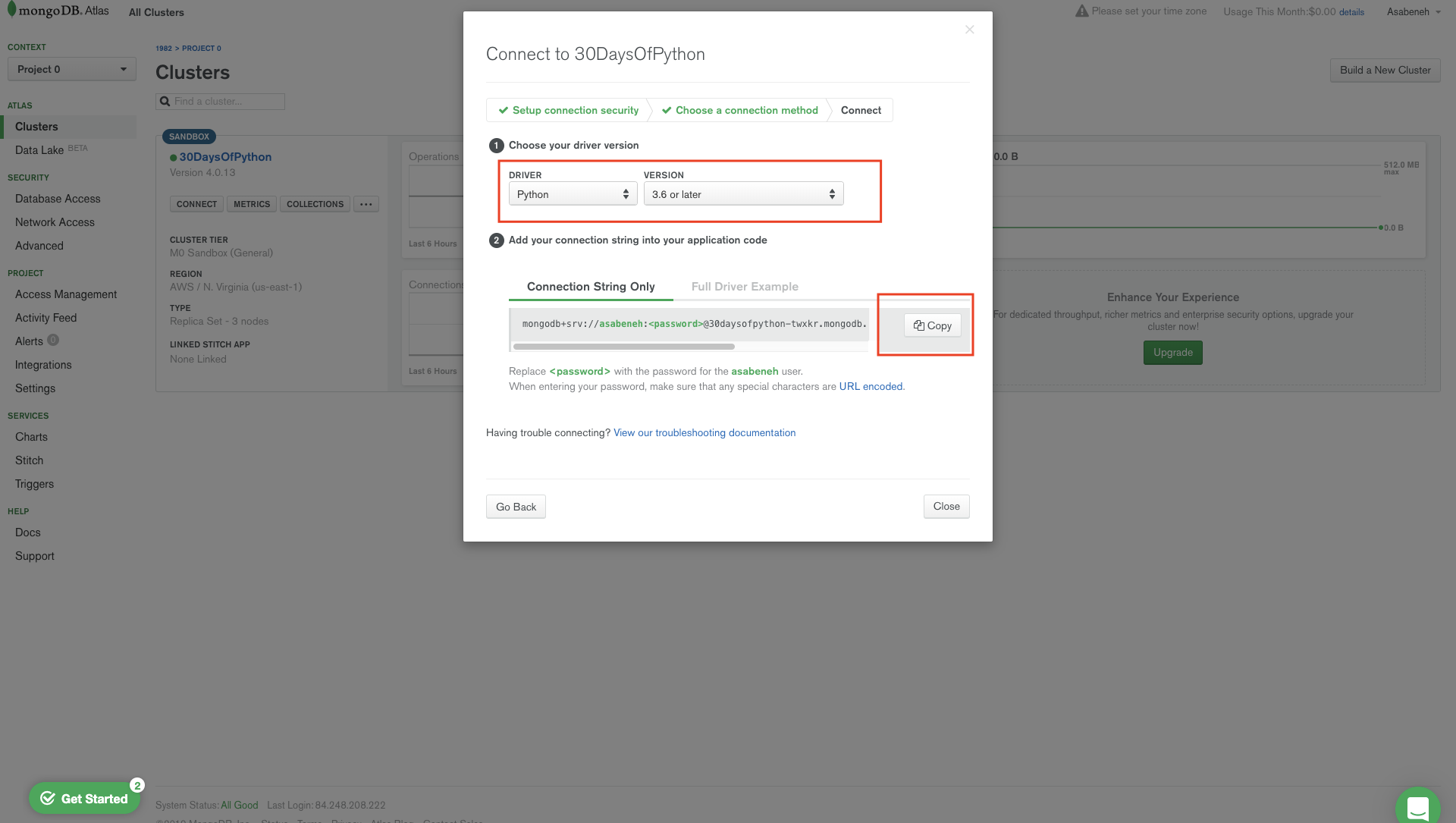
การรับ Connection String (MongoDB URI)
คัดลอก connection string link คุณจะได้รับข้อความประมาณนี้:
mongodb+srv://asabeneh:<password>@30daysofpython-twxkr.mongodb.net/test?retryWrites=true&w=majorityไม่ต้องกังวลเรื่อง URL นี้ มันเป็นแค่วิธีเชื่อมต่อแอปพลิเคชันของคุณกับ mongoDB ให้แทนที่ placeholder ของ password ด้วย password ที่คุณตั้งไว้ตอนเพิ่ม user
ตัวอย่าง:
mongodb+srv://asabeneh:123123123@30daysofpython-twxkr.mongodb.net/test?retryWrites=true&w=majorityตอนนี้ฉันแทนที่ทุกอย่างแล้ว โดย password คือ 123123 และชื่อของฐานข้อมูลคือ thirty_days_python นี่เป็นเพียงตัวอย่าง password ของคุณต้องแข็งแกร่งกว่านี้
Python ต้องการ mongoDB driver เพื่อเข้าถึงฐานข้อมูล mongoDB เราจะใช้ pymongo ร่วมกับ dnspython เพื่อเชื่อมต่อแอปพลิเคชันของเรากับ mongoDB ติดตั้ง pymongo และ dnspython ภายใน project directory ของคุณ
pip install pymongo dnspythonต้องติดตั้ง module "dnspython" เพื่อใช้ mongodb+srv:// URIs โดย dnspython เป็น DNS toolkit สำหรับ Python ซึ่งรองรับ record type แทบทุกประเภท
การเชื่อมต่อแอปพลิเคชัน Flask กับ MongoDB Cluster
# let's import the flask
from flask import Flask, render_template
import os # importing operating system module
MONGODB_URI = 'mongodb+srv://asabeneh:your_password_goes_here@30daysofpython-twxkr.mongodb.net/test?retryWrites=true&w=majority'
client = pymongo.MongoClient(MONGODB_URI)
print(client.list_database_names())

app = Flask(__name__)
if __name__ == '__main__':
    # for deployment we use the environ
    # to make it work for both production and development
    port = int(os.environ.get("PORT", 5000))
    app.run(debug=True, host='0.0.0.0', port=port)
เมื่อรันโค้ดข้างต้น เราจะได้ฐานข้อมูล mongoDB เริ่มต้น:
['admin', 'local']การสร้างฐานข้อมูลและ collection
มาสร้างฐานข้อมูลกัน database และ collection ใน mongoDB จะถูกสร้างขึ้นหากยังไม่มีอยู่ มาสร้างฐานข้อมูลชื่อ thirty_days_of_python และ collection ชื่อ students
วิธีสร้างฐานข้อมูล:
db = client.name_of_databse # we can create a database like this or the second way
db = client['name_of_database']# let's import the flask
from flask import Flask, render_template
import os # importing operating system module
MONGODB_URI = 'mongodb+srv://asabeneh:your_password_goes_here@30daysofpython-twxkr.mongodb.net/test?retryWrites=true&w=majority'
client = pymongo.MongoClient(MONGODB_URI)
# Creating database
db = client.thirty_days_of_python
# Creating students collection and inserting a document
db.students.insert_one({'name': 'Asabeneh', 'country': 'Finland', 'city': 'Helsinki', 'age': 250})
print(client.list_database_names())
app = Flask(__name__)
if __name__ == '__main__':
# for deployment we use the environ
# to make it work for both production and development
port = int(os.environ.get("PORT", 5000))
app.run(debug=True, host='0.0.0.0', port=port)หลังจากสร้างฐานข้อมูล เราได้สร้าง students collection ด้วย และใช้เมธอด insert_one() เพื่อ insert เอกสาร ตอนนี้ฐานข้อมูล thirty_days_of_python และ students collection ถูกสร้างขึ้นแล้ว และเอกสารถูก insert แล้ว ตรวจสอบ mongoDB cluster ของคุณ คุณจะเห็นทั้งฐานข้อมูลและ collection ภายใน collection จะมีเอกสารอยู่
['thirty_days_of_python', 'admin', 'local']ถ้าคุณเห็นสิ่งนี้บน mongoDB cluster แสดงว่าคุณสร้างฐานข้อมูลและ collection สำเร็จแล้ว
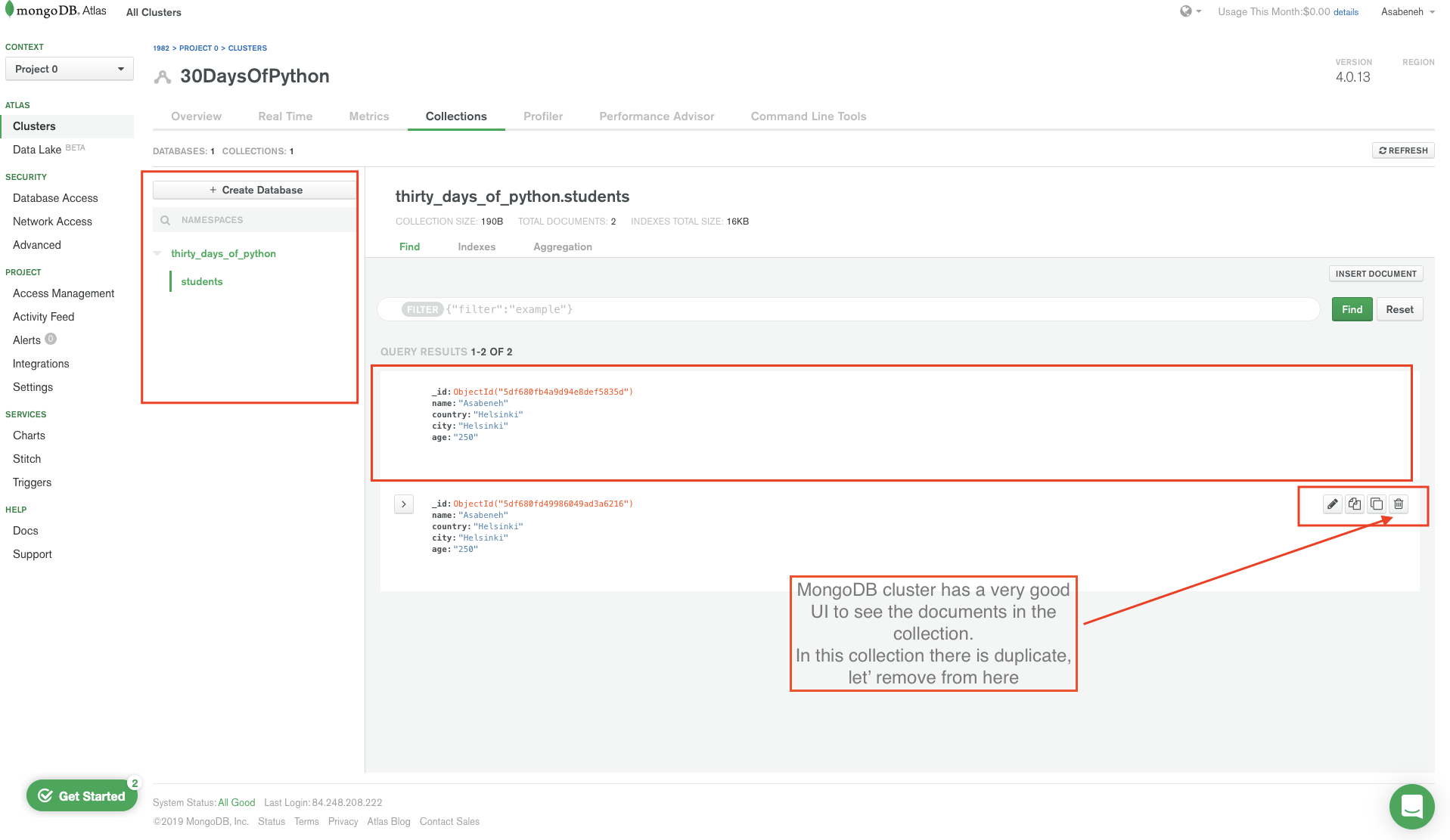
ถ้าคุณเห็นในรูป เอกสารถูกสร้างขึ้นพร้อม id ยาว ๆ ที่ทำหน้าที่เป็น primary key ทุกครั้งที่เราสร้างเอกสาร mongoDB จะสร้าง id เฉพาะให้
การ Insert เอกสารหลายรายการลงใน Collection
เมธอด insert_one() จะ insert ทีละหนึ่งรายการ ถ้าต้องการ insert เอกสารหลายรายการพร้อมกัน ให้ใช้เมธอด insert_many() หรือ for loop เราสามารถใช้ for loop เพื่อ insert เอกสารหลายรายการพร้อมกัน
# let's import the flask
from flask import Flask, render_template
import os # importing operating system module
MONGODB_URI = 'mongodb+srv://asabeneh:your_password_goes_here@30daysofpython-twxkr.mongodb.net/test?retryWrites=true&w=majority'
client = pymongo.MongoClient(MONGODB_URI)

students = [
        {'name':'David','country':'UK','city':'London','age':34},
        {'name':'John','country':'Sweden','city':'Stockholm','age':28},
        {'name':'Sami','country':'Finland','city':'Helsinki','age':25},
    ]
for student in students:
    db.students.insert_one(student)


app = Flask(__name__)
if __name__ == '__main__':
    # for deployment we use the environ
    # to make it work for both production and development
    port = int(os.environ.get("PORT", 5000))
    app.run(debug=True, host='0.0.0.0', port=port)
MongoDB Find
เมธอด find() และ findOne() เป็นเมธอดทั่วไปสำหรับค้นหาข้อมูลใน collection ของฐานข้อมูล mongoDB คล้ายกับคำสั่ง SELECT ใน MySQL มาใช้เมธอด find_one() เพื่อดึงเอกสารจาก collection ในฐานข้อมูลกัน
- find_one({"_id": ObjectId("id")}): ดึงรายการแรกที่พบ ถ้าไม่ระบุ id
# let's import the flask
from flask import Flask, render_template
import os # importing operating system module
MONGODB_URI = 'mongodb+srv://asabeneh:your_password_goes_here@30daysofpython-twxkr.mongodb.net/test?retryWrites=true&w=majority'
client = pymongo.MongoClient(MONGODB_URI)
db = client['thirty_days_of_python'] # accessing the database
student = db.students.find_one()
print(student)


app = Flask(__name__)
if __name__ == '__main__':
    # for deployment we use the environ
    # to make it work for both production and development
    port = int(os.environ.get("PORT", 5000))
app.run(debug=True, host='0.0.0.0', port=port){'_id': ObjectId('5df68a21f106fe2d315bbc8b'), 'name': 'Asabeneh', 'country': 'Helsinki', 'city': 'Helsinki', 'age': 250}Query ข้างต้นจะคืนค่ารายการแรก แต่เราสามารถระบุเอกสารเฉพาะโดยใช้ _id เฉพาะได้ ลองทำตัวอย่างหนึ่ง ใช้ id ของ David เพื่อดึง object ของ David: '_id':ObjectId('5df68a23f106fe2d315bbc8c')
# let's import the flask
from flask import Flask, render_template
import os # importing operating system module
from bson.objectid import ObjectId # id object
MONGODB_URI = 'mongodb+srv://asabeneh:your_password_goes_here@30daysofpython-twxkr.mongodb.net/test?retryWrites=true&w=majority'
client = pymongo.MongoClient(MONGODB_URI)
db = client['thirty_days_of_python'] # accessing the database
student = db.students.find_one({'_id':ObjectId('5df68a23f106fe2d315bbc8c')})
print(student)

app = Flask(__name__)
if __name__ == '__main__':
    # for deployment we use the environ
    # to make it work for both production and development
    port = int(os.environ.get("PORT", 5000))
app.run(debug=True, host='0.0.0.0', port=port){'_id': ObjectId('5df68a23f106fe2d315bbc8c'), 'name': 'David', 'country': 'UK', 'city': 'London', 'age': 34}เราได้เห็นวิธีใช้ find_one() จากตัวอย่างข้างต้นแล้ว มาต่อที่ find() กัน
- find(): คืนค่าทุก occurrence จาก collection ถ้าเราไม่ส่ง query object เข้าไป โดย object ที่ได้คือ pymongo.cursor object
# let's import the flask
from flask import Flask, render_template
import os # importing operating system module

MONGODB_URI = 'mongodb+srv://asabeneh:your_password_goes_here@30daysofpython-twxkr.mongodb.net/test?retryWrites=true&w=majority'
client = pymongo.MongoClient(MONGODB_URI)
db = client['thirty_days_of_python'] # accessing the database
students = db.students.find()
for student in students:
    print(student)

app = Flask(__name__)
if __name__ == '__main__':
    # for deployment we use the environ
    # to make it work for both production and development
    port = int(os.environ.get("PORT", 5000))
app.run(debug=True, host='0.0.0.0', port=port){'_id': ObjectId('5df68a21f106fe2d315bbc8b'), 'name': 'Asabeneh', 'country': 'Finland', 'city': 'Helsinki', 'age': 250}
{'_id': ObjectId('5df68a23f106fe2d315bbc8c'), 'name': 'David', 'country': 'UK', 'city': 'London', 'age': 34}
{'_id': ObjectId('5df68a23f106fe2d315bbc8d'), 'name': 'John', 'country': 'Sweden', 'city': 'Stockholm', 'age': 28}
{'_id': ObjectId('5df68a23f106fe2d315bbc8e'), 'name': 'Sami', 'country': 'Finland', 'city': 'Helsinki', 'age': 25}เราสามารถระบุ field ที่ต้องการแสดงได้โดยส่ง object ตัวที่สองใน find({}, {}) โดย 0 หมายถึงไม่แสดง และ 1 หมายถึงแสดง แต่เราไม่สามารถผสม 0 และ 1 ได้ ยกเว้น _id
# let's import the flask
from flask import Flask, render_template
import os # importing operating system module
MONGODB_URI = 'mongodb+srv://asabeneh:your_password_goes_here@30daysofpython-twxkr.mongodb.net/test?retryWrites=true&w=majority'
client = pymongo.MongoClient(MONGODB_URI)
db = client['thirty_days_of_python'] # accessing the database
students = db.students.find({}, {"_id":0, "name": 1, "country":1}) # 0 means not include and 1 means include
for student in students:
print(student)
app = Flask(__name__)
if __name__ == '__main__':
# for deployment we use the environ
# to make it work for both production and development
port = int(os.environ.get("PORT", 5000))
app.run(debug=True, host='0.0.0.0', port=port){'name': 'Asabeneh', 'country': 'Finland'}
{'name': 'David', 'country': 'UK'}
{'name': 'John', 'country': 'Sweden'}
{'name': 'Sami', 'country': 'Finland'}Find พร้อม Query
ใน mongoDB find รับ query object เราสามารถส่ง query object เพื่อกรองเอกสารที่ต้องการ
# let's import the flask
from flask import Flask, render_template
import os # importing operating system module
MONGODB_URI = 'mongodb+srv://asabeneh:your_password_goes_here@30daysofpython-twxkr.mongodb.net/test?retryWrites=true&w=majority'
client = pymongo.MongoClient(MONGODB_URI)
db = client['thirty_days_of_python'] # accessing the database
query = {
"country":"Finland"
}
students = db.students.find(query)
for student in students:
print(student)
app = Flask(__name__)
if __name__ == '__main__':
# for deployment we use the environ
# to make it work for both production and development
port = int(os.environ.get("PORT", 5000))
app.run(debug=True, host='0.0.0.0', port=port){'_id': ObjectId('5df68a21f106fe2d315bbc8b'), 'name': 'Asabeneh', 'country': 'Finland', 'city': 'Helsinki', 'age': 250}
{'_id': ObjectId('5df68a23f106fe2d315bbc8e'), 'name': 'Sami', 'country': 'Finland', 'city': 'Helsinki', 'age': 25}Query พร้อม modifiers
# let's import the flask
from flask import Flask, render_template
import os # importing operating system module
import pymongo
MONGODB_URI = 'mongodb+srv://asabeneh:your_password_goes_here@30daysofpython-twxkr.mongodb.net/test?retryWrites=true&w=majority'
client = pymongo.MongoClient(MONGODB_URI)
db = client['thirty_days_of_python'] # accessing the database
query = {
"city":"Helsinki"
}
students = db.students.find(query)
for student in students:
print(student)
app = Flask(__name__)
if __name__ == '__main__':
# for deployment we use the environ
# to make it work for both production and development
port = int(os.environ.get("PORT", 5000))
app.run(debug=True, host='0.0.0.0', port=port){'_id': ObjectId('5df68a21f106fe2d315bbc8b'), 'name': 'Asabeneh', 'country': 'Finland', 'city': 'Helsinki', 'age': 250}
{'_id': ObjectId('5df68a23f106fe2d315bbc8e'), 'name': 'Sami', 'country': 'Finland', 'city': 'Helsinki', 'age': 25}Find query พร้อม modifier
# let's import the flask
from flask import Flask, render_template
import os # importing operating system module
import pymongo
MONGODB_URI = 'mongodb+srv://asabeneh:your_password_goes_here@30daysofpython-twxkr.mongodb.net/test?retryWrites=true&w=majority'
client = pymongo.MongoClient(MONGODB_URI)
db = client['thirty_days_of_python'] # accessing the database
query = {
"country":"Finland",
"city":"Helsinki"
}
students = db.students.find(query)
for student in students:
print(student)
app = Flask(__name__)
if __name__ == '__main__':
# for deployment we use the environ
# to make it work for both production and development
port = int(os.environ.get("PORT", 5000))
app.run(debug=True, host='0.0.0.0', port=port){'_id': ObjectId('5df68a21f106fe2d315bbc8b'), 'name': 'Asabeneh', 'country': 'Finland', 'city': 'Helsinki', 'age': 250}
{'_id': ObjectId('5df68a23f106fe2d315bbc8e'), 'name': 'Sami', 'country': 'Finland', 'city': 'Helsinki', 'age': 25}Query พร้อม modifiers
# let's import the flask
from flask import Flask, render_template
import os # importing operating system module
import pymongo
MONGODB_URI = 'mongodb+srv://asabeneh:your_password_goes_here@30daysofpython-twxkr.mongodb.net/test?retryWrites=true&w=majority'
client = pymongo.MongoClient(MONGODB_URI)
db = client['thirty_days_of_python'] # accessing the database
query = {"age":{"$gt":30}}
students = db.students.find(query)
for student in students:
print(student)
app = Flask(__name__)
if __name__ == '__main__':
# for deployment we use the environ
# to make it work for both production and development
port = int(os.environ.get("PORT", 5000))
app.run(debug=True, host='0.0.0.0', port=port){'_id': ObjectId('5df68a21f106fe2d315bbc8b'), 'name': 'Asabeneh', 'country': 'Finland', 'city': 'Helsinki', 'age': 250}
{'_id': ObjectId('5df68a23f106fe2d315bbc8c'), 'name': 'David', 'country': 'UK', 'city': 'London', 'age': 34}# let's import the flask
from flask import Flask, render_template
import os # importing operating system module
import pymongo
MONGODB_URI = 'mongodb+srv://asabeneh:your_password_goes_here@30daysofpython-twxkr.mongodb.net/test?retryWrites=true&w=majority'
client = pymongo.MongoClient(MONGODB_URI)
db = client['thirty_days_of_python'] # accessing the database
query = {"age":{"$gt":30}}
students = db.students.find(query)
for student in students:
print(student){'_id': ObjectId('5df68a23f106fe2d315bbc8d'), 'name': 'John', 'country': 'Sweden', 'city': 'Stockholm', 'age': 28}
{'_id': ObjectId('5df68a23f106fe2d315bbc8e'), 'name': 'Sami', 'country': 'Finland', 'city': 'Helsinki', 'age': 25}การจำกัดจำนวนเอกสาร
เราสามารถจำกัดจำนวนเอกสารที่คืนค่าได้โดยใช้เมธอด limit()
# let's import the flask
from flask import Flask, render_template
import os # importing operating system module
import pymongo
MONGODB_URI = 'mongodb+srv://asabeneh:your_password_goes_here@30daysofpython-twxkr.mongodb.net/test?retryWrites=true&w=majority'
client = pymongo.MongoClient(MONGODB_URI)
db = client['thirty_days_of_python'] # accessing the database
db.students.find().limit(3)Find พร้อมการเรียงลำดับ
ค่าเริ่มต้น sort จะเรียงจากน้อยไปมาก (ascending order) เราสามารถเปลี่ยนการเรียงเป็น descending order ได้โดยเพิ่ม parameter -1
# let's import the flask
from flask import Flask, render_template
import os # importing operating system module
import pymongo
MONGODB_URI = 'mongodb+srv://asabeneh:your_password_goes_here@30daysofpython-twxkr.mongodb.net/test?retryWrites=true&w=majority'
client = pymongo.MongoClient(MONGODB_URI)
db = client['thirty_days_of_python'] # accessing the database
students = db.students.find().sort('name')
for student in students:
print(student)
students = db.students.find().sort('name',-1)
for student in students:
print(student)
students = db.students.find().sort('age')
for student in students:
print(student)
students = db.students.find().sort('age',-1)
for student in students:
print(student)
app = Flask(__name__)
if __name__ == '__main__':
# for deployment we use the environ
# to make it work for both production and development
port = int(os.environ.get("PORT", 5000))
app.run(debug=True, host='0.0.0.0', port=port)เรียงจากน้อยไปมาก (Ascending order)
{'_id': ObjectId('5df68a21f106fe2d315bbc8b'), 'name': 'Asabeneh', 'country': 'Finland', 'city': 'Helsinki', 'age': 250}
{'_id': ObjectId('5df68a23f106fe2d315bbc8c'), 'name': 'David', 'country': 'UK', 'city': 'London', 'age': 34}
{'_id': ObjectId('5df68a23f106fe2d315bbc8d'), 'name': 'John', 'country': 'Sweden', 'city': 'Stockholm', 'age': 28}
{'_id': ObjectId('5df68a23f106fe2d315bbc8e'), 'name': 'Sami', 'country': 'Finland', 'city': 'Helsinki', 'age': 25}เรียงจากมากไปน้อย (Descending order)
{'_id': ObjectId('5df68a23f106fe2d315bbc8e'), 'name': 'Sami', 'country': 'Finland', 'city': 'Helsinki', 'age': 25}
{'_id': ObjectId('5df68a23f106fe2d315bbc8d'), 'name': 'John', 'country': 'Sweden', 'city': 'Stockholm', 'age': 28}
{'_id': ObjectId('5df68a23f106fe2d315bbc8c'), 'name': 'David', 'country': 'UK', 'city': 'London', 'age': 34}
{'_id': ObjectId('5df68a21f106fe2d315bbc8b'), 'name': 'Asabeneh', 'country': 'Finland', 'city': 'Helsinki', 'age': 250}การอัปเดตด้วย Query
เราจะใช้เมธอด update_one() เพื่ออัปเดตหนึ่งรายการ โดยรับ object สองตัว ตัวแรกคือ query และตัวที่สองคือ object ใหม่ บุคคลแรก Asabeneh มีอายุที่ไม่สมเหตุสมผลมาก มาอัปเดตอายุของ Asabeneh กัน
# let's import the flask
from flask import Flask, render_template
import os # importing operating system module
import pymongo
MONGODB_URI = 'mongodb+srv://asabeneh:your_password_goes_here@30daysofpython-twxkr.mongodb.net/test?retryWrites=true&w=majority'
client = pymongo.MongoClient(MONGODB_URI)
db = client['thirty_days_of_python'] # accessing the database
query = {'age':250}
new_value = {'$set':{'age':38}}
db.students.update_one(query, new_value)
# lets check the result if the age is modified
for student in db.students.find():
print(student)
app = Flask(__name__)
if __name__ == '__main__':
# for deployment we use the environ
# to make it work for both production and development
port = int(os.environ.get("PORT", 5000))
app.run(debug=True, host='0.0.0.0', port=port){'_id': ObjectId('5df68a21f106fe2d315bbc8b'), 'name': 'Asabeneh', 'country': 'Finland', 'city': 'Helsinki', 'age': 38}
{'_id': ObjectId('5df68a23f106fe2d315bbc8c'), 'name': 'David', 'country': 'UK', 'city': 'London', 'age': 34}
{'_id': ObjectId('5df68a23f106fe2d315bbc8d'), 'name': 'John', 'country': 'Sweden', 'city': 'Stockholm', 'age': 28}
{'_id': ObjectId('5df68a23f106fe2d315bbc8e'), 'name': 'Sami', 'country': 'Finland', 'city': 'Helsinki', 'age': 25}เมื่อต้องการอัปเดตเอกสารหลายรายการพร้อมกัน ให้ใช้เมธอด update_many()
การลบเอกสาร
เมธอด delete_one() จะลบหนึ่งเอกสาร โดยรับ query object เป็น parameter และจะลบแค่รายการแรกที่พบเท่านั้น มาลบ John ออกจาก collection กัน
# let's import the flask
from flask import Flask, render_template
import os # importing operating system module
import pymongo

MONGODB_URI = 'mongodb+srv://asabeneh:your_password_goes_here@30daysofpython-twxkr.mongodb.net/test?retryWrites=true&w=majority'
client = pymongo.MongoClient(MONGODB_URI)
db = client['thirty_days_of_python'] # accessing the database

query = {'name':'John'}
db.students.delete_one(query)

for student in db.students.find():
    print(student)
# lets check the result if the age is modified
for student in db.students.find():
    print(student)


app = Flask(__name__)
if __name__ == '__main__':
    # for deployment we use the environ
    # to make it work for both production and development
    port = int(os.environ.get("PORT", 5000))
app.run(debug=True, host='0.0.0.0', port=port){'_id': ObjectId('5df68a21f106fe2d315bbc8b'), 'name': 'Asabeneh', 'country': 'Finland', 'city': 'Helsinki', 'age': 38}
{'_id': ObjectId('5df68a23f106fe2d315bbc8c'), 'name': 'David', 'country': 'UK', 'city': 'London', 'age': 34}
{'_id': ObjectId('5df68a23f106fe2d315bbc8e'), 'name': 'Sami', 'country': 'Finland', 'city': 'Helsinki', 'age': 25}จะเห็นว่า John ถูกลบออกจาก collection แล้ว
เมื่อต้องการลบเอกสารหลายรายการ ให้ใช้เมธอด delete_many() โดยรับ query object ถ้าเราส่ง query object เปล่า delete_many({}) จะลบเอกสารทั้งหมดใน collection
การ Drop Collection
ใช้เมธอด drop() เพื่อลบ collection ออกจากฐานข้อมูล
# let's import the flask
from flask import Flask, render_template
import os # importing operating system module
import pymongo

MONGODB_URI = 'mongodb+srv://asabeneh:your_password_goes_here@30daysofpython-twxkr.mongodb.net/test?retryWrites=true&w=majority'
client = pymongo.MongoClient(MONGODB_URI)
db = client['thirty_days_of_python'] # accessing the database
db.students.drop()
ตอนนี้เราได้ลบ students collection ออกจากฐานข้อมูลแล้ว
แบบฝึกหัด: วันที่ 27
คุณทำแบบฝึกหัดวันที่ 27 เสร็จแล้ว — ขอแสดงความยินดี!