On this page
วันที่ 6 — ทูเพิล (Tuples)
เรียนรู้ Tuple ใน Python — โครงสร้างข้อมูลที่มีลำดับและเปลี่ยนแปลงไม่ได้ (immutable)
ทูเพิล (Tuples)
Tuple คือ collection ของชนิดข้อมูลต่าง ๆ ที่มีลำดับและเปลี่ยนแปลงไม่ได้ (ordered and unchangeable/immutable) Tuple เขียนด้วยวงเล็บกลม () เมื่อสร้าง tuple แล้วเราไม่สามารถเปลี่ยนค่าได้ ไม่สามารถใช้ add, insert, remove methods ได้เหมือน list เพราะ tuple ไม่ใช่ mutable Tuple มี methods น้อยกว่า list methods ที่เกี่ยวข้องกับ tuple:
- count: นับจำนวนสมาชิกที่ระบุใน tuple
- index: หา index ของสมาชิกที่ระบุใน tuple
- + operator: ใช้ต่อ tuple สองตัวหรือมากกว่าเข้าด้วยกันเพื่อสร้าง tuple ใหม่
การสร้าง Tuple
สร้าง empty tuple:
# syntax
empty_tuple = ()
# หรือใช้ tuple constructor
empty_tuple = tuple()
สร้าง tuple ที่มีค่าเริ่มต้น:
# syntax
tpl = ('item1', 'item2','item3')
fruits = ('banana', 'orange', 'mango', 'lemon')
ความยาวของ Tuple
ใช้ len() เพื่อหาความยาวของ tuple:
tpl = ('item1', 'item2', 'item3')
len(tpl)
การเข้าถึงสมาชิกใน Tuple
Positive Indexing: เช่นเดียวกับ list การนับเริ่มจาก 0
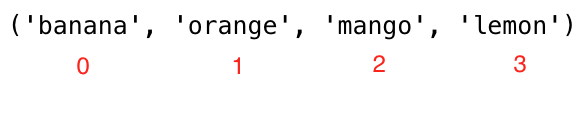
tpl = ('item1', 'item2', 'item3')
first_item = tpl[0]
second_item = tpl[1]
fruits = ('banana', 'orange', 'mango', 'lemon')
first_fruit  = fruits[0]
second_fruit = fruits[1]
last_index   = len(fruits) - 1
last_fruit   = fruits[last_index]
Negative Indexing: นับจากท้าย โดย -1 คือสมาชิกตัวสุดท้าย

tpl = ('item1', 'item2', 'item3','item4')
first_item   = tpl[-4]
second_item  = tpl[-3]
fruits = ('banana', 'orange', 'mango', 'lemon')
first_fruit  = fruits[-4]
second_fruit = fruits[-3]
last_fruit   = fruits[-1]
การตัด Tuple (Slicing)
Range of Positive Indexes:
tpl = ('item1', 'item2', 'item3','item4')
all_items         = tpl[0:4]
all_items         = tpl[0:]
middle_two_items  = tpl[1:3]
fruits = ('banana', 'orange', 'mango', 'lemon')
all_fruits        = fruits[0:4]
all_fruits        = fruits[0:]
orange_mango      = fruits[1:3]
orange_to_the_rest = fruits[1:]
Range of Negative Indexes:
tpl = ('item1', 'item2', 'item3','item4')
all_items        = tpl[-4:]
middle_two_items = tpl[-3:-1]
fruits = ('banana', 'orange', 'mango', 'lemon')
all_fruits   = fruits[-4:]
orange_mango = fruits[-3:-1]
orange_to_the_rest = fruits[-3:]
การแปลง Tuple เป็น List
เนื่องจาก tuple ไม่สามารถแก้ไขได้โดยตรง เราสามารถแปลงเป็น list แก้ไข แล้วแปลงกลับเป็น tuple:
tpl = ('item1', 'item2', 'item3','item4')
lst = list(tpl)
fruits = ('banana', 'orange', 'mango', 'lemon')
fruits = list(fruits)
fruits[0] = 'apple'
print(fruits)     # ['apple', 'orange', 'mango', 'lemon']
fruits = tuple(fruits)
print(fruits)     # ('apple', 'orange', 'mango', 'lemon')
การเช็คสมาชิกใน Tuple
ใช้ตัวดำเนินการ in เพื่อตรวจสอบว่าสมาชิกมีอยู่ใน tuple หรือไม่:
tpl = ('item1', 'item2', 'item3','item4')
'item2' in tpl    # True
fruits = ('banana', 'orange', 'mango', 'lemon')
print('orange' in fruits) # True
print('apple' in fruits)  # False
fruits[0] = 'apple'       # TypeError: 'tuple' object does not support item assignment
การต่อ Tuple
ใช้ + เพื่อต่อ tuple หลายตัวเข้าด้วยกัน:
tpl1 = ('item1', 'item2', 'item3')
tpl2 = ('item4', 'item5','item6')
tpl3 = tpl1 + tpl2
fruits = ('banana', 'orange', 'mango', 'lemon')
vegetables = ('Tomato', 'Potato', 'Cabbage','Onion', 'Carrot')
fruits_and_vegetables = fruits + vegetables
การลบ Tuple
ไม่สามารถลบสมาชิกแต่ละตัวออกจาก tuple ได้ แต่สามารถลบ tuple ทั้งก้อนด้วย del:
tpl1 = ('item1', 'item2', 'item3')
del tpl1
fruits = ('banana', 'orange', 'mango', 'lemon')
del fruits
💻 แบบฝึกหัด — วันที่ 6
ระดับ 1
- สร้าง empty tuple
- สร้าง tuple ที่มีชื่อพี่น้องของคุณ (ถ้าไม่มีก็จินตนาการได้)
- Join brothers และ sisters tuples แล้วเก็บในตัวแปร siblings
- คุณมีพี่น้องกี่คน?
- Modify the siblings tuple โดยเพิ่มชื่อพ่อและแม่แล้วเก็บในตัวแปร family_members
ระดับ 2
- Unpack siblings และ parents จาก family_members
- สร้าง fruits, vegetables และ animal products tuples แล้ว join ทั้งสามเก็บในตัวแปร food_stuff_tp
- แปลง food_stuff_tp tuple เป็น food_stuff_lt list
- Slice out สมาชิกตรงกลางจาก food_stuff_tp tuple หรือ food_stuff_lt list
- Slice out สามตัวแรกและสามตัวท้ายจาก food_stuff_lt list
- ลบ food_stuff_tp tuple ทิ้งทั้งหมด
- เช็คว่าสมาชิกมีอยู่ใน tuple หรือไม่:
- เช็คว่า 'Estonia' เป็นประเทศ nordic หรือไม่
- เช็คว่า 'Iceland' เป็นประเทศ nordic หรือไม่
nordic_countries = ('Denmark', 'Finland','Iceland', 'Norway', 'Sweden')