On this page
- Regular Expressions
- re Module
- Methods ใน re Module
- re.match()
- re.search()
- re.findall()
- re.sub()
- re.split()
- Writing RegEx Patterns
- Square Bracket
- Escape character(\) in RegEx
- One or more times(+)
- Period(.)
- Zero or more times(*)
- Zero or one time(?)
- Quantifier in RegEx
- Cart ^
- 💻 แบบฝึกหัด — วันที่ 18
- ระดับ 1
- ระดับ 2
- ระดับ 3
วันที่ 18 — Regular Expressions
เรียนรู้ Regular Expressions ใน Python ด้วย re module สำหรับค้นหาและจัดการ pattern ใน string
Regular Expressions
Regular expression หรือ RegEx คือ string ชนิดพิเศษที่ช่วยค้นหา pattern ใน data เขียนด้วย built-in module ชื่อ re ใน Python
เมื่อ pattern พบใน string จะ return match object แต่ถ้าไม่พบจะ return None
re Module
หลังจาก import module เราสามารถใช้ได้ดังนี้:
import reMethods ใน re Module
re module มี methods หลายตัว โดยทั่วไปใช้ match, search, findall, finditer, sub และ split
re.match()
ค้นหา pattern ที่ตำแหน่งแรกสุดของ string เท่านั้น:
import re
txt = 'I love to teach python and javaScript'
# It returns an object with span, and match
match = re.match('I love to teach', txt, re.I)
print(match)  # <re.Match object; span=(0, 15), match='I love to teach'>
# We can get the starting and ending position of the match as tuple using span
span = match.span()
print(span)     # (0, 15)
# Lets find the start and stop position from the span
start, end = span
print(start, end)  # 0, 15
substring = txt[start:end]
print(substring)       # I love to teach
re.search()
ค้นหา pattern ตำแหน่งแรกที่พบทั่วทั้ง string:
import re
txt = '''Love is the most beautiful thing in the world.
This world is full of love.
Love is the only genuine feeling that can make the world a better place.'''
match = re.search('This world', txt, re.I)
print(match)  # <re.Match object; span=(47, 57), match='This world'>
span = match.span()
start, end = span
substring = txt[start:end]
print(substring)  # This world
re.findall()
คืนค่า list ของ matches ทั้งหมด:
import re
txt = '''Love is the most beautiful thing in the world.
This world is full of love.
Love is the only genuine feeling that can make the world a better place.'''
matches = re.findall('love', txt, re.I)
print(matches)  # ['Love', 'love', 'Love']
re.sub()
แทนที่ substring หนึ่งหรือหลายตัวด้วย string ใหม่:
import re
txt = '''Love is the most beautiful thing in the world.
This world is full of love.
Love is the only genuine feeling that can make the world a better place.'''
match_replaced = re.sub('Love', 'Like', txt, re.I)
print(match_replaced)
re.split()
แบ่ง string ตาม pattern:
import re
txt = '''I am teacher and  I love teaching.
There is nothing as fulfilling as educating and empowering people.
I found teaching is the best way to transform people.'''
print(re.split('\n', txt)) # splitting using \n - end of line symbol
Writing RegEx Patterns
ตัวอักษรพิเศษ (meta-characters) ที่ใช้ใน regex:
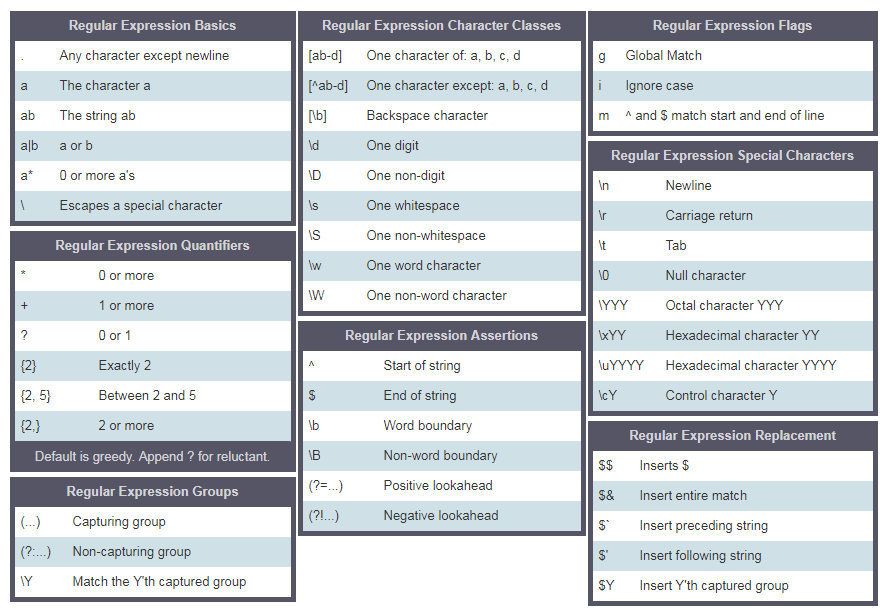
Square Bracket
ใช้ square bracket เพื่อระบุกลุ่มตัวอักษร เช่น [Aa] หมายถึง A หรือ a:
regex_pattern = r'[Aa]pple' # this square bracket mean either A or a
txt = 'Apple and banana are fruits. An old cliche says an apple a day a doctor way has been replaced by a banana a day keeps the doctor far far away.'
matches = re.findall(regex_pattern, txt)
print(matches)  # ['Apple', 'apple']

regex_pattern = r'[Aa]pple|[Bb]anana' # this square bracket means either A or a
txt = 'Apple and banana are fruits. An old cliche says an apple a day a doctor way has been replaced by a banana a day keeps the doctor far far away.'
matches = re.findall(regex_pattern, txt)
print(matches)  # ['Apple', 'banana', 'apple', 'banana']
Escape character(\) in RegEx
ใช้ backslash เพื่อระบุตัวอักษรพิเศษ เช่น \d หมายถึงตัวเลข:
regex_pattern = r'\d'  # d is a special character which means digits
txt = 'This regular expression example was made on December 6,  2019 and revised on July 8, 2021'
matches = re.findall(regex_pattern, txt)
print(matches)  # ['6', '2', '0', '1', '9', '8', '2', '0', '2', '1'], this is not what we want
One or more times(+)
+ หมายถึงหนึ่งครั้งหรือมากกว่า ใช้ร่วมกับ pattern เพื่อจับกลุ่มตัวอักษรที่ปรากฏต่อเนื่องกัน:
regex_pattern = r'\d+'  # d is a special character which means digits, + mean one or more times
txt = 'This regular expression example was made on December 6,  2019 and revised on July 8, 2021'
matches = re.findall(regex_pattern, txt)
print(matches)  # ['6', '2019', '8', '2021'] - now, this is better!
Period(.)
. หมายถึงตัวอักษรใดก็ได้ยกเว้น newline:
regex_pattern = r'[a].'  # this square bracket means a and . means any character except new line
txt = '''Apple and banana are fruits'''
matches = re.findall(regex_pattern, txt)
print(matches)  # ['an', 'an', 'an', 'a ', 'ar']

regex_pattern = r'[a].+'  # . any character, + any character one or more times
matches = re.findall(regex_pattern, txt)
print(matches)  # ['and banana are fruits']
Zero or more times(*)
* หมายถึงศูนย์ครั้งหรือมากกว่า pattern อาจไม่ปรากฏเลยหรือปรากฏกี่ครั้งก็ได้:
regex_pattern = r'[a].*'  # . any character, * any character zero or more times
txt = '''Apple and banana are fruits'''
matches = re.findall(regex_pattern, txt)
print(matches)  # ['and banana are fruits']
Zero or one time(?)
? หมายถึงศูนย์หรือหนึ่งครั้ง pattern อาจไม่ปรากฏหรือปรากฏเพียงครั้งเดียว:
txt = '''I am not sure if there is a convention how to write the word e-mail.
Some people write it as email others may write it as Email or E-mail.'''
regex_pattern = r'[Ee]-?mail'  # ? means here that '-' is optional
matches = re.findall(regex_pattern, txt)
print(matches)  # ['e-mail', 'email', 'Email', 'E-mail']
Quantifier in RegEx
ใช้ curly bracket เพื่อระบุความยาวของ substring ที่ต้องการค้นหา:
txt = 'This regular expression example was made on December 6,  2019 and revised on July 8, 2021'
regex_pattern = r'\d{4}'  # exactly four times
matches = re.findall(regex_pattern, txt)
print(matches)  # ['2019', '2021']

txt = 'This regular expression example was made on December 6,  2019 and revised on July 8, 2021'
regex_pattern = r'\d{1,4}'
matches = re.findall(regex_pattern, txt)
print(matches)  # ['6', '2019', '8', '2021']
Cart ^
^ ใช้สองแบบ: ขึ้นต้นด้วย (starts with) และการปฏิเสธ (negation) ใน set:
txt = 'This regular expression example was made on December 6,  2019 and revised on July 8, 2021'
regex_pattern = r'^This'  # ^ means starts with
matches = re.findall(regex_pattern, txt)
print(matches)  # ['This']

txt = 'This regular expression example was made on December 6,  2019 and revised on July 8, 2021'
regex_pattern = r'[^A-Za-z ]+'  # ^ in set character means negation, not A to Z, not a to z, no space
matches = re.findall(regex_pattern, txt)
print(matches)  # ['6,', '2019', '8', '2021']
💻 แบบฝึกหัด — วันที่ 18
ระดับ 1
- หาคำที่ปรากฏบ่อยที่สุดในย่อหน้าต่อไปนี้ โดยใช้ regex ลบเครื่องหมายวรรคตอนออกก่อน:
paragraph = 'I love teaching. If you do not love teaching what else can you love. I love Python if you do not love something which can give you all the capabilities to develop an application what else can you love.'- ใช้ regex ดึงตัวเลข (ระยะทาง) ออกจากข้อความต่อไปนี้:
sentence = '''The distance between Dublin and London is 464 km,
the distance between Dublin and Belfast is 161 km,
the distance between London and Belfast is 521 km,
the distance between New York and Seoul is 11,021 km,
the distance between New York and Accra is 10,239 km'''
ระดับ 2
- ทำความสะอาด string ต่อไปนี้ (ลบตัวอักษรพิเศษ) แล้วหาคำที่ปรากฏบ่อยที่สุด:
txt = '''%I $am@% a %tea@cher%, &and& I lo%#ve %tea@ching%. &There $is nothing &as &giving &as teaching. %I $am@% a %tea@cher%, &and& I lo%#ve %tea@ching%.'''ระดับ 3
- Clean the following text and find the most frequent word (hint, use replace and regex):
sentence = '''"""Backslash and special characters \n\t\r are common in programming.
\"Quotes\" and other $pecial characters #need@ careful *handling*."""'''