On this page
- Python สำหรับการวิเคราะห์ทางสถิติ
- สถิติ (Statistics)
- ข้อมูล (Data)
- โมดูล Statistics
- NumPy
- การ Import NumPy
- การสร้าง numpy array
- การสร้าง numpy array แบบ int
- การสร้าง numpy array แบบ float
- การสร้าง numpy array แบบ boolean
- การสร้าง array หลายมิติโดยใช้ numpy
- การแปลง numpy array เป็น list
- การสร้าง numpy array จาก tuple
- Shape ของ numpy array
- Data type ของ numpy array
- ขนาดของ numpy array
- การดำเนินการทางคณิตศาสตร์โดยใช้ numpy
- การบวก (Addition)
- การลบ (Subtraction)
- การคูณ (Multiplication)
- การหาร (Division)
- การหารเอาเศษ (Modulus)
- การหารปัดเศษ (Floor Division)
- การยกกำลัง (Exponential)
- การตรวจสอบ data type
- การแปลง type
- อาร์เรย์หลายมิติ (Multi-dimensional Arrays)
- การดึง item จาก numpy array
- การ Slice numpy array
- วิธีกลับแถวและ array ทั้งหมด
- กลับตำแหน่งแถวและคอลัมน์
- วิธีแทนค่าที่หายไป (Missing Values)
- การสร้างตัวเลขสุ่ม (Generating Random Numbers)
- การสร้างตัวเลขสุ่มแบบ normal distribution
- NumPy และสถิติ
- เมทริกซ์ใน numpy
- numpy.arange()
- Arrange คืออะไร?
- การสร้างลำดับตัวเลขโดยใช้ linspace
- ฟังก์ชันทางสถิติของ NumPy พร้อมตัวอย่าง
- วิธีสร้างลำดับซ้ำ (repeating sequences)
- วิธีสร้างตัวเลขสุ่ม
- พีชคณิตเชิงเส้น (Linear Algebra)
- การคูณเมทริกซ์ด้วย np.matmul()
- สรุป (Summary)
- แบบฝึกหัด: วันที่ 24
วันที่ 24 — สถิติ (Statistics)
เรียนรู้การวิเคราะห์ข้อมูลทางสถิติด้วย Python และไลบรารี NumPy ซึ่งเป็นรากฐานสำคัญสำหรับ Data Science และ Machine Learning

Python สำหรับการวิเคราะห์ทางสถิติ
สถิติ (Statistics)
สถิติ คือ ศาสตร์ที่ศึกษาเกี่ยวกับการ _รวบรวม_, _จัดระเบียบ_, _แสดงผล_, _วิเคราะห์_, _ตีความ_ และ _นำเสนอ_ ข้อมูล สถิติเป็นสาขาหนึ่งของคณิตศาสตร์ที่แนะนำให้เรียนเป็นพื้นฐานก่อนเรียน Data Science และ Machine Learning แม้ว่าสถิติจะเป็นสาขาที่กว้างมาก แต่ในส่วนนี้เราจะโฟกัสเฉพาะส่วนที่เกี่ยวข้องมากที่สุด หลังจากทำความท้าทายนี้สำเร็จ คุณสามารถมุ่งหน้าสู่เส้นทาง Web Development, Data Analysis, Machine Learning หรือ Data Science ไม่ว่าคุณจะเลือกเส้นทางใด ในบางจุดของอาชีพคุณจะต้องพบกับข้อมูลที่ต้องทำงานด้วย การมีความรู้ทางสถิติจะช่วยให้คุณตัดสินใจโดยอาศัยข้อมูล ตามคำกล่าวที่ว่า _ข้อมูลเล่าเรื่องราว_
ข้อมูล (Data)
ข้อมูลคืออะไร? ข้อมูลคือชุดตัวอักษรใดๆ ที่รวบรวมและแปลผลเพื่อวัตถุประสงค์บางอย่าง โดยทั่วไปคือการวิเคราะห์ ข้อมูลอาจเป็นตัวอักษรใดก็ได้ รวมถึงข้อความ ตัวเลข รูปภาพ เสียง หรือวิดีโอ หากข้อมูลไม่ได้ถูกวางในบริบทที่เหมาะสม มันก็ไม่มีความหมายสำหรับมนุษย์หรือคอมพิวเตอร์ เพื่อทำให้ข้อมูลมีความหมาย เราต้องทำงานกับข้อมูลโดยใช้เครื่องมือต่างๆ
กระบวนการทำงานของ Data Analysis, Data Science หรือ Machine Learning เริ่มต้นจากข้อมูล ข้อมูลสามารถมาจากแหล่งข้อมูลต่างๆ หรือสร้างขึ้นมาได้ ข้อมูลมีทั้งแบบมีโครงสร้าง (structured) และไม่มีโครงสร้าง (unstructured)
ข้อมูลสามารถอยู่ในรูปแบบขนาดเล็กหรือขนาดใหญ่ก็ได้ ประเภทข้อมูลส่วนใหญ่ที่เราจะพบได้ถูกครอบคลุมแล้วในหัวข้อการจัดการไฟล์
โมดูล Statistics
โมดูล _statistics_ ของ Python ให้ฟังก์ชันสำหรับคำนวณค่าสถิติทางคณิตศาสตร์ของข้อมูลตัวเลข โมดูลนี้ไม่ได้มีเป้าหมายเพื่อแข่งขันกับไลบรารีของบุคคลที่สาม เช่น NumPy, SciPy หรือแพ็กเกจสถิติเต็มรูปแบบที่เป็นของผู้เชี่ยวชาญอย่าง Minitab, SAS และ Matlab แต่มีเป้าหมายสำหรับระดับเครื่องคำนวณกราฟและวิทยาศาสตร์
NumPy
ในส่วนแรก เราได้นิยาม Python ว่าเป็นภาษาโปรแกรมที่ยอดเยี่ยมสำหรับวัตถุประสงค์ทั่วไป แต่เมื่อรวมกับไลบรารียอดนิยมอื่นๆ อย่าง numpy, scipy, matplotlib, pandas และอื่นๆ มันจะกลายเป็นสภาพแวดล้อมที่ทรงพลังสำหรับ Scientific Computing
NumPy คือไลบรารีหลักสำหรับ Scientific Computing ใน Python ซึ่งมี object อาร์เรย์หลายมิติประสิทธิภาพสูง และเครื่องมือสำหรับทำงานกับอาร์เรย์
จนถึงตอนนี้เราใช้ vscode แต่ตั้งแต่นี้เป็นต้นไป แนะนำให้ใช้ Jupyter Notebook เพื่อเข้าถึง Jupyter Notebook ให้ติดตั้ง anaconda ถ้าคุณใช้ anaconda แพ็กเกจทั่วไปส่วนใหญ่จะถูกรวมไว้แล้ว และไม่จำเป็นต้องติดตั้งแพ็กเกจเพิ่มเติม
asabeneh@Asabeneh:~/Desktop/30DaysOfPython$ pip install numpyการ Import NumPy
Jupyter notebook พร้อมใช้งานถ้าคุณต้องการใช้ jupyter notebook
    # How to import numpy
    import numpy as np
    # How to check the version of the numpy package
    print('numpy:', np.__version__)
    # Checking the available methods
    print(dir(np))
การสร้าง numpy array
การสร้าง numpy array แบบ int
    # Creating python List
    python_list = [1,2,3,4,5]

    # Checking data types
    print('Type:', type (python_list)) # <class 'list'>
    #
    print(python_list) # [1, 2, 3, 4, 5]

    two_dimensional_list = [[0,1,2], [3,4,5], [6,7,8]]

    print(two_dimensional_list)  # [[0, 1, 2], [3, 4, 5], [6, 7, 8]]

    # Creating Numpy(Numerical Python) array from python list

    numpy_array_from_list = np.array(python_list)
    print(type (numpy_array_from_list))   # <class 'numpy.ndarray'>
    print(numpy_array_from_list) # array([1, 2, 3, 4, 5])
การสร้าง numpy array แบบ float
การสร้าง float numpy array จาก list พร้อมพารามิเตอร์ data type เป็น float
    # Python list
    python_list = [1,2,3,4,5]

    numy_array_from_list2 = np.array(python_list, dtype=float)
    print(numy_array_from_list2) # array([1., 2., 3., 4., 5.])
การสร้าง numpy array แบบ boolean
การสร้าง boolean numpy array จาก list
    numpy_bool_array = np.array([0, 1, -1, 0, 0], dtype=bool)
    print(numpy_bool_array) # array([False,  True,  True, False, False])
การสร้าง array หลายมิติโดยใช้ numpy
numpy array อาจมีหนึ่งหรือหลายแถวและหลายคอลัมน์
    two_dimensional_list = [[0,1,2], [3,4,5], [6,7,8]]
    numpy_two_dimensional_list = np.array(two_dimensional_list)
    print(type (numpy_two_dimensional_list))
print(numpy_two_dimensional_list) <class 'numpy.ndarray'>
[[0 1 2]
[3 4 5]
[6 7 8]]การแปลง numpy array เป็น list
# We can always convert an array back to a python list using tolist().
np_to_list = numpy_array_from_list.tolist()
print(type (np_to_list))
print('one dimensional array:', np_to_list)
print('two dimensional array: ', numpy_two_dimensional_list.tolist()) <class 'list'>
one dimensional array: [1, 2, 3, 4, 5]
two dimensional array: [[0, 1, 2], [3, 4, 5], [6, 7, 8]]การสร้าง numpy array จาก tuple
# Numpy array from tuple
# Creating tuple in Python
python_tuple = (1,2,3,4,5)
print(type (python_tuple)) # <class 'tuple'>
print('python_tuple: ', python_tuple) # python_tuple:  (1, 2, 3, 4, 5)

numpy_array_from_tuple = np.array(python_tuple)
print(type (numpy_array_from_tuple)) # <class 'numpy.ndarray'>
print('numpy_array_from_tuple: ', numpy_array_from_tuple) # numpy_array_from_tuple:  [1 2 3 4 5]
Shape ของ numpy array
method shape ให้ข้อมูล shape ของ array ในรูปแบบ tuple โดยตัวแรกคือแถว และตัวที่สองคือคอลัมน์ ถ้า array เป็นมิติเดียว จะคืนค่าขนาดของ array
    nums = np.array([1, 2, 3, 4, 5])
    print(nums)
    print('shape of nums: ', nums.shape)
    numpy_two_dimensional_list = np.array([[0,1,2],[3,4,5],[6,7,8]])
    print(numpy_two_dimensional_list)
    print('shape of numpy_two_dimensional_list: ', numpy_two_dimensional_list.shape)
    three_by_four_array = np.array([[0, 1, 2, 3],
        [4,5,6,7],
        [8,9,10,11]])
    print(three_by_four_array)
print('shape of three_by_four_array: ', three_by_four_array.shape) [1 2 3 4 5]
shape of nums: (5,)
[[0 1 2]
[3 4 5]
[6 7 8]]
shape of numpy_two_dimensional_list: (3, 3)
(3, 4)Data type ของ numpy array
ประเภทข้อมูลที่รองรับ: str, int, float, complex, bool, list, None
int_lists = [-3, -2, -1, 0, 1, 2,3]
int_array = np.array(int_lists)
float_array = np.array(int_lists, dtype=float)

print(int_array)
print(int_array.dtype)
print(float_array)
print(float_array.dtype) [-3 -2 -1 0 1 2 3]
int64
[-3. -2. -1. 0. 1. 2. 3.]
float64ขนาดของ numpy array
ใน numpy เพื่อทราบจำนวน item ใน numpy array list ให้ใช้ size
numpy_array_from_list = np.array([1, 2, 3, 4, 5])
two_dimensional_list = np.array([[0, 1, 2],
                              [3, 4, 5],
                              [6, 7, 8]])

print('The size:', numpy_array_from_list.size) # 5
print('The size:', two_dimensional_list.size) # 3 The size: 5
The size: 9การดำเนินการทางคณิตศาสตร์โดยใช้ numpy
numpy array ไม่เหมือน python list ทุกประการ การดำเนินการทางคณิตศาสตร์ใน Python list ต้องวนลูปผ่าน item ต่างๆ แต่ numpy สามารถทำการดำเนินการทางคณิตศาสตร์ใดๆ ได้โดยไม่ต้องวนลูป
การดำเนินการทางคณิตศาสตร์:
- การบวก (+)
- การลบ (-)
- การคูณ (*)
- การหาร (/)
- การหารเอาเศษ (Modulus) (%)
- การหารปัดเศษ (Floor Division) (//)
- การยกกำลัง (Exponential) (**)
การบวก (Addition)
# Mathematical Operation
# Addition
numpy_array_from_list = np.array([1, 2, 3, 4, 5])
print('original array: ', numpy_array_from_list)
ten_plus_original = numpy_array_from_list  + 10
print(ten_plus_original) original array: [1 2 3 4 5]
[11 12 13 14 15]การลบ (Subtraction)
# Subtraction
numpy_array_from_list = np.array([1, 2, 3, 4, 5])
print('original array: ', numpy_array_from_list)
ten_minus_original = numpy_array_from_list  - 10
print(ten_minus_original) original array: [1 2 3 4 5]
[-9 -8 -7 -6 -5]การคูณ (Multiplication)
# Multiplication
numpy_array_from_list = np.array([1, 2, 3, 4, 5])
print('original array: ', numpy_array_from_list)
ten_times_original = numpy_array_from_list * 10
print(ten_times_original) original array: [1 2 3 4 5]
[10 20 30 40 50]การหาร (Division)
# Division
numpy_array_from_list = np.array([1, 2, 3, 4, 5])
print('original array: ', numpy_array_from_list)
ten_times_original = numpy_array_from_list / 10
print(ten_times_original) original array: [1 2 3 4 5]
[0.1 0.2 0.3 0.4 0.5]การหารเอาเศษ (Modulus)
# Modulus; Finding the remainder
numpy_array_from_list = np.array([1, 2, 3, 4, 5])
print('original array: ', numpy_array_from_list)
ten_times_original = numpy_array_from_list % 3
print(ten_times_original) original array: [1 2 3 4 5]
[1 2 0 1 2]การหารปัดเศษ (Floor Division)
# Floor division: the division result without the remainder
numpy_array_from_list = np.array([1, 2, 3, 4, 5])
print('original array: ', numpy_array_from_list)
ten_times_original = numpy_array_from_list // 10
print(ten_times_original)
การยกกำลัง (Exponential)
# Exponential is finding some number the power of another:
numpy_array_from_list = np.array([1, 2, 3, 4, 5])
print('original array: ', numpy_array_from_list)
ten_times_original = numpy_array_from_list  ** 2
print(ten_times_original) original array: [1 2 3 4 5]
[ 1 4 9 16 25]การตรวจสอบ data type
#Int,  Float numbers
numpy_int_arr = np.array([1,2,3,4])
numpy_float_arr = np.array([1.1, 2.0,3.2])
numpy_bool_arr = np.array([-3, -2, 0, 1,2,3], dtype='bool')

print(numpy_int_arr.dtype)
print(numpy_float_arr.dtype)
print(numpy_bool_arr.dtype) int64
float64
boolการแปลง type
เราสามารถแปลง data type ของ numpy array ได้
- Int to Float
numpy_int_arr = np.array([1,2,3,4], dtype = 'float')
numpy_int_arr array([1., 2., 3., 4.])- Float to Int
numpy_int_arr = np.array([1., 2., 3., 4.], dtype = 'int')
numpy_int_arr array([1, 2, 3, 4])- Int ot boolean
np.array([-3, -2, 0, 1,2,3], dtype='bool') array([ True, True, False, True, True, True])- Int to str
numpy_float_list.astype('int').astype('str') array(['1', '2', '3'], dtype='<U21')อาร์เรย์หลายมิติ (Multi-dimensional Arrays)
# 2 Dimension Array
two_dimension_array = np.array([(1,2,3),(4,5,6), (7,8,9)])
print(type (two_dimension_array))
print(two_dimension_array)
print('Shape: ', two_dimension_array.shape)
print('Size:', two_dimension_array.size)
print('Data type:', two_dimension_array.dtype) <class 'numpy.ndarray'>
[[1 2 3]
[4 5 6]
[7 8 9]]
Shape: (3, 3)
Size: 9
Data type: int64การดึง item จาก numpy array
# 2 Dimension Array
two_dimension_array = np.array([[1,2,3],[4,5,6], [7,8,9]])
first_row = two_dimension_array[0]
second_row = two_dimension_array[1]
third_row = two_dimension_array[2]
print('First row:', first_row)
print('Second row:', second_row)
print('Third row: ', third_row) First row: [1 2 3]
Second row: [4 5 6]
Third row: [7 8 9]first_column= two_dimension_array[:,0]
second_column = two_dimension_array[:,1]
third_column = two_dimension_array[:,2]
print('First column:', first_column)
print('Second column:', second_column)
print('Third column: ', third_column)
print(two_dimension_array) First column: [1 4 7]
Second column: [2 5 8]
Third column: [3 6 9]
[[1 2 3]
[4 5 6]
[7 8 9]]การ Slice numpy array
การ Slicing ใน numpy คล้ายกับการ Slicing ใน Python list
two_dimension_array = np.array([[1,2,3],[4,5,6], [7,8,9]])
first_two_rows_and_columns = two_dimension_array[0:2, 0:2]
print(first_two_rows_and_columns) [[1 2]
[4 5]]วิธีกลับแถวและ array ทั้งหมด
two_dimension_array[::] array([[1, 2, 3],
[4, 5, 6],
[7, 8, 9]])กลับตำแหน่งแถวและคอลัมน์
    two_dimension_array = np.array([[1,2,3],[4,5,6], [7,8,9]])
two_dimension_array[::-1,::-1] array([[9, 8, 7],
[6, 5, 4],
[3, 2, 1]])วิธีแทนค่าที่หายไป (Missing Values)
    print(two_dimension_array)
    two_dimension_array[1,1] = 55
    two_dimension_array[1,2] =44
print(two_dimension_array) [[1 2 3]
[4 5 6]
[7 8 9]]
[[ 1 2 3]
[ 4 55 44]
[ 7 8 9]] # Numpy Zeroes
# numpy.zeros(shape, dtype=float, order='C')
numpy_zeroes = np.zeros((3,3),dtype=int,order='C')
numpy_zeroes array([[0, 0, 0],
[0, 0, 0],
[0, 0, 0]])# Numpy Zeroes
numpy_ones = np.ones((3,3),dtype=int,order='C')
print(numpy_ones) [[1 1 1]
[1 1 1]
[1 1 1]]twoes = numpy_ones * 2# Reshape
# numpy.reshape(), numpy.flatten()
first_shape = np.array([(1,2,3), (4,5,6)])
print(first_shape)
reshaped = first_shape.reshape(3,2)
print(reshaped) [[1 2 3]
[4 5 6]]
[[1 2]
[3 4]
[5 6]]flattened = reshaped.flatten()
flattened array([1, 2, 3, 4, 5, 6]) ## Horitzontal Stack
np_list_one = np.array([1,2,3])
np_list_two = np.array([4,5,6])
print(np_list_one + np_list_two)
print('Horizontal Append:', np.hstack((np_list_one, np_list_two))) [5 7 9]
Horizontal Append: [1 2 3 4 5 6] ## Vertical Stack
print('Vertical Append:', np.vstack((np_list_one, np_list_two))) Vertical Append: [[1 2 3]
[4 5 6]]การสร้างตัวเลขสุ่ม (Generating Random Numbers)
    # Generate a random float  number
    random_float = np.random.random()
random_float 0.018929887384753874 # Generate a random float number
random_floats = np.random.random(5)
random_floats array([0.26392192, 0.35842215, 0.87908478, 0.41902195, 0.78926418]) # Generating a random integers between 0 and 10
random_int = np.random.randint(0, 11)
random_int 4 # Generating a random integers between 2 and 11, and creating a one row array
random_int = np.random.randint(2,10, size=4)
random_int array([8, 8, 8, 2]) # Generating a random integers between 0 and 10
random_int = np.random.randint(2,10, size=(3,3))
random_int array([[3, 5, 3],
[7, 3, 6],
[2, 3, 3]])การสร้างตัวเลขสุ่มแบบ normal distribution
    # np.random.normal(mu, sigma, size)
    normal_array = np.random.normal(79, 15, 80)
normal_array array([ 89.49990595, 82.06056961, 107.21445842, 38.69307086,
47.85259157, 93.07381061, 76.40724259, 78.55675184,
72.17358173, 47.9888899 , 65.10370622, 76.29696568,
95.58234254, 68.14897213, 38.75862686, 122.5587927 ,
67.0762565 , 95.73990864, 81.97454563, 92.54264805,
59.37035153, 77.76828101, 52.30752166, 64.43109931,
62.63695351, 90.04616138, 75.70009094, 49.87586877,
80.22002414, 68.56708848, 76.27791052, 67.24343975,
81.86363935, 78.22703433, 102.85737041, 65.15700341,
84.87033426, 76.7569997 , 64.61321853, 67.37244562,
74.4068773 , 58.65119655, 71.66488727, 53.42458179,
70.26872028, 60.96588544, 83.56129414, 72.14255326,
81.00787609, 71.81264853, 72.64168853, 86.56608717,
94.94667321, 82.32676973, 70.5165446 , 85.43061003,
72.45526212, 87.34681775, 87.69911217, 103.02831489,
75.28598596, 67.17806893, 92.41274447, 101.06662611,
87.70013935, 70.73980645, 46.40368207, 50.17947092,
61.75618542, 90.26191397, 78.63968639, 70.84550744,
88.91826581, 103.91474733, 66.3064638 , 79.49726264,
70.81087439, 83.90130623, 87.58555972, 59.95462521])NumPy และสถิติ
import matplotlib.pyplot as plt
import seaborn as sns
sns.set()
plt.hist(normal_array, color="grey", bins=50) (array([2., 0., 0., 0., 1., 2., 2., 0., 2., 0., 0., 1., 2., 2., 1., 4., 3.,
4., 2., 7., 2., 2., 5., 4., 2., 4., 3., 2., 1., 5., 3., 0., 3., 2.,
1., 0., 0., 1., 3., 0., 1., 0., 0., 0., 0., 0., 0., 0., 0., 1.]),
array([ 38.69307086, 40.37038529, 42.04769973, 43.72501417,
45.4023286 , 47.07964304, 48.75695748, 50.43427191,
52.11158635, 53.78890079, 55.46621523, 57.14352966,
58.8208441 , 60.49815854, 62.17547297, 63.85278741,
65.53010185, 67.20741628, 68.88473072, 70.56204516,
72.23935959, 73.91667403, 75.59398847, 77.27130291,
78.94861734, 80.62593178, 82.30324622, 83.98056065,
85.65787509, 87.33518953, 89.01250396, 90.6898184 ,
92.36713284, 94.04444727, 95.72176171, 97.39907615,
99.07639058, 100.75370502, 102.43101946, 104.1083339 ,
105.78564833, 107.46296277, 109.14027721, 110.81759164,
112.49490608, 114.17222052, 115.84953495, 117.52684939,
119.20416383, 120.88147826, 122.5587927 ]),
<a list of 50 Patch objects>)เมทริกซ์ใน numpy
four_by_four_matrix = np.matrix(np.ones((4,4), dtype=float))four_by_four_matrixmatrix([[1., 1., 1., 1.],
[1., 1., 1., 1.],
[1., 1., 1., 1.],
[1., 1., 1., 1.]])np.asarray(four_by_four_matrix)[2] = 2
four_by_four_matrixmatrix([[1., 1., 1., 1.],
[1., 1., 1., 1.],
[2., 2., 2., 2.],
[1., 1., 1., 1.]])numpy.arange()
Arrange คืออะไร?
บางครั้งคุณอาจต้องการสร้างค่าที่มีระยะห่างสม่ำเสมอภายในช่วงที่กำหนด ตัวอย่างเช่น คุณต้องการสร้างค่าตั้งแต่ 1 ถึง 10 สามารถใช้ฟังก์ชัน numpy.arange() ได้
# creating list using range(starting, stop, step)
lst = range(0, 11, 2)
lstrange(0, 11, 2)for l in lst:
print(l) 0
2
4
6
8
10# Similar to range arange numpy.arange(start, stop, step)
whole_numbers = np.arange(0, 20, 1)
whole_numbersarray([ 0, 1, 2, 3, 4, 5, 6, 7, 8, 9, 10, 11, 12, 13, 14, 15, 16,
17, 18, 19])natural_numbers = np.arange(1, 20, 1)
natural_numbersodd_numbers = np.arange(1, 20, 2)
odd_numbers array([ 1, 3, 5, 7, 9, 11, 13, 15, 17, 19])even_numbers = np.arange(2, 20, 2)
even_numbers array([ 2, 4, 6, 8, 10, 12, 14, 16, 18])การสร้างลำดับตัวเลขโดยใช้ linspace
# numpy.linspace()
# numpy.logspace() in Python with Example
# For instance, it can be used to create 10 values from 1 to 5 evenly spaced.
np.linspace(1.0, 5.0, num=10) array([1. , 1.44444444, 1.88888889, 2.33333333, 2.77777778,
3.22222222, 3.66666667, 4.11111111, 4.55555556, 5. ])# not to include the last value in the interval
np.linspace(1.0, 5.0, num=5, endpoint=False)array([1. , 1.8, 2.6, 3.4, 4.2])# LogSpace
# LogSpace returns even spaced numbers on a log scale. Logspace has the same parameters as np.linspace.
# Syntax:
# numpy.logspace(start, stop, num, endpoint)
np.logspace(2, 4.0, num=4)array([ 100. , 464.15888336, 2154.43469003, 10000. ])# to check the size of an array
x = np.array([1,2,3], dtype=np.complex128)x array([1.+0.j, 2.+0.j, 3.+0.j])x.itemsize16# indexing and Slicing NumPy Arrays in Python
np_list = np.array([(1,2,3), (4,5,6)])
np_list array([[1, 2, 3],
[4, 5, 6]])print('First row: ', np_list[0])
print('Second row: ', np_list[1]) First row: [1 2 3]
Second row: [4 5 6]print('First column: ', np_list[:,0])
print('Second column: ', np_list[:,1])
print('Third column: ', np_list[:,2]) First column: [1 4]
Second column: [2 5]
Third column: [3 6]ฟังก์ชันทางสถิติของ NumPy พร้อมตัวอย่าง
NumPy มีฟังก์ชันทางสถิติที่มีประโยชน์มากสำหรับการหาค่าต่ำสุด ค่าสูงสุด ค่าเฉลี่ย ค่ามัธยฐาน เปอร์เซ็นไทล์ ส่วนเบี่ยงเบนมาตรฐาน ความแปรปรวน ฯลฯ จากข้อมูลใน array ฟังก์ชันต่างๆ อธิบายไว้ดังต่อไปนี้
ฟังก์ชันทางสถิติ
Numpy มีฟังก์ชันทางสถิติที่แข็งแกร่งดังนี้
- ฟังก์ชัน Numpy
- Min np.min()
- Max np.max()
- Mean np.mean()
- Median np.median()
- Variance
- Percentile
- Standard deviation np.std()
np_normal_dis = np.random.normal(5, 0.5, 100)
np_normal_dis
## min, max, mean, median, sd
print('min: ', two_dimension_array.min())
print('max: ', two_dimension_array.max())
print('mean: ',two_dimension_array.mean())
# print('median: ', two_dimension_array.median())
print('sd: ', two_dimension_array.std()) min: 1
max: 55
mean: 14.777777777777779
sd: 18.913709183069525min: 1
max: 55
mean: 14.777777777777779
sd: 18.913709183069525print(two_dimension_array)
print('Column with minimum: ', np.amin(two_dimension_array,axis=0))
print('Column with maximum: ', np.amax(two_dimension_array,axis=0))
print('=== Row ==')
print('Row with minimum: ', np.amin(two_dimension_array,axis=1))
print('Row with maximum: ', np.amax(two_dimension_array,axis=1)) [[ 1 2 3]
[ 4 55 44]
[ 7 8 9]]
Column with minimum: [1 2 3]
Column with maximum: [ 7 55 44]
=== Row ==
Row with minimum: [1 4 7]
Row with maximum: [ 3 55 9]วิธีสร้างลำดับซ้ำ (repeating sequences)
a = [1,2,3]

# Repeat whole of 'a' two times
print('Tile:   ', np.tile(a, 2))

# Repeat each element of 'a' two times
print('Repeat: ', np.repeat(a, 2)) Tile: [1 2 3 1 2 3]
Repeat: [1 1 2 2 3 3]วิธีสร้างตัวเลขสุ่ม
# One random number between [0,1)
one_random_num = np.random.random()
one_random_in = np.random
print(one_random_num) 0.61494032826782130.4763968133790438 0.4763968133790438# Random numbers between [0,1) of shape 2,3
r = np.random.random(size=[2,3])
print(r) [[0.13031737 0.4429537 0.1129527 ]
[0.76811539 0.88256594 0.6754075 ]]print(np.random.choice(['a', 'e', 'i', 'o', 'u'], size=10)) ['u' 'o' 'o' 'i' 'e' 'e' 'u' 'o' 'u' 'a']['i' 'u' 'e' 'o' 'a' 'i' 'e' 'u' 'o' 'i'] ['iueoaieuoi']## Random numbers between [0, 1] of shape 2, 2
rand = np.random.rand(2,2)
rand array([[0.97992598, 0.79642484],
[0.65263629, 0.55763145]])rand2 = np.random.randn(2,2)
rand2 array([[ 1.65593322, -0.52326621],
[ 0.39071179, -2.03649407]])# Random integers between [0, 10) of shape 2,5
rand_int = np.random.randint(0, 10, size=[5,3])
rand_int array([[0, 7, 5],
[4, 1, 4],
[3, 5, 3],
[4, 3, 8],
[4, 6, 7]])from scipy import stats
np_normal_dis = np.random.normal(5, 0.5, 1000) # mean, standard deviation, number of samples
np_normal_dis
## min, max, mean, median, sd
print('min: ', np.min(np_normal_dis))
print('max: ', np.max(np_normal_dis))
print('mean: ', np.mean(np_normal_dis))
print('median: ', np.median(np_normal_dis))
print('mode: ', stats.mode(np_normal_dis))
print('sd: ', np.std(np_normal_dis)) min: 3.557811005458804
max: 6.876317743643499
mean: 5.035832048106663
median: 5.020161980441937
mode: ModeResult(mode=array([3.55781101]), count=array([1]))
sd: 0.489682424165213plt.hist(np_normal_dis, color="grey", bins=21)
plt.show()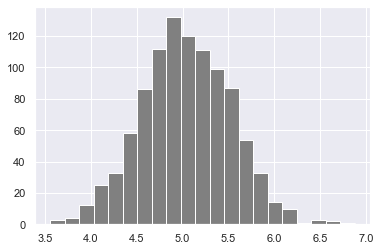
# numpy.dot(): Dot Product in Python using Numpy
# Dot Product
# Numpy is powerful library for matrices computation. For instance, you can compute the dot product with np.dot

# Syntax

# numpy.dot(x, y, out=None)
พีชคณิตเชิงเส้น (Linear Algebra)
- Dot Product
## Linear algebra
### Dot product: product of two arrays
f = np.array([1,2,3])
g = np.array([4,5,3])
### 1*4+2*5 + 3*6
np.dot(f, g)  # 23
การคูณเมทริกซ์ด้วย np.matmul()
### Matmul: matruc product of two arrays
h = [[1,2],[3,4]]
i = [[5,6],[7,8]]
### 1*5+2*7 = 19
np.matmul(h, i) array([[19, 22],
[43, 50]])## Determinant 2*2 matrix
### 5*8-7*6np.linalg.det(i)np.linalg.det(i) -1.999999999999999Z = np.zeros((8,8))
Z[1::2,::2] = 1
Z[::2,1::2] = 1Z array([[0., 1., 0., 1., 0., 1., 0., 1.],
[1., 0., 1., 0., 1., 0., 1., 0.],
[0., 1., 0., 1., 0., 1., 0., 1.],
[1., 0., 1., 0., 1., 0., 1., 0.],
[0., 1., 0., 1., 0., 1., 0., 1.],
[1., 0., 1., 0., 1., 0., 1., 0.],
[0., 1., 0., 1., 0., 1., 0., 1.],
[1., 0., 1., 0., 1., 0., 1., 0.]])new_list = [ x + 2 for x in range(0, 11)]new_list [2, 3, 4, 5, 6, 7, 8, 9, 10, 11, 12][2, 3, 4, 5, 6, 7, 8, 9, 10, 11, 12] [2, 3, 4, 5, 6, 7, 8, 9, 10, 11, 12]np_arr = np.array(range(0, 11))
np_arr + 2array([ 2, 3, 4, 5, 6, 7, 8, 9, 10, 11, 12])เราใช้สมการเชิงเส้นสำหรับปริมาณที่มีความสัมพันธ์เชิงเส้น ลองดูตัวอย่างด้านล่าง:
temp = np.array([1,2,3,4,5])
pressure = temp * 2 + 5
pressurearray([ 7, 9, 11, 13, 15])plt.plot(temp,pressure)
plt.xlabel('Temperature in oC')
plt.ylabel('Pressure in atm')
plt.title('Temperature vs Pressure')
plt.xticks(np.arange(0, 6, step=0.5))
plt.show()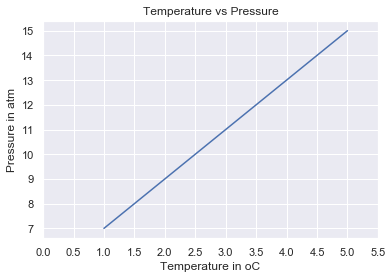
เพื่อวาด Gaussian normal distribution โดยใช้ numpy ดังที่เห็นด้านล่าง numpy สามารถสร้างตัวเลขสุ่มได้ ในการสร้าง random sample เราต้องการ mean (mu), sigma (standard deviation) และจำนวนจุดข้อมูล
mu = 28
sigma = 15
samples = 100000

x = np.random.normal(mu, sigma, samples)
ax = sns.distplot(x);
ax.set(xlabel="x", ylabel='y')
plt.show()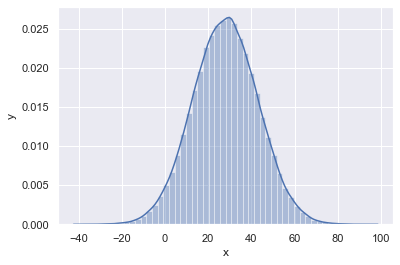
สรุป (Summary)
สรุปความแตกต่างหลักระหว่าง numpy array กับ Python list:
- Arrays รองรับการดำเนินการแบบ vectorized ในขณะที่ list ไม่รองรับ
- เมื่อสร้าง array แล้ว ไม่สามารถเปลี่ยนขนาดได้ ต้องสร้าง array ใหม่หรือเขียนทับอันที่มีอยู่
- ทุก array มี dtype เพียงหนึ่งชนิดเท่านั้น item ทั้งหมดต้องเป็นชนิดนั้น
- numpy array เทียบเท่าใช้พื้นที่หน่วยความจำน้อยกว่า Python list of lists มาก
- numpy arrays รองรับ boolean indexing
แบบฝึกหัด: วันที่ 24
- ทำซ้ำตัวอย่างทั้งหมดที่มีในบทนี้